Currently Empty: ₨ 0
Top Career-Oriented Computer Programs in Lahore for Students and Working Professionals
Komal Shahzadi
- August 24, 2026
- Comment 0
Top Career-Oriented Computer Programs in Lahore for Students and Working Professionals
Web Development and Cloud-Based Software Development
Web development is one of the strongest choices for learners who want to move into a technical career and are prepared to invest more time in practice. Unlike a short introductory course, web development usually requires learners to understand how websites and applications are structured, how interfaces work, how data moves between different components, and how developers troubleshoot problems. The journey can begin with front-end concepts such as HTML, CSS, and JavaScript and gradually expand toward back-end development, databases, APIs, frameworks, version control, testing, and deployment. For students with a computing background, this can complement formal education by adding hands-on project experience. For career changers, it can provide a structured route into technology, although realistic expectations are important because becoming employable as a developer takes consistent practice rather than simply completing a certificate.
Cloud-based software development takes the concept further by introducing learners to applications and development workflows that operate through cloud infrastructure. Modern software teams commonly rely on cloud platforms, hosted databases, remote development environments, deployment pipelines, APIs, containers, monitoring systems, and collaborative tools. A learner entering this area should therefore expect a steeper learning curve than in basic computer programs. The advantage is that the skill set can eventually connect to software engineering, cloud application development, DevOps-oriented workflows, and other technology roles. It is particularly suitable for learners who enjoy logical problem-solving and are willing to keep learning as technologies evolve.
The key is to avoid jumping directly into advanced cloud development without understanding the underlying fundamentals. A beginner who has never written code may need to start with programming basics and web concepts before studying cloud architecture. A computer science graduate may be able to move more quickly into development frameworks and cloud services. Someone already working as a developer might focus on deployment, APIs, databases, security, or cloud-native application patterns. The best pathway is therefore progressive rather than rushed. Think of technical education as climbing a staircase: skipping several steps may look faster, but it usually makes the climb harder.
From Beginner Coding to Advanced Development
A practical web development pathway often begins with understanding how a browser interprets a webpage. HTML provides structure, CSS controls presentation, and JavaScript adds behavior and interaction. Once these foundations become comfortable, learners can explore responsive design, accessibility, APIs, front-end frameworks, server-side programming, databases, authentication, and deployment. The exact technology stack can vary, but the transferable skill is the ability to understand a problem, break it into smaller components, build a solution, test it, and improve it. That mindset is more durable than memorizing a particular framework that may change over time.
For advanced learners, cloud-based software development can introduce another layer of professional capability. Applications need somewhere to run, databases need to be managed, users need secure access, data needs to move reliably, and systems need monitoring. Cloud environments can provide scalable infrastructure, but they also introduce concepts around permissions, networking, costs, availability, backups, and security. This is why learners should not judge a cloud course simply by how many cloud products it mentions. A quality program should explain why a particular service is used and give learners opportunities to build, deploy, troubleshoot, and document real projects.
Project work is especially important here. A learner might create a simple web application, connect it to a database, deploy it online, and document how it works. Another project could involve an API, user authentication, or a cloud-hosted application. Each project becomes evidence that the learner can move beyond tutorials. For students, these projects can strengthen internship and employment applications. For working professionals, they can demonstrate readiness for a technical transition. For freelancers, they can become portfolio examples. The destination may differ, but the principle remains the same: career-oriented technical training should produce something that can be demonstrated, tested, and discussed professionally.
Data, Business Intelligence, and Power BI
Businesses generate enormous amounts of information, but raw information does not automatically become useful insight. This is where Power BI and business intelligence skills can become valuable. Power BI allows users to connect data sources, transform information, create models, and develop interactive reports and dashboards. For office employees who already work with Excel, it can be a natural next step because it extends familiar spreadsheet concepts into more structured analytical workflows. Students studying business, finance, economics, management, information systems, or related fields may also find Power BI useful because it combines technical tools with business decision-making.
The appeal of Power BI is not limited to people with advanced programming backgrounds. Learners can begin with data preparation, importing information, creating visualizations, applying filters, and designing useful dashboards. As their skills improve, they can explore data modeling, calculated measures, relationships, and more sophisticated analytical techniques. The important point is to learn why a visualization matters, not simply how to create one. A dashboard containing dozens of colorful charts may look impressive while communicating almost nothing. A smaller dashboard that clearly shows sales performance, customer trends, expenses, or operational problems can be much more valuable.
For working professionals in Lahore, Power BI can be particularly relevant when their current job already involves reports or spreadsheets. Instead of abandoning existing experience, they can build upon it. An employee who understands sales operations, for instance, can learn to transform sales data into management dashboards. Someone in finance can explore financial reporting and variance analysis. An HR professional might analyze workforce information. This combination of domain knowledge and technical ability can be powerful because the learner understands both the numbers and the business context behind them.
Power BI also illustrates an important career principle: you do not always need to start from scratch to develop a new skill. Your existing professional knowledge can become an advantage. Rather than competing as a complete beginner, you can combine what you already understand with a modern digital capability. A finance professional who learns Power BI is not simply “another Power BI learner”; they can potentially position themselves as someone who understands finance and can communicate financial data through interactive reporting. That is the kind of skill stacking that can make career development more strategic.
Who Should Learn Power BI?
Power BI is especially suitable for office employees, business professionals, analysts, students, and entrepreneurs who regularly deal with data. If most of your working day involves reports, spreadsheets, sales numbers, financial information, inventory, customer records, or operational metrics, learning business intelligence tools may be worth considering. It can also suit learners who enjoy finding patterns and answering questions with data. If you prefer purely creative work and dislike numbers, a creative program such as graphic design or video editing may be a more natural fit.
Before enrolling, learners should examine what they want to accomplish. Someone seeking a basic understanding of dashboards may need a different level of training from an analyst who wants to build sophisticated data models. A beginner can start with Excel and basic data concepts before moving into Power BI. An experienced Excel user may already have many of the necessary foundations. The course should ideally include messy or realistic datasets rather than only perfectly organized examples. Real-world data is rarely as tidy as a classroom demonstration.
A useful learning project might involve transforming a collection of sales records into a management dashboard showing revenue, product performance, monthly trends, regional comparisons, and other relevant indicators. Another project could analyze expenses and identify changes over time. The goal is to develop the ability to move from question → data → analysis → visualization → decision. That sequence represents the real value of business intelligence. The software is the vehicle; better decisions are the destination.
Freelancing Programs for Independent Professionals
Freelancing is less a single technical skill than a professional model for selling skills independently. That distinction matters because someone can complete courses in graphic design, SEO, WordPress, video editing, or web development and still struggle to secure clients. Freelancing requires a combination of technical ability, communication, portfolio development, pricing judgment, project management, consistency, and an understanding of what buyers actually need. A dedicated freelancing program can help learners connect their technical training with these practical realities. For students and working professionals in Lahore, this can provide an alternative pathway for monetizing skills without immediately depending on a traditional office position.
The most sensible approach is to choose a core service first. A beginner might start with graphic design, WordPress, SEO, video editing, or another area they genuinely enjoy. Once that core capability becomes strong, complementary skills can be added. For example, a WordPress freelancer might learn basic SEO; an SEO specialist might learn content strategy; a graphic designer might add short-form video; a web developer might learn cloud deployment. This creates a skill stack rather than a confusing collection of unrelated certificates. Clients tend to value people who can solve a clear problem, so specialization can make positioning easier.
Freelancing education should also cover the business side of independent work. Learners need to understand how to interpret a client brief, ask useful questions, define scope, establish milestones, manage revisions, protect files, communicate professionally, and deliver work on time. They should also understand that online marketplaces and social platforms are competitive environments. Completing a profile does not guarantee clients. A freelancer has to build trust through relevant samples, clear communication, reliability, and consistent delivery.
The strongest freelancing pathway therefore looks less like “take course → immediately earn money” and more like “learn → practice → build portfolio → specialize → pitch → deliver → collect evidence → improve.” That process may feel slower, but it builds a foundation that can survive beyond a single platform or client. Lahore learners can also look for opportunities in local businesses while developing online services. A nearby retailer, restaurant, educational center, clinic, or professional service provider may need a website, social media creatives, SEO support, or video content. Local projects can provide practical experience before a freelancer expands into international markets.
Turning Computer Skills Into Marketable Services
A computer skill becomes easier to sell when it is translated into a specific outcome. “I know Photoshop” describes software familiarity, while “I create social media marketing graphics for small businesses” describes a service. “I know WordPress” is broad; “I build and maintain WordPress websites for local service businesses” is much clearer. This shift from tool-based language to problem-based language is one of the most useful lessons for aspiring freelancers. Clients usually care less about the number of tools you have studied and more about whether you can produce the result they need.
Portfolio development should follow the same principle. Instead of creating ten nearly identical exercises, a learner can create several projects that demonstrate different capabilities. A graphic designer could show branding, promotional graphics, and social media work. A WordPress learner could present a service-business website, an ecommerce concept, and a content-focused website. An SEO learner could create a sample audit and explain the reasoning behind recommendations. A video editor could show different editing styles, such as promotional, educational, and short-form content.
Professional communication is another overlooked part of freelancing. A technically excellent freelancer can lose work by responding late, misunderstanding requirements, or repeatedly missing deadlines. Conversely, a learner with moderate experience can build strong relationships by being organized, transparent, and responsive. Training should therefore include practical exercises around proposals, briefs, revisions, and delivery. These habits may not look as exciting as learning a new software feature, but they can have a direct impact on a freelancer’s reputation.
Finally, learners should treat freelancing as a business rather than a lottery. Income can fluctuate, competition can be intense, and clients can come and go. Building multiple acquisition channels, developing repeat-client relationships, improving skills, and maintaining a professional portfolio can create greater stability over time. Computer training provides the capability; freelancing turns that capability into a commercial service. The two work best when learned together.
CCTV Technician Training as a Practical Technical Career
Not every career-oriented computer program has to lead toward websites, software, or digital marketing. CCTV technician training can be a practical option for learners interested in security technology, installation, troubleshooting, networking, and hands-on technical work. CCTV systems have evolved beyond simple cameras connected to recording devices. Modern installations can involve IP cameras, network infrastructure, digital video recorders, network video recorders, storage, remote viewing, configuration, maintenance, and integration with other security technologies. This makes technical understanding increasingly important for people entering the field.
CCTV training can suit learners who prefer working with physical equipment rather than spending an entire day designing graphics or writing code. It can also be attractive to people seeking a technical trade that combines computer knowledge with fieldwork. A good course should cover more than camera mounting. Learners should understand system planning, basic networking, cable selection, power requirements, camera positioning, recording configuration, troubleshooting, and safe installation practices. Practical exercises are particularly valuable because technical installation skills cannot be mastered effectively through theory alone.
For working professionals and career changers, CCTV can offer an interesting alternative because the learner can build on general computer and networking fundamentals. Someone who already understands IP addresses, routers, switches, and basic troubleshooting may have an easier transition into network-based surveillance systems. A beginner, however, can still enter the field through structured foundational training. As with every program discussed in this article, the right level depends on what the learner already knows.
The career possibilities can include installation, maintenance, technical support, security-system service work, and independent contracting. A learner may eventually expand into related areas such as networking, access control, alarms, or broader security systems. This illustrates why career selection should be based on personal fit as well as market opportunity. If you enjoy diagnosing equipment, visiting installation sites, and solving practical problems, CCTV technician training may suit you better than a purely desk-based digital program.
Best Computer Programs for Students
Students have an advantage that working professionals often do not: they may have more flexibility to experiment. This makes student-focused computer training an opportunity to test different interests before committing to a long-term career direction. A student who is uncertain about technology can begin with MS Office and basic digital skills. Someone interested in creativity can explore graphic design or video editing. A student interested in business can consider digital marketing, SEO, WordPress, or Power BI. Those with a strong technical inclination can progressively move toward web development and cloud-based software development.
The best program should complement—not unnecessarily compete with—the student’s formal education. A business student could develop Power BI and digital marketing skills alongside their degree. A computer science student could emphasize web development, cloud technologies, and portfolio projects. A media student might gain an advantage from video editing and graphic design. This approach creates a T-shaped skill profile: broad awareness across useful digital areas combined with deeper expertise in one chosen specialty.
Students should also consider time and workload. A demanding technical program may not be appropriate during a semester packed with exams and assignments. A shorter foundational course could be completed first, followed by a more intensive specialization during a less demanding period. The goal is sustainable learning. There is little benefit in enrolling in five programs simultaneously and completing none properly.
Best Computer Programs for Office Employees
For office employees, the best training is usually the program that solves a problem they already encounter at work or prepares them for the next role they want. MS Office and Microsoft Office Specialist are obvious choices for improving productivity. Excel can become particularly powerful for reporting and data management. Employees who regularly prepare reports may then consider Power BI to develop more advanced business intelligence capabilities.
Employees interested in marketing or business development can consider digital marketing, SEO, or WordPress. An HR employee may benefit from Excel and Power BI, while someone in administration may prioritize advanced Office skills. The key is to connect the course to an identifiable career benefit. Ask: Will this skill help me perform my current job better, qualify for a new responsibility, or move toward a different role? If the answer is unclear, another program may be a better investment.
Time management should be part of the decision. Evening and weekend learning can be practical for full-time employees, but the learner should reserve time for independent practice. A two-hour class without practice is rarely enough for deep skill development. Even short, consistent practice sessions can be more effective than occasional bursts of study.
Best Computer Programs for Freelancers
Freelancers should select training according to what they can package and sell. Graphic design, video editing, SEO, WordPress, digital marketing, and web development can all become freelance services, but each requires a different learning curve and client acquisition strategy. A beginner should usually choose one core area rather than attempting all six at once.
The choice can also depend on personal working style. Someone who enjoys visual creativity might begin with graphic design. A person who likes writing and research may prefer SEO. Someone interested in websites can start with WordPress and later move into development. A technically inclined learner can pursue web development and eventually cloud-based software development. The important thing is to build a portfolio that demonstrates a recognizable service.
Freelancers should also study communication and project management. A beautiful portfolio cannot compensate indefinitely for poor client handling. Clear requirements, realistic deadlines, organized files, and professional revisions are part of the service. The strongest computer program for a freelancer is therefore one that produces both technical capability and commercially useful evidence of that capability.
Best Computer Programs for Career Changers
Career changers should resist the temptation to select a program solely because it is described as “high paying.” A career transition is more sustainable when the new field matches the person’s strengths, interests, and available learning time. Someone from an administrative background might move toward advanced Excel and Power BI. A marketing professional could deepen expertise through SEO and digital marketing. A creative professional might transition into graphic design or video editing. Someone with strong analytical and technical interests could pursue web development.
Career changers should also take transferable skills seriously. Communication, project management, customer service, industry knowledge, and analytical thinking do not disappear when you change fields. They can become differentiators. A finance professional learning Power BI, for example, can combine financial expertise with data visualization. A teacher learning digital marketing may understand educational audiences better than a generic beginner. These combinations can create a more convincing professional identity.
A realistic transition plan should include foundational learning, practical projects, portfolio development, and gradual exposure to the new field. Depending on the target role, learners may also need internships, freelance assignments, or entry-level employment before making a complete switch. The transition does not have to happen overnight. Think of it as building a bridge while still standing on the original side.
Best Computer Programs for Business Owners
Business owners should prioritize computer training that can directly improve operations, marketing, reporting, or customer acquisition. WordPress can help owners understand website management. SEO and digital marketing can strengthen online visibility. Graphic design and video editing can help produce marketing assets. MS Office and Power BI can improve internal reporting and decision-making.
The objective is not necessarily to become an expert in every field. Business owners often gain more value from understanding the fundamentals well enough to make informed decisions and communicate effectively with specialists. A restaurant owner, for example, does not need to become a full-time SEO professional to understand local search basics, website content, customer reviews, and digital campaigns. Similarly, an entrepreneur may not need to become a professional designer but can benefit from understanding brand consistency and content requirements.
Training can also reduce dependency on external service providers for simple tasks. Updating a website, preparing a basic report, reviewing analytics, or creating a simple promotional asset may become manageable in-house. More complex work can still be outsourced. The skill, therefore, becomes a form of business literacy.
Best Computer Programs for Complete Beginners
Complete beginners should start with confidence, not complexity. MS Office and general computer skills are often sensible foundations because they teach learners how to work with documents, spreadsheets, presentations, files, and common workplace tasks. Once these basics become comfortable, the learner can explore specialization based on personal interests.
A beginner who enjoys visual work can move into graphic design or video editing. Someone interested in online business can explore WordPress, digital marketing, and SEO. A person who likes numbers can progress toward Excel and Power BI. Someone fascinated by technology and problem-solving can gradually enter web development. Practical technical learners may find CCTV technician training more suitable.
Beginners should ask training providers how much hands-on work is included. A course that promises advanced skills while assuming prior knowledge may create unnecessary frustration. Good instruction should meet learners where they are and progressively increase difficulty. The goal is not to impress a beginner with technical terminology; it is to help them become capable.
Course-Selection Roadmap for Lahore Learners
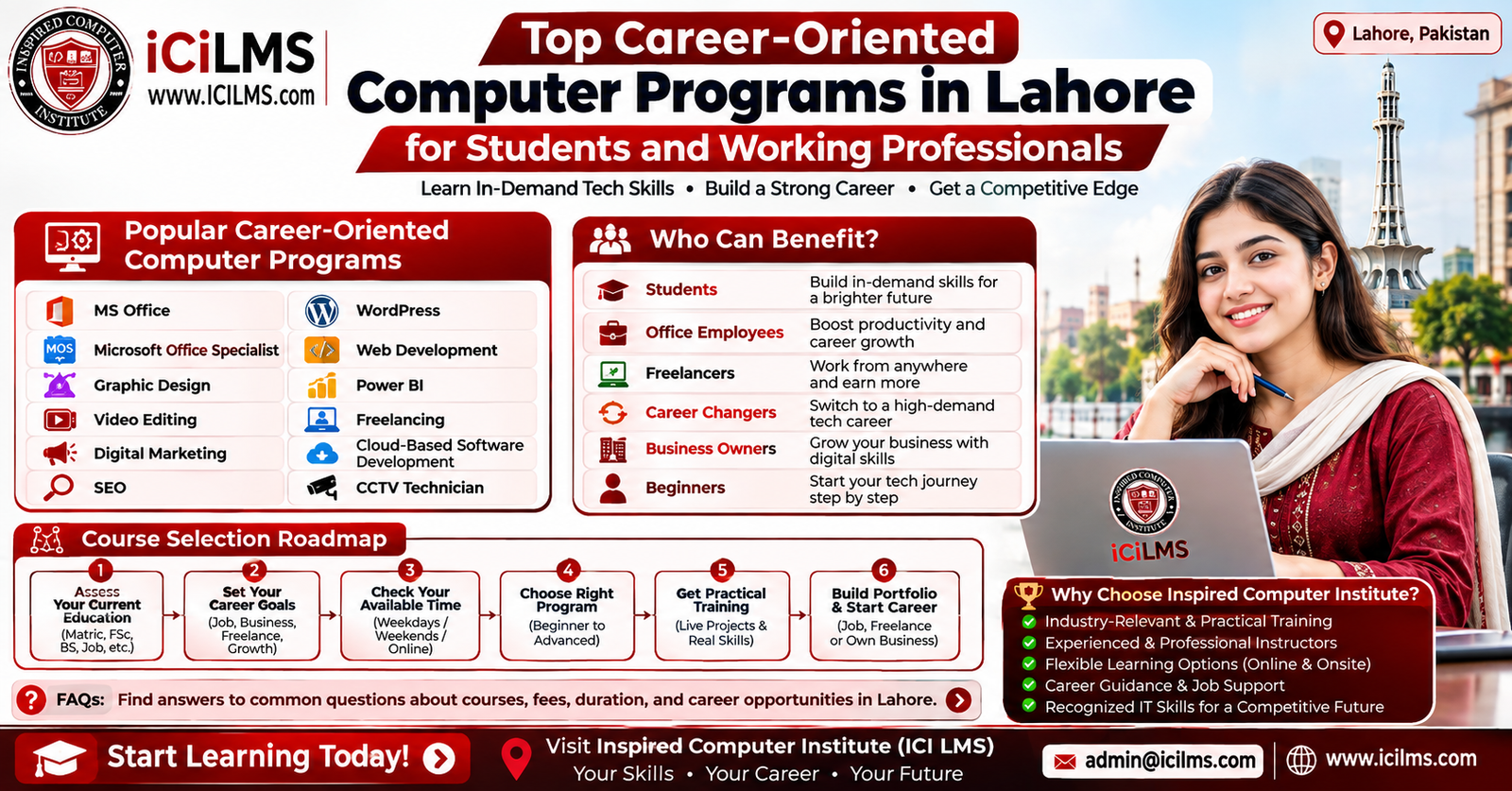
Choosing among numerous computer programs becomes easier when learners follow a simple decision pathway. Start by identifying your current education and experience. Then calculate the amount of time you can realistically dedicate each week. Finally, define the outcome you want: employment, promotion, freelancing, business growth, career transition, or general digital competence.
| Learner Goal | Recommended Starting Programs | Possible Next Step |
|---|---|---|
| Complete beginner | MS Office | MOS, Power BI, digital specialization |
| Student | MS Office, Graphic Design, Digital Marketing | Web Development, SEO, Power BI |
| Office employee | MS Office, MOS, Excel | Power BI |
| Creative freelancer | Graphic Design, Video Editing | Digital Marketing |
| Website freelancer | WordPress | Web Development, SEO |
| SEO-focused learner | SEO, WordPress | Digital Marketing |
| Technical career seeker | Web Development | Cloud-Based Software Development |
| Business owner | WordPress, Digital Marketing, SEO | Power BI or advanced marketing |
| Hands-on technical learner | CCTV Technician | Networking and related security skills |
| Career changer | Foundation + chosen specialization | Portfolio and practical experience |
The roadmap should remain flexible. You may begin with one objective and discover another during training. That is not failure; it is useful information. A student who begins with MS Office and discovers a passion for data can redirect toward Power BI. A WordPress learner who becomes fascinated by coding can progress into web development. The important thing is to make deliberate changes rather than continuously jumping between unrelated courses.
Before enrolling, compare curriculum depth, practical assignments, instructor experience, lab access, project work, class schedule, learner support, and the institute’s approach to career preparation. Inspired Computer Institute may be one option for learners comparing computer training providers in Lahore, but prospective students should evaluate the current course details and teaching arrangements directly before making a decision. The same standard should be applied to any institute.
How to Evaluate a Computer Training Institute in Lahore
A course title can sound excellent while the actual learning experience varies considerably. Before choosing an institute, examine what students will actually do during training. Does the course involve practical assignments? Are learners given projects? Can they ask questions outside the classroom? Is the curriculum updated? Are instructors able to explain concepts clearly to beginners while still challenging experienced students? These questions often reveal more than promotional language.
Schedule is another practical factor. A student may be able to attend daytime classes, whereas an office employee may require evening or weekend sessions. Commute time matters too. An excellent course that takes an exhausting journey to reach every day may be difficult to sustain. Lahore’s traffic and travel distances make location a genuine consideration, particularly for learners attending several days a week.
Learners should also distinguish between certification and competence. A certificate can be useful as supporting evidence, but it should not be treated as a substitute for practical ability. Ask what projects will be completed and whether those projects can be included in a portfolio. For technical programs, ask whether students get opportunities to troubleshoot real scenarios. For creative programs, ask whether they receive feedback on their work. For digital marketing and SEO, ask whether students analyze realistic websites and campaigns.
An institute such as Inspired Computer Institute (ICI LMS) can be evaluated using these same criteria. Look beyond the course name and investigate the curriculum, practical exposure, instructor support, schedule, learning resources, and current student experience. A good decision is based on evidence rather than simply choosing the institute with the longest course list.
Lahore Local SEO: Finding the Right Computer Institute Near You
When searching for computer training locally, learners often use queries such as “computer courses in Lahore,” “computer institute in Lahore,” “best computer courses near me,” “MS Office course in Lahore,” “graphic design course Lahore,” “web development course Lahore,” or more specific searches for SEO, Power BI, WordPress, freelancing, and other programs. Local SEO matters because proximity, class schedules, accessibility, and neighborhood relevance can affect the actual learning experience.
Instead of relying only on a generic “best institute” search, compare several local options. Check the institute’s official website, course pages, contact information, location, schedules, available programs, and recent public information. Google Maps or other local listings can help identify the physical location, while independent reviews may provide clues about student experiences. However, reviews should be interpreted carefully rather than treated as absolute proof. Look for recurring themes instead of relying on one unusually positive or negative comment.
A good local search strategy also involves identifying the specific skill first. “Computer course Lahore” is broad. “Power BI course Lahore for office professionals” is much more targeted. “WordPress and SEO training in Lahore” indicates a different goal. The more clearly you define your requirement, the easier it becomes to compare relevant programs. This approach can save time because you are evaluating courses against an actual objective rather than scrolling through dozens of generic training options.
For institutes themselves, local SEO is equally important because learners need accurate location and program information. A well-optimized local presence should make it easy to understand where the institute is located, what it teaches, who the courses are designed for, and how prospective students can contact it. For learners, that transparency is useful. For training providers, it can help them reach people searching with genuine local intent.
Conclusion
The best computer program in Lahore is not necessarily the longest, most advanced, or most heavily advertised course. It is the program that connects your current ability, available time, educational background, and career objective. A beginner can build confidence through MS Office before specializing. An office employee can progress from Excel and MOS toward Power BI. A creative learner can build a career pathway through graphic design and video editing, while an aspiring digital professional can combine WordPress, SEO, and digital marketing. Technical learners may progress through web development into cloud-based software development, and hands-on learners can explore CCTV technician training.
For students, the smartest approach is to develop practical skills alongside formal education. For employees, training should ideally solve current workplace problems or prepare them for advancement. Freelancers should focus on marketable services and portfolios, while career changers should build bridges between existing experience and new capabilities. Business owners can prioritize skills that improve marketing, websites, reporting, and digital decision-making. Beginners should start with foundations rather than allowing complicated terminology to dictate their choices.
Lahore offers learners many possible routes, but successful training depends on fit, practice, and consistency. Before enrolling, compare institutes carefully, inspect the curriculum, ask about practical projects, consider travel and class schedules, and determine what you should be able to accomplish when the program ends. Whether you explore Inspired Computer Institute, ICI LMS, or another local provider, choose based on evidence and relevance to your goal. A computer course becomes truly career-oriented when it does more than provide a certificate—it gives you a skill you can actually use.
The simplest roadmap is this: identify your goal, assess your current level, choose one relevant skill, practice it consistently, build proof of your ability, and then add complementary skills. That approach can turn computer education from a collection of certificates into a genuine career-building strategy.
Frequently Asked Questions About Computer Programs in Lahore
1. Which computer course is best for beginners in Lahore?
For complete beginners, MS Office and basic computer training are usually sensible starting points because they establish practical digital skills before specialization. After gaining confidence, learners can choose graphic design, digital marketing, Power BI, WordPress, web development, or another field according to their goals.
2. Which computer course is best for getting an office job?
MS Office, Excel, and Microsoft Office Specialist training can be useful for administrative and office-oriented roles. Power BI can be considered by learners who want to move toward reporting, analytics, and business intelligence.
3. Is MS Office still useful for careers?
Yes. Word, Excel, and PowerPoint remain relevant across many workplace environments. Advanced proficiency is more valuable than simply knowing basic commands because it can improve productivity and reporting capabilities.
4. What is the difference between MS Office and Microsoft Office Specialist training?
MS Office training generally focuses on practical use of applications, while MOS-oriented preparation is designed around demonstrating proficiency in Microsoft Office applications and can involve certification preparation.
5. Which course is best for freelancing?
There is no single best course for every freelancer. Graphic design, video editing, SEO, WordPress, digital marketing, and web development can all become freelance services. The best choice depends on your interests and the type of service you want to sell.
6. Is graphic design a good option for students?
Graphic design can be a practical option for students who enjoy visual communication. Building a portfolio through realistic projects is important because employers and clients often want to see examples of actual work.
7. Should I learn video editing with graphic design?
Learning both can be useful because businesses often need static and video content. Beginners should generally establish one core skill first and add the second as a complementary capability.
8. Is SEO difficult to learn?
SEO has beginner-friendly concepts, but professional SEO becomes increasingly complex as learners encounter technical optimization, content strategy, analytics, search intent, and competitive research. Consistent practice is more important than trying to learn everything at once.
9. Can I learn WordPress without knowing programming?
Yes. WordPress can be learned at a beginner level without extensive programming knowledge. Learners interested in deeper customization and development can later study HTML, CSS, JavaScript, PHP, or other relevant technologies.
10. Is Power BI suitable for non-programmers?
Yes. Power BI can be learned by people who are not professional programmers, particularly those who already work with Excel or business data. Advanced data work may require deeper technical and analytical knowledge.
11. Which computer course is best for office employees?
MS Office, advanced Excel, MOS, and Power BI are strong options for many office employees. The best choice depends on the employee’s current responsibilities and desired career progression.
12. Which computer program is best for business owners?
Business owners may benefit from WordPress, digital marketing, SEO, graphic design, video editing, MS Office, or Power BI. The right choice depends on whether the main need is marketing, website management, content creation, or business reporting.
13. Is web development suitable for career changers?
Yes, but career changers should expect a meaningful learning curve. A structured progression from programming and web fundamentals toward projects, frameworks, databases, and deployment is more realistic than expecting immediate professional-level skills.
14. What is cloud-based software development?
Cloud-based software development involves building, deploying, and managing applications using cloud infrastructure and services. It can involve application development, databases, APIs, deployment, security, monitoring, and other cloud technologies.
15. Is CCTV technician training a computer-related career?
Modern CCTV work often combines computer, networking, electronics, and security-system knowledge. IP-based surveillance systems in particular require technical understanding of networking, configuration, recording, and remote access.
16. How long does it take to learn a computer course in Lahore?
The duration varies substantially by program, level, schedule, and learner background. A basic application course may require considerably less time than a comprehensive web development or cloud development pathway.
17. How should students choose between technical and creative courses?
Students should consider what type of work they enjoy, their academic background, and the career they envision. Creative learners may prefer design or video, while analytical and technically inclined learners may prefer Power BI, web development, or cloud technologies.
18. Should I take several computer courses at the same time?
Usually, beginners benefit more from concentrating on one primary skill. Once a core capability is established, complementary skills can be added strategically to create a stronger professional profile.
19. How can I choose a good computer institute in Lahore?
Compare curriculum, practical work, projects, instructor expertise, schedule, location, learning resources, student support, and current course information. Do not select an institute solely because it advertises a large number of certificates or programs.
20. Is Inspired Computer Institute suitable for computer training in Lahore?
Inspired Computer Institute can be included among the options learners investigate, but suitability depends on the specific program, current curriculum, schedule, teaching approach, and learner objective. Prospective students should review current information and compare it with other Lahore training providers before enrolling.
FAQs at a Glance
- Best for beginners: MS Office and computer fundamentals
- Best for office professionals: MS Office, MOS, Excel, and Power BI
- Best for creative learners: Graphic Design and Video Editing
- Best for digital careers: SEO, Digital Marketing, and WordPress
- Best for technical careers: Web Development and Cloud-Based Software Development
- Best for hands-on technical work: CCTV Technician
- Best for freelancers: A focused core skill plus freelancing and business skills
- Best for business owners: Digital Marketing, SEO, WordPress, and Power BI depending on business needs