Currently Empty: ₨ 0
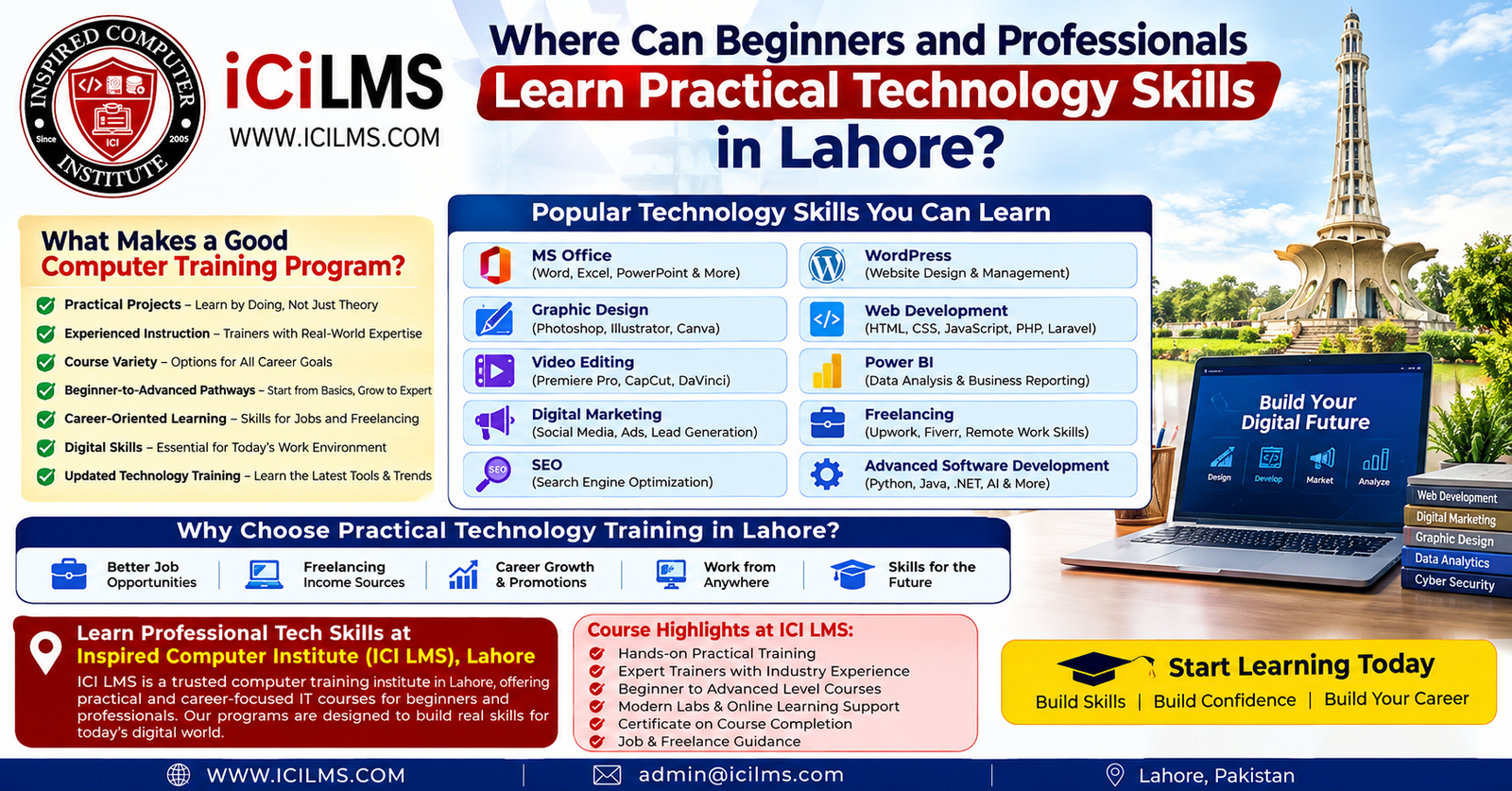
Where Can Beginners and Professionals Learn Practical Technology Skills in Lahore?
Komal Shahzadi
- August 22, 2026
- Comment 0
Where Can Beginners and Professionals Learn Practical Technology Skills in Lahore?
Lahore has a broad learning ecosystem for people who want to build practical technology skills, but having many options can also make the choice confusing. A student who wants to learn MS Office does not need the same training approach as a marketing professional studying SEO, a designer learning advanced creative software, or a developer moving toward professional software engineering. The useful question, therefore, is not simply, “Which computer institute is best in Lahore?” A better question is, “Which learning environment can help me turn technology concepts into skills I can actually use?”
That distinction matters because technology education can look impressive on a course brochure while feeling very different once classes begin. A program may list dozens of software tools, programming languages, and digital subjects, yet still provide little opportunity to create something independently. Practical education works differently. You learn a concept, apply it to a realistic task, make mistakes, receive guidance, improve the result, and gradually become comfortable working without someone standing beside you. That cycle is much closer to how technology skills are developed in the workplace.
For beginners, the right course should make technology feel approachable rather than overwhelming. A person who has never worked confidently with spreadsheets, presentations, websites, design applications, or online business tools needs a clear starting point. Professionals, on the other hand, may already understand the basics and want focused training that fills a particular skills gap. Lahore learners can find programs covering both ends of this spectrum, but the quality and usefulness of those programs depend heavily on curriculum design, instructor experience, practical work, and how closely the training reflects current digital workflows.
What Should You Look for in a Computer Training Program in Lahore?
A good computer training program should be judged by what learners can do after completing it, not only by the number of topics included in its syllabus. This sounds obvious, yet it is easy to overlook when comparing courses. A long list of software names can make a program appear comprehensive, but learning five applications superficially may be less valuable than developing strong working ability in one relevant area. Before enrolling, it is useful to look at the relationship between instruction, practice, projects, assessment, and progression.
One important factor is course variety. Lahore learners have very different goals. Someone preparing for an office position might need Word, Excel, PowerPoint, email, document management, and spreadsheet skills. A creative learner may be more interested in graphic design or video editing. A business owner might need WordPress, digital marketing, SEO, analytics, and content skills. A student interested in technology as a profession may eventually require web development, programming, databases, software-development practices, and version control. A training provider that offers multiple technology pathways can make it easier for learners to move from foundational skills into a more specialized area.
The second factor is the connection between theory and practice. A learner should have opportunities to work with realistic assignments instead of merely watching demonstrations. If a course teaches Excel, for example, learners can benefit from building spreadsheets, using formulas, organizing data, and interpreting results. If the subject is WordPress, they should gain experience working with pages, menus, themes, plugins, layouts, and basic website administration. If the subject is digital marketing, practical exercises can involve campaign planning, keyword research, content strategy, analytics, or optimization.
Another consideration is the instructor. Technology changes quickly, so effective instruction requires more than knowing what a button does. A strong teacher can explain why a particular workflow is useful, identify common mistakes, adapt explanations for different learners, and connect classroom exercises to realistic professional situations. This is particularly important for advanced subjects where learners can easily become lost if foundational concepts are skipped.
Practical Projects Should Be Part of the Learning Process
Projects are one of the clearest ways to distinguish passive exposure from practical technology education. When someone watches an instructor create a design, spreadsheet, website, dashboard, or video, the learner may feel that the task is easy. Then comes the moment when the learner has to reproduce the result independently. That is where genuine understanding begins. A project forces the learner to remember processes, make decisions, troubleshoot problems, and discover which parts of the workflow they have not yet understood.
A useful project does not have to be enormous. In an MS Office course, it could involve creating a structured report, preparing a spreadsheet for a small business, or developing a professional presentation. In graphic design, it might involve creating a consistent set of social media graphics or a basic brand identity. A video-editing learner could work on a short promotional video, while a WordPress student could build a small informational website. These assignments create something concrete that can be reviewed, improved, and discussed.
Projects are also valuable because technology work rarely follows a perfectly scripted sequence. Real users do not always provide clean files, complete instructions, or perfectly defined requirements. A client may change a design, a spreadsheet may contain inconsistent data, a website plugin may behave unexpectedly, or a marketing campaign may produce results that require adjustment. Practical exercises can introduce learners to this problem-solving mindset without pretending that classroom work is identical to professional employment.
For someone comparing computer institutes in Lahore, therefore, one of the most useful questions is simple: What will I actually build or complete during this course? Ask to see examples of student assignments where appropriate, find out how projects are evaluated, and determine whether learners receive meaningful feedback. A course becomes substantially more useful when practice is treated as part of the curriculum rather than something students are expected to do alone after class.
Why Hands-On Practice Matters
Hands-on practice matters because technology skills are procedural as well as conceptual. You can understand what a spreadsheet formula is without being comfortable building a complex workbook. You can know what SEO means without knowing how to investigate search intent or improve a page. You can understand the purpose of a programming language without being able to structure, debug, and maintain a working application. Knowledge provides the map; repeated practice teaches you how to travel.
This is particularly important for beginners. Early success can build confidence, while carefully designed mistakes can reveal where additional explanation is needed. A learner who creates a document, fixes its formatting, restructures a spreadsheet, edits a video, modifies a website, or resolves a programming error is developing a mental model of how the technology behaves. Over time, individual commands become less important because the learner begins thinking in terms of workflows and outcomes.
Hands-on work also helps professionals identify whether a new skill genuinely fits their needs. Suppose a marketing employee is considering learning Power BI. Reading about dashboards may sound interesting, but building one from a realistic dataset provides a much clearer understanding of the work involved. Likewise, someone considering freelance graphic design can learn more from completing several structured design briefs than from simply watching software tutorials.
The best practical learning environment does not remove every difficulty. It provides enough support that learners can work through difficulty instead of becoming stuck indefinitely. That balance is important. If an instructor performs every task for the student, independence does not develop. If students receive no guidance at all, frustration can replace learning. A strong program sits somewhere between those extremes: explain the concept, demonstrate the process, let the learner attempt it, review the result, and encourage another attempt.
Experienced Instructors and Relevant Guidance
Instructor quality can have a major effect on the usefulness of technology training. Software interfaces can be learned from documentation and tutorials, but understanding how and when to use a tool effectively often requires context. An experienced instructor can explain not just how something works but also when it makes sense, what mistakes are common, and how a professional might approach the same problem.
This becomes especially important as learners progress beyond beginner subjects. A new Excel user may need help understanding formulas, worksheets, formatting, and basic data organization. A more experienced learner might need guidance on advanced functions, data modeling, dashboards, or Power BI workflows. Similarly, a beginner web-development student may start with HTML, CSS, and JavaScript concepts, while an advanced learner may need to understand application architecture, APIs, databases, testing, deployment, and maintainable code. The teaching approach has to evolve as the learner’s questions become more complex.
Good instructors also recognize that not everyone learns at the same pace. One student may understand a concept immediately while another needs a second example using different terminology. In a practical classroom, that flexibility can make a significant difference. Technology education is not a race through a software menu; it is a process of developing confidence and competence.
For Lahore learners, instructor experience should therefore be considered alongside curriculum and facilities. It is reasonable to ask who teaches a course, what topics they specialize in, how practical assignments are handled, and whether learners can ask questions when they encounter difficulties. Professional education becomes more valuable when the instructor acts as a guide rather than simply reading through a syllabus.
Choosing a Course That Matches Your Current Skill Level
The right technology course depends heavily on where you are starting. A common mistake is choosing a course because its title sounds advanced, only to discover that the material assumes knowledge the learner does not have. The opposite mistake is equally frustrating: an experienced learner enrolls in an introductory program and spends weeks revisiting concepts they already understand. A sensible training pathway should make the starting point clear.
For beginners, foundational digital skills can provide a useful base. These may include computer operation, file organization, internet use, document creation, spreadsheets, presentations, communication tools, and general digital productivity. From there, learners can move toward areas such as design, marketing, web development, data analysis, or freelancing according to their goals.
Professionals often need a more targeted approach. A person already working in marketing might not need a general introduction to computers. They may instead want SEO, analytics, digital advertising, content strategy, WordPress, or reporting skills. A designer might want more advanced creative workflows. An office employee could benefit from advanced Excel or Power BI. A developer may need specialized training in frameworks, databases, cloud technologies, software architecture, or modern development practices.
Beginner-to-Advanced Learning Pathways
A clear beginner-to-advanced pathway gives learners room to grow instead of forcing them to start from scratch each time they acquire a new skill. Imagine learning technology like climbing a staircase: each level should give you enough stability to reach the next one. If a course jumps from basic concepts to advanced tools without building the intermediate knowledge, learners can quickly feel as though the technology is more complicated than it actually is.
A sensible pathway might begin with general computer literacy, move into productivity software, then branch into a specialization. Someone interested in creative work could progress from basic design principles to graphic-design software and then into more sophisticated branding or digital-content workflows. A learner interested in websites might move from basic web concepts into WordPress and then into HTML, CSS, JavaScript, and broader web-development practices.
The pathway can also work horizontally. Technology careers increasingly overlap. A web professional may benefit from SEO. A digital marketer may need WordPress knowledge. A designer may need video-editing skills. A freelancer may need communication, project management, portfolio development, and basic business knowledge in addition to their technical specialization. Learning does not have to happen inside one narrow box.
Career-Oriented Technology Education
Career-oriented learning focuses on applying skills to situations that resemble actual work. That does not mean a training institute can guarantee employment or income; no responsible course should make that promise. Instead, career-oriented education helps learners understand the tasks, tools, workflows, and expectations associated with a particular field.
For example, an SEO learner can work through keyword research, on-page optimization, technical considerations, content planning, and performance measurement. A digital-marketing student can explore campaign planning, audience research, content distribution, analytics, and optimization. A freelancer can learn how to present a service, organize a portfolio, communicate requirements, manage revisions, and deliver work professionally.
This approach changes the question from “What software will I learn?” to “What problems will I be able to solve?” That is a much stronger way to evaluate technology education. Employers, clients, and businesses ultimately need outcomes: accurate reports, functional websites, useful dashboards, effective marketing campaigns, attractive designs, edited videos, reliable software, and organized digital operations.
MS Office and Essential Digital Skills
MS Office remains relevant because many workplaces still depend on documents, spreadsheets, presentations, email, and structured digital information. For beginners entering an office environment, learning these tools can remove a major source of daily friction. Instead of struggling with formatting, formulas, tables, presentations, or document organization, a trained user can focus more of their attention on the actual work.
A useful MS Office course should go beyond teaching where individual buttons are located. Word training can include document formatting, styles, tables, page layouts, professional reports, and efficient editing. Excel can progress from basic worksheets and formulas toward data organization, functions, charts, analysis, and more advanced workflows. PowerPoint can cover presentation structure, visual hierarchy, layouts, charts, and professional slide preparation.
Digital skills extend beyond a single software package. Learners increasingly need to understand file management, cloud-based collaboration, online communication, information organization, digital security awareness, and efficient use of workplace platforms. These capabilities may not sound glamorous, but they often determine whether someone can operate comfortably in a modern office.
What You Can Learn Beyond Basic Office Tasks
Once the basics are comfortable, learners can use productivity tools for more sophisticated tasks. Excel, for instance, can become a platform for organizing operational information, analyzing business data, creating reports, and preparing decision-support dashboards. PowerPoint can become a communication tool rather than simply a place to put bullet points. Word can support structured documentation rather than basic typing.
This progression is important for professionals because productivity often comes from combining features rather than using them individually. A spreadsheet that is carefully structured, validated, analyzed, and presented can save substantially more time than one that merely contains raw numbers. Similarly, a well-designed report can make information easier for colleagues and decision-makers to understand.
For Lahore students and professionals, foundational computer education can therefore serve as the first step rather than the final destination. Once basic digital confidence is established, learners can move toward specialized areas with a much stronger foundation.
Graphic Design and Creative Software Skills
Graphic design combines software knowledge with visual communication. Learning an application is only one part of the process; a capable designer also needs to understand composition, typography, color, hierarchy, spacing, image preparation, and the purpose of different design formats. A practical course should give learners opportunities to apply these ideas rather than treating software menus as the entire subject.
Beginners may start with fundamental design concepts and common creative tools before progressing toward real assignments. These might include social media graphics, promotional materials, presentations, basic branding assets, advertisements, or other visual communication pieces. Working on different briefs helps learners discover that good design is not simply about making something colorful or attractive. It is about making information understandable and appropriate for its audience.
Professionals can take the subject further by developing more efficient workflows, improving consistency, understanding file preparation, and adapting designs for different digital platforms. Someone working in marketing, for example, may benefit from combining graphic design with social media strategy and digital advertising. A freelancer may need design skills alongside client communication and portfolio presentation.
The most useful training environment encourages learners to explain their design decisions, receive feedback, revise their work, and build a collection of projects that demonstrates progression. That iterative process resembles real creative work much more closely than simply completing isolated software exercises.
Video Editing for Modern Digital Work
Video has become a major part of online communication, marketing, education, entertainment, and business content. Learning video editing can therefore open a range of practical applications, from short social-media videos to promotional content, tutorials, interviews, and longer-form productions. The technical side includes cutting footage, organizing timelines, adding audio, working with transitions, applying visual adjustments, incorporating text and graphics, and exporting content appropriately.
A beginner should not be expected to master every advanced editing technique immediately. A structured course can begin with timeline management and basic editing before introducing more complex workflows. The learner should repeatedly create short pieces of content because editing skill develops through judgment: deciding what to remove, where to cut, how long a shot should remain on screen, and how sound and visuals should work together.
Professionals may approach video editing differently. A marketer may care about creating concise campaign assets, while a content creator may focus on retention, pacing, captions, and platform-specific formats. A business may need polished internal training material rather than entertainment-oriented content. The software remains important, but the intended outcome determines which skills matter most.
Practical projects are especially valuable here because video editing is difficult to understand purely through explanation. The learner needs to work with actual footage, encounter imperfect audio or awkward cuts, experiment with pacing, and revise the result. That hands-on process turns technical features into usable production skills.
Digital Marketing and SEO Skills
Digital marketing brings together several disciplines, including content, search, social platforms, email, analytics, advertising, and audience research. Because the field is broad, learners should be cautious about courses that promise to make them experts in every area within a very short period. A stronger approach is to understand the fundamentals first and then develop deeper ability in selected areas.
SEO is one particularly practical specialization. Learners can study how search engines discover and interpret pages, how search intent influences content, how websites can be structured for accessibility and discoverability, and how performance can be evaluated. Modern SEO is not simply a matter of inserting keywords into an article. It involves understanding the searcher’s need and helping a website provide a useful, technically accessible, trustworthy experience.
Learning SEO as a Practical Skill
Practical SEO education should involve real exercises. Students can research search queries, evaluate competing pages, identify content gaps, optimize page titles and headings, review internal links, examine technical issues, and think critically about whether a piece of content actually satisfies a user’s question. They can also learn that rankings are influenced by many factors and that no legitimate course can guarantee a specific position in search results.
For local businesses in Lahore, local SEO adds another dimension. A business may need accurate location information, consistent business details, useful service pages, customer reviews, and a strong presence across relevant local search surfaces. The strategy for a Lahore-based clinic, restaurant, training institute, retailer, or professional service can differ considerably from the strategy for a national e-commerce website.
Digital marketing and SEO also connect naturally with WordPress, analytics, content writing, design, and basic web knowledge. This is why learners may benefit from choosing a training provider where related courses are available. Cross-disciplinary skills can make it easier to understand how different parts of a digital business fit together.
WordPress and Website Management
WordPress can be an accessible starting point for people who want to understand website creation without immediately entering advanced programming. A practical WordPress course should cover more than installing a theme and publishing a page. Learners should understand site structure, pages, posts, menus, media, themes, plugins, basic customization, security awareness, backups, performance considerations, and routine administration.
For a small business owner, these skills can make website management less dependent on others for every minor update. For a freelancer, WordPress can become part of a broader service offering. For an aspiring web professional, it can provide a useful introduction to concepts such as content management systems, hosting, domains, responsive design, and website maintenance.
The limitations should also be understood. WordPress knowledge is not identical to becoming a professional software developer. As projects become more customized, developers may need HTML, CSS, JavaScript, PHP, databases, APIs, version control, and other technical skills. That distinction helps learners choose an appropriate pathway rather than expecting one course to cover everything.
Web Development From Fundamentals to Professional Skills
Web development is a broader technical field that can take learners from basic website structure to sophisticated applications. Beginners often encounter HTML, CSS, and JavaScript as foundational technologies. These teach how web pages are structured, styled, and made interactive. From there, learners may explore frameworks, backend technologies, databases, APIs, authentication, testing, deployment, and other areas depending on their goals.
A strong web-development program should encourage learners to build rather than merely memorize syntax. A simple website is a starting point. As learners progress, they can create projects that require responsive layouts, forms, dynamic behavior, data storage, external services, or application logic. Each project introduces new problems that force the learner to think like a developer.
Advanced software-development education can then extend into software architecture, version control, testing, debugging, databases, application programming interfaces, security concepts, deployment practices, and modern development workflows. The exact technologies will change over time, which makes the underlying ability to learn and adapt particularly important.
For professionals, advanced development training can be useful when it addresses a specific gap rather than trying to cover the entire software industry at once. A developer may need deeper backend expertise, while another may need frontend specialization, database skills, DevOps knowledge, or experience with a particular framework. A good training pathway should make those distinctions visible.
Power BI and Data-Focused Skills
Power BI is relevant to learners who want to move from raw data toward interactive reporting and business intelligence. The value is not simply knowing how to create colorful charts. A capable learner should understand how data is imported, cleaned, structured, modeled, analyzed, and presented so that the resulting report helps someone make sense of information.
A practical Power BI course can introduce learners to data transformation, relationships, calculated measures, visualizations, dashboard design, and report development. Projects are particularly useful because data rarely arrives perfectly organized. Working with realistic datasets gives students experience identifying inconsistencies and deciding which information actually matters.
Professionals can apply these skills in areas such as sales reporting, operations, finance, marketing, inventory, or performance analysis. The precise use case depends on the organization and the available data. This makes Power BI a good example of why career-oriented training should emphasize problem-solving instead of software features alone.
A learner comparing technology courses in Lahore should consider whether the Power BI curriculum includes complete workflows. Importing a dataset is only the beginning. The real learning happens when the student turns that dataset into a coherent model, selects meaningful metrics, designs a readable report, and explains what the information suggests.
Freelancing and Turning Skills Into Services
Freelancing is often discussed as though learning a technical skill automatically leads to online income. In reality, the relationship is more complicated. A person may be technically capable and still struggle to find clients, define a service, communicate requirements, price work, manage revisions, or maintain professional relationships. Technology training can provide the technical foundation, while freelancing education can help learners understand how that foundation may be packaged as a service.
Different skills lend themselves to different freelance offerings. A graphic designer might provide social-media creatives or branding support. A WordPress professional might build and maintain small business websites. An SEO practitioner might offer audits, content optimization, or local SEO support. A video editor could work on short-form content, promotional videos, or educational material. A developer might offer website development, custom applications, integrations, or maintenance.
A practical freelancing pathway should encourage learners to build a portfolio rather than relying entirely on certificates. A portfolio gives potential clients something concrete to evaluate. Even when projects are created during training, they can demonstrate the learner’s ability to approach a brief, complete a task, and present the result professionally.
This is another reason projects matter throughout technology education. A collection of meaningful assignments can gradually become evidence of capability. No certificate can replace the need to demonstrate what you can actually do, especially in fields where clients and employers can inspect the quality of your work directly.
Advanced Software Development Skills
Learners who want to pursue software development professionally eventually need to move beyond introductory programming. Advanced training may involve algorithms and data structures, databases, APIs, software architecture, testing, debugging, version control, security principles, deployment, and maintainability. The precise curriculum depends on the development path, but the central objective remains the same: learning to build software systematically.
This stage requires patience because advanced programming is less about memorizing commands and more about reasoning. A developer needs to break a large problem into manageable components, understand dependencies, investigate unexpected behavior, and choose solutions that can remain maintainable as a project grows. Practical projects are essential because these abilities are difficult to develop through lectures alone.
Professional learners may also need exposure to collaborative workflows. Modern software development frequently involves source control, code review, issue tracking, documentation, testing, and team-based development. These practices teach learners that writing code is only one part of delivering reliable software.
For someone in Lahore considering an advanced development program, the syllabus should therefore be examined carefully. Which programming concepts are covered? Are students expected to build complete projects? Is debugging included? Are databases and APIs discussed? Does the course introduce version control and professional development practices? Questions like these can reveal much more than a course title.
Why Updated Technology Training Matters
Technology education has a built-in challenge: the tools learners use today may change significantly over time. Software interfaces are redesigned, digital platforms introduce new capabilities, programming ecosystems evolve, and workplace expectations shift. A useful training program should therefore distinguish between durable fundamentals and tools that require regular updating.
The fundamentals still matter. Logical thinking, communication, information organization, design principles, programming concepts, data literacy, problem-solving, and understanding user needs remain valuable even when specific software changes. At the same time, learners should gain experience with current workflows and contemporary tools relevant to their chosen field.
This balance is especially important when evaluating AI-related changes to digital work. Artificial intelligence is increasingly affecting content production, software development, marketing, design, research, analytics, and office productivity. Learning how to use modern AI-assisted tools can be useful, but it should complement—not replace—the underlying skill. A person who understands the task can evaluate AI output critically; someone who only knows how to generate output may struggle to identify errors.
Updated technology training should consequently encourage adaptability. The goal is not to memorize one version of a software interface forever. It is to develop enough understanding that when the interface changes, the learner can adapt without starting from zero.
How Inspired Computer Institute (ICI LMS) Fits Into This Landscape
Inspired Computer Institute (ICI LMS) can be considered by learners in Lahore who are looking for a computer-education environment with multiple technology-learning options. Its relevance to different learners depends on the specific course, current curriculum, instructor, schedule, and learning objectives, so prospective students should evaluate the particular program they are considering rather than assuming every course will suit every learner.
The breadth of subjects associated with professional computer education is useful because technology careers rarely exist in complete isolation. A learner might begin with digital literacy or MS Office, then move into graphic design, digital marketing, SEO, WordPress, web development, Power BI, freelancing, or more advanced development skills. Having access to different subject areas can make it easier to explore a direction before committing to a specialized pathway.
As with any institute, the sensible approach is to ask practical questions before enrolling. What does the current syllabus include? How much classroom time is dedicated to practice? Are projects part of assessment? Who teaches the course? What level of prior knowledge is expected? Does the program match the learner’s career objective? These questions are more useful than relying on broad promotional language.
For beginners, the most important consideration may be whether the teaching style makes unfamiliar technology understandable. For professionals, it may be whether the course covers the specific advanced capabilities they need. A learner interested in ICI LMS—or any other computer institute in Lahore—should compare these details against their own goals before making a decision.
How to Choose the Right Technology Course in Lahore
Choosing a course becomes easier when the decision starts with the desired outcome. Instead of searching for the “best computer course” in general, define what you want to be able to do. Do you want to work confidently in an office? Create professional graphics? Edit videos? Manage websites? Improve a company’s search visibility? Build dashboards? Start freelancing? Develop software? Each answer points toward a different learning path.
Location and schedule also matter in a city as large and busy as Lahore. A technically excellent course may not be practical if its schedule conflicts with work or education, or if attending classes regularly is difficult. Learners should consider commute, class timing, duration, learning format, and the amount of independent practice expected.
The course syllabus deserves close attention too. Look for specific skills rather than vague promises. For example, a web-development course should make its technologies and project expectations clear. An SEO course should identify the areas of SEO covered. A Power BI course should explain whether it includes data preparation and modeling as well as visualization. Specificity makes comparison easier.
Cost is another factor, but it should not be the only one. A lower fee is not necessarily better value if learners receive little practical guidance, while a higher fee is not automatically justified by a longer list of topics. Compare what is actually included: instruction, practical sessions, projects, feedback, resources, access to labs or software where applicable, and the overall structure of the learning pathway.
Questions to Ask Before Enrolling
Before joining a computer training program in Lahore, prospective students can ask a few direct questions. First, what will I be able to complete independently by the end of the course? The answer should describe practical outcomes rather than simply repeating software names. Second, what level does the course target? This prevents beginners from entering advanced material too early and helps professionals avoid unnecessary repetition.
It is also useful to ask how projects are handled. Are assignments optional, or are they built into the course? Does an instructor review the work? Can learners revise projects after receiving feedback? These details can make a significant difference in practical skill development.
Students should also ask how frequently the curriculum is reviewed. This is particularly relevant to digital marketing, SEO, web development, software tools, analytics, and other rapidly changing fields. A course should have a sensible process for keeping its material aligned with current practices.
Finally, ask how the course fits into the next step. If someone completes beginner web development, is there an intermediate pathway? If an MS Office learner wants to progress into data analysis, are related options available? If a freelancer wants to specialize further, can they move into advanced training? A coherent learning journey can be more valuable than an isolated certificate.
Lahore-Focused FAQs About Computer Training
Which technology course is best for a complete beginner in Lahore?
There is no single course that is best for every beginner because the right choice depends on the learner’s goal. Someone entering office work may benefit from MS Office and essential digital skills, while a creative learner may prefer graphic design or video editing. A person interested in websites could begin with WordPress or foundational web development, whereas someone interested in online business may start with digital marketing and SEO. The best starting course is one that matches the learner’s current ability and provides enough practical work to build confidence.
Can professionals learn advanced technology skills while working?
Yes. Professionals can choose focused programs that target a particular skill rather than repeating basic computer concepts. For example, an experienced marketing professional might study SEO or analytics, an office professional might progress toward Power BI, and a developer might pursue advanced software-development topics. Schedule, course intensity, and prerequisites should be checked before enrollment so that the program fits alongside existing professional responsibilities.
Is a certificate enough to get a technology job in Lahore?
A certificate can document that someone completed training, but it should not be treated as a substitute for practical ability. Employers and clients may also consider portfolios, projects, problem-solving ability, communication, experience, and technical performance. A learner should therefore prioritize programs that produce demonstrable work alongside any certificate they provide.
What should I learn if I want to freelance from Lahore?
Start with a skill that can be turned into a clearly defined service. Options can include graphic design, video editing, WordPress, SEO, digital marketing, web development, data reporting, or software development. Then develop a portfolio, learn professional communication, understand how to define project requirements, and practice delivering work consistently. Freelancing is a business activity as well as a technical activity, so both sides deserve attention.
Can I learn both basic and advanced computer skills at one institute?
That depends on the institute’s current course structure. Some training providers offer pathways ranging from foundational computer education to specialized areas such as digital marketing, design, web development, data tools, freelancing, and advanced programming. Prospective students should review the current syllabus and prerequisites for each level rather than assuming that all subjects follow one continuous pathway.
Conclusion
For beginners and professionals in Lahore, practical technology education is less about collecting course titles and more about developing skills that can be applied independently. A strong program combines hands-on projects, capable instruction, relevant course variety, clear beginner-to-advanced pathways, career-oriented practice, digital skills, and regularly updated technology knowledge. Whether the goal is office productivity, graphic design, video editing, digital marketing, SEO, WordPress, web development, Power BI, freelancing, or advanced software development, the learning method should remain connected to real tasks.
Institutes such as Inspired Computer Institute (ICI LMS) may be worth considering as part of that search, particularly for learners who want access to multiple areas of computer and technology education. The final decision, however, should come from comparing the specific course syllabus, instructor support, practical assignments, schedule, prerequisites, and personal career objective. Lahore offers learners many possible directions; the smartest choice is the one that turns classroom time into skills they can continue using long after the course ends.