Currently Empty: ₨ 0
Lahore Computer Training Guide
Komal Shahzadi
- August 20, 2026
- Comment 0
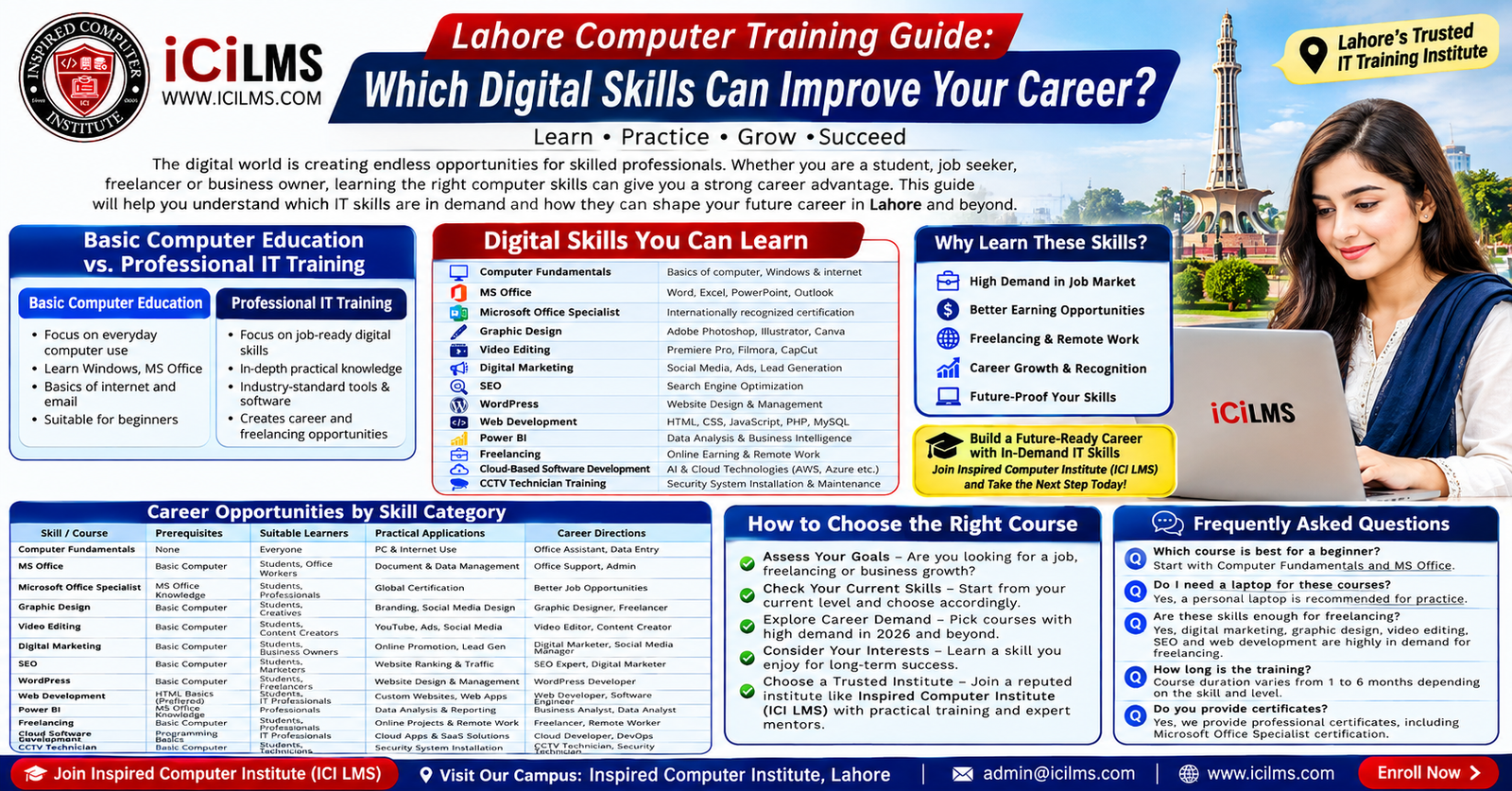
Lahore Computer Training Guide: Which Digital Skills Can Improve Your Career? — Continued
Digital Marketing
Digital marketing brings together several skills used to attract audiences, generate leads, build brands, and sell products or services through digital channels. Unlike a single software skill, digital marketing is an ecosystem. It can include social media marketing, search engine optimization, paid advertising, email marketing, content strategy, analytics, conversion optimization, and online reputation management. That breadth is both an advantage and a challenge for someone comparing digital marketing courses in Lahore. A beginner can enter without being a programmer, but should understand that becoming genuinely effective requires practice, experimentation, measurement, and an ability to understand customer behavior.
The prerequisites are relatively accessible. Basic computer literacy, internet familiarity, reasonable written communication, and curiosity about how people search and make buying decisions are useful starting points. A marketing learner does not need an advanced mathematics background, although comfort with numbers becomes increasingly valuable when working with campaign metrics and analytics. The practical side of training should include activities such as creating a content calendar, researching an audience, writing promotional copy, setting up a basic campaign plan, reading performance data, and developing a strategy for improving results.
Digital marketing has applications across almost every commercial sector. Lahore businesses ranging from restaurants and fashion stores to software companies and educational institutes need digital visibility. An organization might hire a marketing assistant to manage social pages, a content specialist to produce articles, an SEO professional to improve organic visibility, or a paid-media specialist to manage advertising campaigns. Freelancers can also package these capabilities into services for small businesses that cannot justify a full-time marketing team.
One useful way to understand digital marketing is to think of it as a business feedback loop. You create a message, put it in front of an audience, observe what happens, learn from the data, and adjust the next message. A course that teaches only how to publish posts misses the heart of the discipline. Learners should understand objectives, audiences, channels, metrics, testing, and conversion paths. This is where practical projects become valuable: rather than simply discussing marketing concepts, students can create a mock campaign and explain why they selected particular audiences, content formats, keywords, and calls to action.
SEO as a Specialized Digital Marketing Skill
Search engine optimization (SEO) deserves separate attention because it combines content, technical knowledge, research, analytics, and user experience. SEO is the process of improving a website’s ability to be discovered through unpaid search results while also making the site useful for the people who visit it. A beginner might start with keyword research, search intent, on-page optimization, internal linking, content structure, basic technical SEO, and performance measurement. More advanced practitioners may work on site architecture, structured data, international SEO, technical audits, digital PR, and large-scale content strategies.
SEO is suitable for people who enjoy research and writing but don’t necessarily want a purely creative career. It can also suit analytical learners because SEO involves interpreting search behavior and performance data. The prerequisites are generally basic computer and internet skills, although strong English or Urdu writing ability can be useful depending on the target audience. Technical SEO becomes easier if the learner develops some understanding of HTML, websites, hosting, and web development, but beginners do not need to be programmers.
Practical applications include optimizing business websites, publishing search-focused articles, improving product pages, auditing websites, researching competitors, and building content strategies. Career directions include SEO executive, SEO specialist, content strategist, SEO analyst, technical SEO assistant, and freelance SEO consultant. Because SEO projects can be delivered remotely, it can also become part of a freelancing career.
A good SEO course should teach learners to think beyond keyword repetition. Search engines increasingly evaluate whether content satisfies the underlying need behind a query, so understanding search intent is critical. Someone searching “best laptops under a budget” has a different need from someone searching “how to install Windows.” The page structure, information, examples, and call to action should reflect that difference. Learners should also understand that rankings are not guaranteed and that SEO is an ongoing process rather than a button that produces instant results.
WordPress Website Development
WordPress sits between no-code website building and traditional web development, which makes it an appealing option for many beginners. It allows learners to create and manage websites without writing every line of code manually. A practical WordPress course should cover installation or setup, themes, plugins, pages, posts, menus, media management, forms, security basics, backups, performance, responsive layouts, and basic search optimization. Learners who progress further can explore customization, child themes, CSS, PHP, APIs, WooCommerce, and more advanced site management.
The prerequisites are usually straightforward. Basic computer literacy and internet skills are enough to begin, while familiarity with HTML and CSS becomes useful as customization becomes more technical. Someone who wants to become a WordPress service provider should also understand domains, hosting, SSL, backups, DNS concepts, and website maintenance. These subjects may sound intimidating at first, but they become easier when learned through an actual website rather than through isolated definitions.
WordPress has a wide range of practical applications. A freelancer can build a small business website, portfolio, blog, landing page, educational site, news platform, or online store. A company may employ someone to update pages, publish content, manage plugins, troubleshoot common issues, and maintain website performance. Entrepreneurs can also use WordPress to establish their own online presence without depending entirely on a developer for routine updates.
Who Should Learn WordPress?
WordPress is particularly suitable for beginners who want to enter website services relatively quickly, digital marketers who want more control over websites, content creators, small-business owners, and freelancers. It can also serve as a bridge toward professional web development. Once a learner understands how websites work through WordPress, concepts such as HTML, CSS, JavaScript, databases, hosting, and APIs can become easier to understand.
However, learners should distinguish between “I can install a theme” and “I can professionally deliver a website.” Clients expect websites to work correctly on phones, load efficiently, remain secure, have logical navigation, and be easy to maintain. A strong course should therefore include complete projects rather than isolated exercises. Build a website from a blank starting point, configure its pages, optimize its images, test it on multiple screen sizes, create forms, configure backups, and troubleshoot errors. That process develops the practical judgment that clients actually pay for.
For someone interested in freelancing, WordPress becomes even more valuable when combined with SEO, copywriting, graphic design, and digital marketing. Instead of selling “WordPress installation,” a freelancer can offer a more complete business solution: website creation, basic SEO, landing-page optimization, analytics setup, content publishing, and ongoing maintenance. The broader service has a clearer commercial outcome and can create opportunities for recurring work.
Web Development
Web development is a deeper technical path than WordPress site creation. It involves understanding how websites and web applications are built, how browsers interpret code, how servers process requests, how databases store information, and how different components communicate. Beginners commonly encounter HTML for structure, CSS for presentation, and JavaScript for interactivity before moving into frameworks, backend languages, databases, APIs, version control, testing, and deployment. The precise technology stack varies across employers, so a good training program should teach durable concepts rather than making students dependent on a single framework.
Web development requires more patience than some entry-level digital skills because programming is a problem-solving discipline. A learner will encounter errors. Code will behave differently from what was expected. A seemingly minor character can break a page. That is normal. The skill develops when the learner learns how to investigate the problem, read documentation, use developer tools, test assumptions, and fix the underlying issue rather than simply copying a solution.
The prerequisites can be minimal, but the commitment should be substantial. Basic computer literacy is necessary, while logical thinking and willingness to practice are more important than advanced mathematics. Learners should expect to spend significant time writing code outside class. Watching someone build an application can feel productive, but the real learning happens when you try to reproduce it independently and then modify it.
Front-End, Back-End, and Full-Stack Career Paths
Web development can be divided into several broad directions. Front-end development focuses on what users see and interact with in a browser. Back-end development handles server-side logic, databases, authentication, APIs, and other behind-the-scenes operations. Full-stack development combines both areas to a greater degree. There are also adjacent specialties such as DevOps, quality assurance, accessibility, security, and specialized application development.
Career possibilities include junior front-end developer, web developer, back-end developer, full-stack developer, WordPress developer, software engineer, and freelance web developer. Salaries and opportunities vary significantly according to experience, technology stack, portfolio quality, company, location, and remote-work access, so learners should be cautious about institutes promising guaranteed employment or specific income figures.
Projects are the best way to test whether web-development training is working. A beginner could build a responsive business website, a task-management application, a product catalog, or a simple dashboard. More advanced learners might develop authentication, database operations, APIs, and deployment workflows. A portfolio should show not just screenshots but evidence of how the application works. Git-based version control and clear project documentation can also demonstrate professional habits to potential employers.
Power BI and Business Data Analytics
Power BI is an attractive option for learners who enjoy numbers, reporting, business questions, and visual analysis. Microsoft Power BI allows users to connect to data sources, transform and model data, create visualizations, and build interactive reports and dashboards. For someone coming from an MS Office background, it can be a natural next step because spreadsheet experience provides useful context. However, Power BI is not simply “Excel with prettier charts.” Learners need to understand data preparation, relationships, data modeling, calculations, visualization choices, and the business question behind the report.
The prerequisites are manageable for people with basic computer and spreadsheet experience. Strong Excel knowledge is helpful, particularly familiarity with formulas, tables, filtering, sorting, and structured data. Learners should also develop analytical thinking: What does this number mean? Why did sales decline? Which category is growing? Which region is performing differently? A dashboard becomes valuable when it helps someone make a decision rather than merely displaying colorful charts.
Practical applications include sales reporting, financial analysis, inventory monitoring, marketing performance, operations dashboards, HR reporting, and management information systems. A business might have thousands of rows of transactional data but struggle to understand the story within it. A well-designed Power BI report can transform that raw information into interactive views that help decision-makers explore trends and comparisons.
Prerequisites and Practical Uses of Power BI
A learner should ideally start with basic Excel and data concepts, although determined beginners can learn Power BI from scratch. Training should include data cleaning, Power Query, relationships, measures, appropriate visual selection, dashboard design, and report publishing concepts. Depending on the course level, learners may also encounter DAX, Microsoft’s expression language used for calculations in Power BI.
The career directions can include Power BI developer, reporting analyst, business intelligence analyst, data analyst, MIS analyst, and reporting specialist. Job titles vary by organization, and Power BI is often one component of a broader analytical role. Combining it with Excel, SQL, business knowledge, and communication skills can significantly strengthen a learner’s profile.
A practical portfolio might contain a sales dashboard, inventory report, customer analysis, and financial-performance dashboard. Each should answer clear business questions. Instead of saying, “Here is my Power BI project,” explain what decision the report is intended to support. That small shift demonstrates that you understand analytics as a business tool rather than simply a software interface.
Freelancing and Remote Digital Work
Freelancing is not a technical skill by itself; it is a way of selling a technical or creative skill. This distinction matters when comparing computer courses in Lahore. Taking a “freelancing course” without having a service to sell can leave a learner with profiles, proposals, and terminology but no compelling offer. A stronger approach is to develop a marketable capability first and then learn how to package, price, present, and deliver it to clients.
Freelancing can be built around graphic design, video editing, WordPress, web development, SEO, digital marketing, data analytics, virtual assistance, and other digital services. The practical requirements include communication, client discovery, proposal writing, project management, file handling, time management, invoicing or payment processes appropriate to the platform and jurisdiction, and the ability to protect client information. Learners should also understand that freelance marketplaces are competitive. Completing a course does not automatically create clients.
Turning a Technical Skill Into a Freelance Service
The most effective freelance offers are usually specific. “I do everything in digital marketing” is difficult for a potential client to evaluate. “I manage local SEO for small businesses” communicates a clearer service. Similarly, “I build WordPress websites for restaurants and local businesses” is easier to understand than simply calling yourself a web expert.
A practical freelance training path might look like this: learn the technical skill, create several portfolio projects, choose a niche or service, understand the client’s problem, prepare a professional profile, practice proposals, start with manageable projects, request legitimate feedback, and gradually increase the complexity of your work. Platforms and payment options change over time, so learners should check current rules and availability directly with each service before relying on it.
The ICI learning environment can be useful here when technical training and supporting resources are connected. ICI LMS can help learners revisit lessons while building projects, which is particularly useful when freelancing requires independent practice. Still, the marketplace itself becomes the final classroom. Client feedback, revisions, deadlines, changing requirements, and real-world communication teach lessons that no single classroom session can completely reproduce.
Cloud-Based Software Development
Cloud-based software development is a more advanced pathway for learners interested in building, deploying, and operating applications using cloud infrastructure and services. Rather than treating software as something that runs only on a local computer or traditional private server, cloud development involves services for computing, storage, databases, networking, identity, monitoring, deployment, and scaling. Major cloud ecosystems include platforms such as AWS, Microsoft Azure, and Google Cloud, although the specific provider matters less initially than understanding the underlying concepts.
This is generally not the first course a complete beginner should choose. Learners will benefit from programming fundamentals, databases, networking concepts, operating systems, and version control. Depending on the intended role, knowledge of Linux, APIs, containers, CI/CD, infrastructure concepts, and security may become important. The pathway can be demanding, but it offers a strong direction for students who genuinely enjoy software engineering and systems.
Practical applications include deploying web applications, creating cloud APIs, managing databases, automating development workflows, building scalable services, and supporting distributed applications. Career directions can include cloud developer, cloud engineer, DevOps engineer, software engineer, platform engineer, and cloud application specialist, although each role has different expectations.
Skills and Prerequisites for Cloud Careers
A sensible learning progression is programming fundamentals first, followed by web or application development, Git and version control, networking basics, Linux, cloud fundamentals, and then provider-specific services. Learners should also understand security because putting software on the internet creates responsibilities around identity, permissions, secrets, data protection, and system configuration.
Projects make advanced cloud learning much more meaningful. Instead of memorizing service names, build an application, deploy it, connect it to a database, configure access controls, monitor it, and document the deployment. The goal is to understand why each component exists. Cloud terminology can look like a wall of acronyms when studied theoretically; a working project turns those terms into pieces of a system you can actually see.
For someone comparing training institutes, ask whether cloud courses include hands-on labs and deployment practice. A slide deck explaining cloud architecture is not equivalent to operating a cloud environment. Because cloud services can involve usage charges, learners should also understand cost controls and use training environments responsibly. The exact platforms, certifications, and service names can change quickly, so course content should be reviewed for current relevance before enrollment.
CCTV Technician Training
CCTV technician training offers a different type of career path from software and digital-media courses. It combines computer knowledge with physical installation, networking, surveillance equipment, configuration, troubleshooting, and basic security practices. Learners may work with cameras, digital video recorders or network video recorders, cables, connectors, power supplies, storage devices, monitors, network equipment, and remote-viewing configurations. This makes CCTV training particularly relevant for people who prefer hands-on technical work rather than spending their entire day writing code or designing graphics.
Basic computer literacy is helpful, and learners should be comfortable following technical instructions. Depending on the course, networking concepts such as IP addresses, routers, switches, ports, and connectivity can become important. Practical training should include installation procedures, camera positioning, cabling, configuration, recording settings, remote access, maintenance, and troubleshooting. Safety is also essential when installations involve electrical work, ladders, outdoor equipment, or building infrastructure.
Applications are widespread. Homes, shops, offices, schools, warehouses, factories, apartment buildings, hospitals, and commercial facilities may require surveillance systems. Career directions include CCTV technician, surveillance-system installer, security-system technician, field support technician, maintenance technician, and independent installation contractor. Experienced technicians can also expand into access control, alarm systems, networking, and integrated security solutions.
The practical nature of this field makes hands-on training especially important. Watching a video about connecting a camera is not the same as physically terminating a cable, configuring a device, identifying why a camera is offline, or diagnosing poor image quality. When comparing a CCTV course in Lahore, ask whether learners actually work with equipment. The more realistic the training environment, the better prepared a student is likely to be for field situations.
How to Choose the Right Computer Course in Lahore
Choosing the right course begins with one uncomfortable but useful question: What do you want to be able to do six months or one year from now? Don’t begin with the course title. Begin with the outcome. If your immediate objective is an office job, Computer Fundamentals, MS Office, and advanced Excel may make more sense than jumping directly into programming. If you want creative freelance work, graphic design or video editing could be more appropriate. If you want to build websites, WordPress may provide an accessible entry point, while web development offers a deeper technical route.
Your existing skill level matters just as much. A person who has never used spreadsheets should not assume that an advanced Power BI class is the quickest route to a data career. Likewise, someone who already builds WordPress websites may benefit more from learning JavaScript or backend development than from repeating beginner website lessons. Good training should meet you at your current level and move you toward a clearly defined next stage.
Questions to Ask Before Enrolling
Before selecting a computer training institute in Lahore, investigate the curriculum, instructor experience, class structure, practical assignments, lab access, course duration, assessment methods, and post-course learning support. Ask what a student should be capable of doing by the end rather than asking only how many topics are included. A course that lists fifty features but never gives students time to practice may be less useful than a narrower course built around real projects.
It is also wise to ask whether the syllabus reflects current industry practices. Technology changes, and training material can become outdated. For web development, ask about current development workflows and version control. For digital marketing and SEO, ask how the course approaches analytics, search intent, content quality, and changing search environments. For Power BI, ask whether data modeling and DAX are covered. For CCTV, ask whether students work with current IP-based equipment.
Finally, consider the learning environment. Can you access course resources after class? Are assignments reviewed? Is there an LMS? Are there opportunities to ask questions? Does the institute encourage project work? Inspired Computer Institute can be one option for learners comparing training providers in Lahore, particularly for those looking for multiple digital-skill pathways in one learning environment. Reviewing the current curriculum, schedule, instructors, facilities, and student-support arrangements directly is still essential before making a decision.
Why Practical Training and an LMS Matter
A computer course can be divided into three layers: explanation, practice, and application. Explanation tells you what something is. Practice helps you remember how to use it. Application forces you to solve a problem without someone standing beside you. Many learners overestimate the value of the first layer because classroom demonstrations feel easy to follow. The real test begins when the instructor closes the example and says, “Now build it yourself.”
An LMS can strengthen the learning process by keeping course materials organized. With a platform such as ICI LMS, learners may have a structured place to revisit lessons and supporting resources, depending on the course and current institute offering. This matters because digital skills are rarely mastered in one sitting. You may understand a Photoshop technique today and forget the exact workflow next month; having organized material available for revision can reduce that friction.
Learning With Projects, Practice, and ICI LMS
Projects should be closely connected to the target career. A graphic design student could build a brand identity. A digital marketer could develop a campaign strategy. An SEO student could audit a sample website. A WordPress learner could create a complete business site. A Power BI student could transform raw data into an executive dashboard. A web developer could deploy a working application. A CCTV learner could install and configure a complete sample surveillance setup.
The advantage of this approach is measurable progress. Instead of saying, “I completed twelve chapters,” you can say, “I built four projects and can demonstrate them.” That difference becomes important during interviews and client conversations. A portfolio gives people something concrete to evaluate, while practical assignments expose weaknesses before those weaknesses become workplace problems.
An LMS should support—not replace—hands-on learning. Digital resources are most useful when they lead learners back to practice. The ideal cycle is simple: learn → practice → make mistakes → receive feedback → revise → build independently. Repeat that cycle enough times and a skill starts becoming natural.
Career Planning After Computer Training
Completing a computer course is not the finish line. It is closer to receiving a map. The next stage is deciding where you want to travel and building evidence that you can operate in that environment. For employment, that evidence might include a portfolio, practical assignments, certifications where relevant, internships, volunteer projects, or demonstrable technical tests. For freelancing, it may include portfolio samples, service packages, client communication skills, and successful project history.
It is also helpful to combine complementary skills. MS Office + Power BI can create a stronger analytics pathway than either skill alone. Graphic design + video editing can support broader content-creation services. WordPress + SEO + digital marketing can create a comprehensive website-and-growth service. Web development + cloud skills can lead toward more advanced software roles. CCTV + networking can strengthen a technician’s ability to handle modern surveillance installations.
Don’t try to learn everything simultaneously. Digital careers can become overwhelming because there is always another tool, framework, platform, certification, or trend. Choose one primary skill, become competent at it, and then add a complementary skill when there is a clear reason. Your career should resemble a tree: one strong trunk with useful branches, rather than a pile of disconnected leaves.
Conclusion
The best computer course in Lahore is not necessarily the course with the most impressive title or the longest list of software names. It is the course that matches your current ability, career objective, learning style, and willingness to practice. Computer Fundamentals and MS Office provide a valuable foundation for beginners, while Microsoft Office Specialist training can deepen professional productivity skills. Graphic design and video editing suit creative learners, digital marketing and SEO fit people interested in audiences and online growth, and WordPress provides an accessible route into website services.
Learners who want deeper technical careers can explore web development, Power BI, cloud-based software development, or related IT fields. People who prefer hands-on technical work can consider CCTV technician training. Freelancing can then become a way to monetize many of these skills, but it works best when built on genuine technical ability rather than treated as a shortcut to income.
When comparing institutes such as Inspired Computer Institute, look beyond certificates. Examine practical projects, instructors, curriculum relevance, lab facilities, learning support, and resources such as ICI LMS. Most importantly, choose a course that produces something you can demonstrate. In today’s digital workplace, the strongest question isn’t simply “What course did you complete?” It is “What can you actually do?”
Frequently Asked Questions About Computer Courses in Lahore
Which computer course is best for beginners?
For someone with little or no computer experience, Computer Fundamentals and MS Office is usually the most sensible starting point. It develops basic digital confidence before introducing more specialized tools. Once you are comfortable with files, internet use, Word, Excel, and presentations, you can choose a specialization such as graphic design, digital marketing, WordPress, Power BI, or web development. Starting with fundamentals can save you considerable frustration because advanced courses often assume that basic computer operations are already familiar.
Which IT skill has the best freelancing potential?
There is no single skill that guarantees freelance success. Web development, WordPress, graphic design, video editing, SEO, digital marketing, Power BI, and other specialized services can all be monetized depending on your expertise, portfolio, communication, niche, and ability to find and retain clients. Instead of choosing a course solely because someone claims it is “high income,” investigate whether you genuinely enjoy the work and whether you can develop a service that solves a recognizable client problem. A focused offer backed by strong portfolio work is generally more useful than a broad list of weak skills.
Can I learn professional IT skills without a computer science degree?
Yes. Many digital skills can be learned through structured training, self-study, projects, and practical experience without a formal computer science degree. This is especially true for areas such as graphic design, video editing, digital marketing, SEO, WordPress, office productivity, freelancing, and CCTV installation. More advanced software-engineering and cloud roles can also be entered through alternative learning pathways, although they generally require substantial technical study and project experience. The important distinction is that not having a degree does not eliminate the need for competence. You still need to demonstrate what you can build, manage, analyze, design, or troubleshoot.
How long does it take to become job-ready?
The answer depends heavily on the skill, your starting level, course intensity, and how much you practice outside class. Basic office skills can become usable relatively quickly, while web development, cloud engineering, advanced analytics, and professional digital marketing require longer periods of consistent practice. A course completion date should not automatically be treated as a job-readiness date. A better benchmark is whether you can independently complete realistic tasks, troubleshoot common problems, explain your decisions, and show credible projects or work samples.
How should I choose between digital marketing, web development, and design?
Think about the type of work you naturally prefer. Digital marketing is a strong fit if you enjoy audiences, communication, research, campaigns, and measuring results. Web development is better suited to people who enjoy logic, programming, problem-solving, and building technical systems. Graphic design is appropriate for learners who enjoy visual communication, composition, branding, and creative problem-solving. You can eventually combine these areas, but choosing one primary direction first usually makes learning more manageable and gives your career development a clearer focus.