Currently Empty: ₨ 0
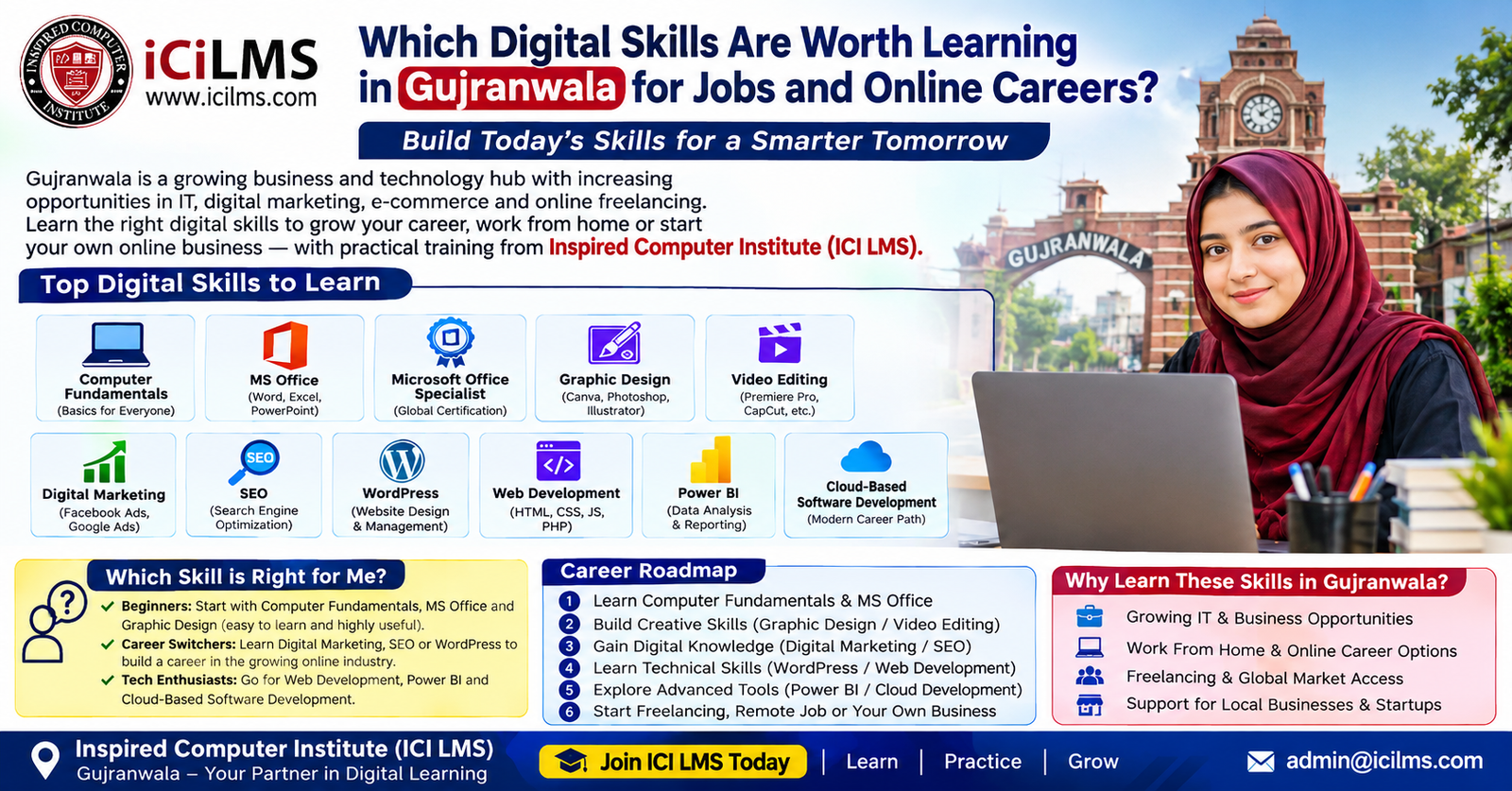
Which Digital Skills Are Worth Learning in Gujranwala for Jobs and Online Careers?
Komal Shahzadi
- August 31, 2026
- Comment 0
Which Digital Skills Are Worth Learning in Gujranwala for Jobs and Online Careers?
Choosing a digital skill can feel surprisingly difficult when you are starting from scratch. You search for courses in Gujranwala and immediately see terms such as graphic design, digital marketing, SEO, WordPress, web development, Power BI, freelancing, cloud development, and Microsoft Office. Every skill sounds useful, but that does not mean every skill is right for every learner. A student looking for an office job needs a different starting point from someone who wants to become a freelance designer, while a computer science graduate may be better suited to software development than basic office applications.
For learners in Gujranwala, the sensible approach is to think about skills as career tools rather than course certificates. The real question is not simply, “Which computer course is popular?” A better question is, “What can I learn well enough to solve a real problem for an employer, client, customer, or business?” That change in thinking can save months of jumping from one course to another without developing a marketable ability.
This guide explores practical digital skills that can support employment, freelancing, entrepreneurship, and longer-term online careers. It also explains which options are beginner-friendly, which require previous knowledge, and how you can move from basic computer literacy toward more specialized work. Inspired Computer Institute, commonly referred to as ICI LMS, can be one option for learners comparing structured computer training in Gujranwala, but the bigger goal should be choosing a learning path that matches your starting level, interests, available time, and intended career direction.
Why Digital Skills Matter for Learners in Gujranwala
Digital skills have become part of ordinary working life rather than something reserved for programmers or technology companies. A local office may need someone who can prepare professional documents, maintain spreadsheets, organize digital records, and create presentations. A retailer may need help managing social media, producing promotional graphics, updating a website, or analyzing sales information. A freelancer may provide services to clients in other Pakistani cities or internationally without sitting in the same office as the customer.
That variety is particularly important when considering career development in Gujranwala. The city has a broad business environment, with manufacturing, trading, retail, services, education, and small and medium-sized businesses creating different kinds of work. Many businesses increasingly depend on digital communication and software even when their core business is not a technology business. Someone working for a traditional company, for example, might still spend much of the day using spreadsheets, email, cloud storage, presentation software, accounting platforms, customer-management systems, or online marketing tools.
The opportunity, however, should not be confused with a promise of automatic employment or guaranteed freelance income. Learning Photoshop does not automatically make someone a successful designer, and completing an SEO course does not automatically produce clients. Skill depth, practice, communication, portfolio quality, reliability, and continuous learning all matter. Think of a digital course as learning how to use a set of tools; your career develops when you learn how to use those tools to produce useful results.
Local jobs and online work require different skill combinations
A person targeting a traditional job in Gujranwala may benefit from Computer Fundamentals, MS Office, Excel, communication, and workplace software skills. Someone interested in online work could combine a specialized skill such as graphic design or WordPress with freelancing, client communication, and basic digital marketing. An aspiring developer may need programming fundamentals, version control, databases, APIs, and cloud technologies.
This means there is no single “best computer course” for everyone. There is a best starting point for a particular person.
A useful rule is simple: if you are uncomfortable managing files, folders, typing, browsers, email, and basic computer settings, start with fundamentals. If you already work comfortably on a computer and want an office career, strengthen MS Office and especially Excel. If you are visually creative, investigate graphic design or video editing. If you enjoy business and communication, digital marketing and SEO may make sense. If you like technology and problem-solving, WordPress can be a gentle introduction to websites, while web development provides a deeper technical route.
The strongest path is usually the one you can practice repeatedly. Digital careers reward people who can demonstrate what they can do, not merely list course names on a CV.
Computer Fundamentals: The Best Starting Point for Beginners
Computer Fundamentals is often underestimated because it does not sound as exciting as artificial intelligence, software development, or digital marketing. Yet for a complete beginner, it can be the foundation on which almost every other digital skill depends. If you do not understand files, folders, applications, browsers, downloads, uploads, basic troubleshooting, typing, internet usage, and safe digital practices, advanced software can quickly become frustrating.
A beginner-oriented fundamentals course should ideally be practical rather than purely theoretical. You should learn how to create, rename, move, copy, organize, and back up files; use browsers efficiently; work with email attachments; install or manage common applications appropriately; understand basic operating-system functions; and recognize common security risks such as suspicious links, unsafe downloads, and weak passwords. These abilities may seem ordinary, but they appear repeatedly in real workplaces.
For someone in Gujranwala who has recently completed school or college, or for an adult returning to education after several years, this can be a sensible first step. It is also useful for learners who own a computer but have mostly used it for entertainment or basic browsing. The objective is not to become an IT professional overnight. The objective is to become confident and independent when using a computer.
What you should learn before moving to advanced software
The best test is practical: can you complete ordinary digital tasks without needing someone to guide you through every click? Can you create a properly named folder, save a document in the correct location, download a file, attach it to an email, find it later, and move information between applications? Can you use keyboard shortcuts, search effectively, and recognize when a website or file looks suspicious?
Once those abilities become natural, learning specialized applications becomes considerably easier. You can then move into MS Office, graphic design, video editing, digital marketing, WordPress, or another path without simultaneously struggling with basic computer operations.
Beginners should also resist the temptation to skip fundamentals because they appear too simple. Imagine trying to learn driving while still figuring out how the steering wheel and pedals work. Advanced digital skills create enough complexity on their own; you do not need basic computer confusion adding another layer.
For learners who already use computers confidently, spending a long time on fundamentals may not be necessary. A short assessment of your current ability can help you decide whether to move directly into an intermediate skill. The important thing is to identify the gap honestly rather than choosing a course because its title sounds more impressive.
MS Office Skills for Office and Administrative Jobs
MS Office remains a practical skill family for people targeting administrative, clerical, education, sales, operations, and many other workplace roles. Microsoft Word, Excel, and PowerPoint serve different purposes, and learning them as workplace tools is more valuable than simply memorizing menus.
Word is useful for creating letters, reports, applications, proposals, forms, resumes, and other documents. PowerPoint helps with presentations, training materials, meetings, and educational content. Excel is particularly important because it moves beyond simple typing into data organization, calculations, formulas, tables, sorting, filtering, charts, and basic analysis.
For a learner in Gujranwala searching for an entry-level office position, Excel deserves special attention. Many routine business tasks involve lists of customers, products, invoices, expenses, attendance, sales, inventory, or employee information. Someone who can structure that information neatly and use formulas accurately can be more useful than someone who only knows how to type data.
The key is to learn Office through realistic exercises. Instead of creating meaningless sample documents, imagine you are working for a small business. Build an inventory sheet. Prepare a monthly expense report. Create a sales summary. Draft a professional letter. Make a short presentation for a hypothetical company. These exercises begin turning software knowledge into workplace competence.
Word, Excel, PowerPoint, and everyday workplace tasks
The three applications should not be treated as isolated subjects. Real work often moves information between them. You might analyze sales in Excel, create a summary in Word, and present the results in PowerPoint. Learning that workflow gives you a more realistic understanding of how office software fits into a business.
You should also become comfortable with professional file naming, document formatting, printing or exporting to PDF, spreadsheet organization, and sharing files appropriately. Modern workplaces may also use cloud storage and collaboration tools, so understanding how digital documents are shared and updated is increasingly useful.
MS Office is generally suitable for beginners who already have basic computer familiarity. You do not need programming knowledge to start. However, becoming genuinely proficient requires more than following an instructor’s steps. You need independent practice, because an employer will not necessarily tell you which button to click.
A useful progression is to begin with Word and PowerPoint while giving extra practice time to Excel. Once the basics are comfortable, you can explore more advanced Excel functions and eventually consider business-intelligence tools such as Power BI. That creates a natural progression from everyday office work toward more analytical responsibilities.
Microsoft Office Specialist for Professional Certification
Microsoft Office Specialist (MOS) is different from simply saying that you know MS Office. It refers to a certification pathway designed around proficiency in Microsoft Office applications. For learners who want a more structured target, certification preparation can provide a useful framework because it encourages you to learn specific features rather than relying on vague familiarity with the software.
This route can be particularly useful for students, office professionals, and job seekers who want to validate their knowledge of Microsoft applications. Certification alone should not be treated as a substitute for practical ability, though. An employer may care about whether you can actually prepare an accurate spreadsheet or professional document when given a real assignment.
For beginners, it is usually sensible to learn the software first and then prepare for certification once the basic concepts are comfortable. Trying to memorize certification topics without understanding why the tools are used can turn learning into a short-term exam exercise.
For example, an Excel learner should understand how formulas, tables, sorting, filtering, formatting, and charts work in real situations. A Word learner should be able to create a polished multi-page document rather than simply knowing where formatting buttons are located. The certificate can then serve as evidence of structured learning rather than being the entire learning objective.
If you are comparing computer training options in Gujranwala, ask whether a program teaches practical Office workflows and whether it prepares students for recognized certification where appropriate. Also ask how much hands-on practice is included. A certificate has greater value when it sits alongside demonstrable skills and work samples.
Graphic Design for Creative and Freelance Careers
Graphic design can be an attractive path for learners who naturally enjoy visual communication. Instead of working primarily with numbers or code, designers use typography, color, composition, imagery, layout, and branding to communicate an idea. Local businesses need visual material for many ordinary activities: social media posts, promotional banners, menus, product graphics, flyers, packaging concepts, presentations, and digital advertisements.
The beginner barrier is relatively accessible compared with programming, but professional design still takes substantial practice. Knowing how to operate design software is only one part of the job. A person can learn Photoshop or Illustrator and still produce weak designs if they do not understand hierarchy, spacing, contrast, alignment, typography, or the needs of the target audience.
This is why portfolio development should begin early. A learner might create a fictional restaurant campaign, a small-business social media package, a product advertisement, and a simple brand identity. These projects provide evidence of decision-making and execution. They also give you something concrete to discuss when applying for a job or approaching a client.
Graphic design can pair naturally with digital marketing, social media management, video editing, and freelancing. For instance, a small business might need someone who can create Instagram graphics, resize campaign assets, edit short promotional videos, and understand the basics of online promotion. A designer who understands the wider business context can therefore offer more useful services than someone focused only on making attractive images.
For a complete beginner, start with design principles and one major tool rather than trying to master every application simultaneously. Build a small portfolio, request feedback, recreate professional layouts for practice, and gradually tackle more demanding projects.
Video Editing for Social Media and Digital Content
Video has become a major format for communication, education, entertainment, product promotion, and social media. That makes video editing another practical digital skill for learners who prefer visual storytelling. Businesses, creators, educators, agencies, and online sellers can all need edited videos, but the exact requirements vary widely—from short vertical clips to longer promotional or educational videos.
A beginner does not need to start with complicated cinematic production. Basic editing skills can already involve importing footage, trimming clips, arranging a timeline, cleaning audio, adding text, using transitions appropriately, inserting music, correcting basic visual problems, and exporting the finished video in a suitable format.
The word appropriately matters. Good editing is not about filling every second with flashy transitions. Sometimes the strongest edit is almost invisible. If a viewer can understand the message easily and remains engaged, the editor has done something useful.
For learners in Gujranwala, video editing can also complement local business work. Imagine a clothing shop that wants short product videos, a restaurant promoting a new menu, an academy producing educational clips, or a manufacturer preparing social content. A skilled editor can turn raw footage into material that is easier for the business to publish.
Beginners should practice with short projects and gradually increase complexity. Learn storytelling, pacing, audio, captions, framing, and platform-specific formats alongside the editing software. Once those fundamentals are established, advanced techniques such as color grading, motion graphics, and more sophisticated audio workflows become easier to understand.
Video editing generally suits learners who enjoy creative work and have patience for detail. It does not require programming knowledge, although basic computer skills and good file-management habits are important because video projects can involve large numbers of files and relatively large media assets.
Digital Marketing for Businesses and Online Brands
Digital marketing is broader than posting on social media. It involves using digital channels and measurable strategies to attract attention, communicate with audiences, generate leads, support sales, and build relationships. Depending on the role, a digital marketer might work with social media, search engines, email, content, paid advertising, analytics, websites, or several of these areas together.
This breadth makes digital marketing both attractive and potentially confusing for beginners. You do not need to master every marketing channel on day one. A better strategy is to understand core concepts first and then specialize. Learn who the customer is, what problem a business solves, how a marketing funnel works, how content supports a business objective, and how results can be measured.
For a small business in Gujranwala, digital marketing could mean improving its Google presence, creating useful social content, running carefully targeted campaigns, developing a website, or building an email/customer communication process. The work should begin with the business goal rather than the platform. Posting every day is not automatically a marketing strategy.
Digital marketing also combines well with other skills. Someone who knows SEO and WordPress can help improve a company’s website. Someone with graphic design and marketing knowledge can create campaign assets that fit a brand’s objectives. Someone comfortable with analytics can evaluate whether campaigns are generating useful outcomes.
This path is suitable for beginners who enjoy communication, research, experimentation, and business thinking. It does require a willingness to learn continuously because platforms, search behavior, advertising systems, and consumer habits change.
There are no guaranteed-income shortcuts here. A learner should be skeptical of courses promising effortless earnings from digital marketing. Strong marketers develop their abilities by studying real businesses, testing ideas, analyzing outcomes, and learning from what does not work.
SEO for Websites, Businesses, and Freelance Services
Search engine optimization (SEO) focuses on improving a website’s ability to be discovered through relevant search queries and providing a useful experience for visitors. It combines research, content, technical understanding, website structure, and analysis. For a learner interested in online careers, SEO can be valuable because it connects technical website work with writing and business objectives.
Beginners can start with concepts such as search intent, keyword research, on-page optimization, internal linking, content structure, metadata, crawlability, and basic technical SEO. As experience develops, they can explore more advanced areas such as site architecture, structured data, log analysis, international SEO, and performance diagnostics.
Local search is particularly relevant to businesses serving a specific area. A Gujranwala restaurant, clinic, academy, retailer, workshop, or service provider may have different search needs from a nationwide e-commerce company. Understanding that distinction helps an SEO learner think beyond generic keywords and focus on what potential customers actually need.
SEO also requires patience. Search visibility can depend on competition, site quality, content usefulness, technical factors, authority, and many other variables. Anyone learning SEO should avoid guarantees such as “rank number one in a few days.” Sustainable optimization is closer to gardening than flipping a switch: you improve the soil, plant useful things, monitor what grows, and keep adapting.
For freelancing, SEO can be packaged into specific services rather than sold as a vague promise. A beginner might eventually offer keyword research, on-page optimization, content briefs, local SEO support, or technical audits after developing enough competence. Combining SEO with WordPress is especially practical because it allows you to understand both the website and the optimization process.
WordPress for Fast Website Creation
WordPress is one of the most approachable ways for a beginner to enter the world of websites without immediately having to become a programmer. That does not mean WordPress is “easy” in the sense that you can master it in a weekend. Rather, it gives learners a practical environment in which they can understand how websites are structured, published, managed, and improved while gradually introducing more advanced concepts. For someone in Gujranwala who wants to work with local businesses, online stores, blogs, educational websites, or freelance clients, this can be a useful digital career path.
A beginner can start by learning how WordPress dashboards work, how pages and posts differ, how themes control appearance, how plugins extend functionality, and how menus, media, forms, and basic settings are managed. From there, the learner can progress toward responsive design, website performance, security, backups, SEO, e-commerce, and customization. The advantage is that you can see the result of your work immediately. Build a page, change its layout, add content, preview it, and improve it. That feedback loop makes learning much more tangible.
For example, imagine a small Gujranwala clothing business that has an active social media presence but no proper website. A WordPress learner could build a simple site containing the business story, product categories, contact information, location, inquiry form, and selected products. A more advanced learner might add an online store, payment integration, analytics, search optimization, and performance improvements. The business receives a useful digital asset, while the learner gains a portfolio project that demonstrates practical ability.
WordPress is especially attractive when combined with SEO, graphic design, digital marketing, and freelancing. However, learners should understand the difference between assembling a template and solving a client’s website problem. Professional work involves planning, mobile responsiveness, content organization, usability, maintenance, backups, security, and communication. If you enjoy creating things visually but also want to understand how websites work, WordPress can be an excellent bridge between design and development.
Web Development for Technical Career Paths
Web development is a deeper technical route than WordPress site building. It is suitable for learners who enjoy logical thinking, problem-solving, experimentation, and understanding how technology works beneath the surface. Rather than relying primarily on prebuilt components, developers learn programming languages and frameworks that allow them to create interactive websites, web applications, APIs, databases, and other software systems.
For a complete beginner, the journey usually starts with understanding how the web works and learning foundational technologies such as HTML, CSS, and JavaScript. HTML provides structure, CSS controls presentation, and JavaScript adds behavior and interactivity. Once these foundations become comfortable, learners can explore front-end frameworks, back-end development, databases, APIs, authentication, testing, version control, and deployment.
This is not a skill path to choose simply because “developers earn well.” Programming requires sustained practice. At first, a small error can consume an hour because you may not understand why something broke. That frustration is normal. Over time, debugging becomes less like searching for a needle in a haystack and more like following clues in a detective story.
A practical learner should build projects instead of spending all their time watching tutorials. Create a responsive business website, a portfolio, a task-management application, a small inventory system, or a simple booking interface. Each project teaches something different and gives you material for a portfolio.
Web development can lead toward employment, freelance projects, agency work, startup development, and more specialized software engineering. It also creates a foundation for cloud-based software development later. Unlike basic computer courses, this route generally requires previous computer familiarity but not necessarily previous programming knowledge. Beginners can start from zero if they are prepared for a longer learning curve.
The most important decision is consistency. Learning three programming languages superficially is usually less useful than becoming competent with one technology stack and learning how its pieces work together. Once the fundamentals are strong, adding frameworks and tools becomes much easier.
Power BI for Data and Business Intelligence
Power BI is a strong option for learners who like numbers, business information, reports, and visual analysis but do not necessarily want to become full-time programmers. It is designed to help users connect to data, transform it, analyze it, and create interactive reports and dashboards. This makes it relevant to businesses that need better visibility into sales, operations, inventory, finance, customer activity, or other performance indicators.
A beginner can approach Power BI after gaining basic computer and spreadsheet skills, particularly Excel. Understanding tables, rows, columns, formulas, and basic data organization makes the transition smoother. Power BI then introduces ideas such as data cleaning, relationships between tables, calculated measures, visualizations, filters, dashboards, and reporting.
Consider a hypothetical manufacturing business in Gujranwala. It may have information about monthly sales, products, customers, production quantities, and regional orders. A spreadsheet can contain that information, but a well-designed Power BI dashboard can make patterns easier to see. Managers might quickly identify which products are performing well, which months are stronger, or which regions need attention. The technology becomes useful because it helps people make decisions from data rather than merely storing numbers.
This is why Power BI should not be learned as a collection of buttons. A dashboard with twenty colorful charts is not automatically a good dashboard. The learner needs to understand the question being asked and then select the appropriate data and visualization. Good business intelligence is about turning information into something understandable and actionable.
Power BI is generally more suitable for intermediate beginners than absolute computer beginners. You can learn it without becoming a software engineer, but familiarity with Excel and basic data concepts is highly beneficial. Later, SQL, database knowledge, statistics, and data modeling can deepen your capabilities.
For learners in Gujranwala interested in office careers, business analysis, reporting, finance, operations, or data-oriented roles, Power BI can provide a useful specialization. It can also complement Excel rather than replace it. Think of Excel as a versatile workbench and Power BI as a more specialized environment for turning larger or more complex datasets into interactive business insights.
Freelancing: Turning Digital Skills Into Online Services
Freelancing is not a digital skill by itself; it is a way of selling and delivering a skill. This distinction is crucial for anyone in Gujranwala considering an online career. A person cannot realistically become a strong freelancer simply by learning how to create an account on a freelance marketplace. Clients ultimately pay for solutions, so the first priority should be developing something useful to sell.
For example, a graphic designer might offer social media graphics, a WordPress specialist might build business websites, an SEO professional might conduct website audits, a video editor might produce short-form videos, and a developer might create web applications. The service becomes more credible when the freelancer can show relevant examples.
A beginner should therefore build a portfolio before becoming obsessed with platforms. You do not necessarily need ten clients to create your first portfolio. You can develop realistic sample projects. A designer could create a fictional brand identity. A WordPress learner could build a demonstration website for a hypothetical local business. An SEO learner could prepare an example audit. A video editor could turn raw footage into a short promotional sequence.
Communication is another major part of freelancing. You need to understand what a client wants, ask sensible questions, explain what you will deliver, agree on scope, manage deadlines, and respond professionally when something changes. A technically talented freelancer who communicates poorly can still create a difficult client experience.
There is also competition. Online marketplaces expose freelancers to people from many countries and skill levels. That means competing only on low prices can become exhausting. A better long-term strategy is to improve quality, specialize where appropriate, understand a particular client’s needs, and develop a reputation for reliability.
Learners should also be careful about income claims. Freelancing can create opportunities, but earnings are not guaranteed. Results depend on skill level, demand, portfolio quality, communication, pricing, consistency, market competition, and the ability to find and retain clients.
For someone in Gujranwala, freelancing can complement local employment rather than being an either-or decision. You can learn a skill, seek local practical experience, and gradually test online service work. That approach often provides a more realistic path than expecting immediate full-time freelance income.
Cloud-Based Software Development for Advanced Learners
Cloud-based software development belongs toward the more advanced end of the digital-skills spectrum. It is not usually the best first course for someone who is still learning how folders, browsers, or office applications work. It makes more sense after developing a foundation in programming, software development practices, databases, networking concepts, and version control.
Cloud development involves building, deploying, operating, or integrating software using cloud platforms and services. Depending on the role, a developer may work with hosted databases, application services, storage, authentication, APIs, containers, monitoring systems, automated deployment pipelines, and scalable infrastructure. Major cloud ecosystems provide a large range of services, but beginners should avoid trying to learn every service simultaneously.
A sensible progression starts with software development fundamentals. Learn a programming language properly. Understand Git and version control. Build applications locally. Learn how databases work. Understand APIs and authentication. Then learn how to deploy an application to a cloud environment. Once you understand what you are deploying and why, cloud services become much easier to understand.
For example, imagine a developer creates a web application for managing customer inquiries. Locally, the application may work perfectly. The next challenge is making it accessible online, storing data reliably, protecting user accounts, handling errors, monitoring performance, and updating the software without breaking the live application. Cloud technologies provide tools and infrastructure for these requirements.
This path can be highly rewarding intellectually, but it demands patience. It is best suited to learners with previous programming or software-development knowledge. A student who jumps into cloud architecture without understanding basic programming may end up memorizing terminology without knowing how the pieces fit together.
For advanced learners in Gujranwala who want to pursue software engineering or remote technical careers, cloud knowledge can become a valuable specialization. The important thing is sequence: fundamentals first, development second, cloud specialization third. Building that foundation may take longer, but it produces much stronger technical understanding than rushing directly toward advanced certifications.
Which Skill Is Right for Me?
There is no universal answer because your best skill depends on your current ability, interests, career objective, and available learning time. A useful way to narrow the choices is to imagine the kind of work you would actually enjoy doing repeatedly. Do you prefer organizing information, creating visuals, writing and communication, analyzing numbers, building websites, or solving programming problems?
If you are a complete beginner, Computer Fundamentals is usually the safest starting point. Once comfortable, you can move into MS Office or another specialization. If your immediate goal is an office or administrative position, MS Office—with strong Excel skills—may be more practical than jumping directly into web development.
If you are creative and enjoy visual work, Graphic Design or Video Editing may suit you. If you are interested in business promotion, communication, and online audiences, Digital Marketing and SEO are worth exploring. If you want to create websites but are not ready for programming, WordPress can provide a gentler entry point. If you enjoy logic and technology and are prepared for a longer learning curve, web development is the deeper route.
| Your situation | Suitable starting path | Next step |
|---|---|---|
| Complete computer beginner | Computer Fundamentals | MS Office or specialization |
| Looking for office work | MS Office | Advanced Excel / MOS / Power BI |
| Creative and visual | Graphic Design | Video Editing / Marketing |
| Interested in content | Video Editing | Digital Marketing |
| Interested in business promotion | Digital Marketing | SEO / Analytics |
| Want to build websites quickly | WordPress | SEO / advanced WordPress |
| Enjoy coding and problem-solving | Web Development | Frameworks / databases / cloud |
| Like numbers and reports | Excel | Power BI / data skills |
| Want online client work | One specialized skill | Freelancing + portfolio |
| Already a developer | Cloud development | Deployment / DevOps / cloud specialization |
The best choice is also the one you are willing to practice consistently. You do not need to predict your entire career today. Choose a sensible starting point, become competent, create projects, and then let your experience guide the next decision.
A Practical Digital Skills Career Roadmap in Gujranwala
A realistic digital career roadmap should begin with foundation, specialization, practice, portfolio, and professional application. Trying to learn ten skills simultaneously often produces shallow knowledge. It is much better to become genuinely useful in one area and then add complementary skills.
During the first stage, assess your computer ability. If necessary, learn Computer Fundamentals. Then develop workplace basics such as typing, file management, internet research, email, document handling, and digital safety. These skills remain useful regardless of your eventual specialization.
The second stage is choosing one primary skill. An office-oriented learner might select MS Office and Excel. A creative learner might choose graphic design. A marketing-oriented learner might select digital marketing or SEO. A website-focused learner could choose WordPress, while a technically inclined learner could begin web development.
The third stage is project-based practice. Do not wait until you finish the entire course. Start producing small pieces of work as soon as you understand the basics. Projects expose gaps that tutorials often hide.
The fourth stage is portfolio development. Select your strongest work and present it clearly. Explain the problem, your approach, the tools used, and the result. A portfolio does not have to look extravagant; it needs to make your ability easy to understand.
The fifth stage is professional application. Depending on your objective, that could mean applying for local jobs in Gujranwala, approaching businesses, seeking internships, joining an agency, building your own business presence, or offering freelance services online.
A simple progression might look like this:
Month 1–2: computer fundamentals and workplace confidence.
Month 2–4: primary specialization.
Month 4–6: projects and portfolio.
Month 6 onward: practical work, internships, job applications, client outreach, or deeper specialization.
The exact timeline will differ dramatically between learners. Programming and cloud development may require substantially more study than basic office applications. The roadmap is therefore a framework, not a promise that a particular skill can be mastered within a fixed number of months.
Practical Examples of Digital Skills in Real Work
The easiest way to understand the value of digital skills is to look at realistic combinations. Imagine a small manufacturing company in Gujranwala that wants to improve its online presence. It may need a website, product photographs prepared for publication, social media graphics, search optimization, and basic analytics. One person might not handle all of these tasks, but a team can divide them among people with different specialties.
A WordPress specialist could build and maintain the website. A graphic designer could prepare banners and product visuals. An SEO specialist could improve page structure and search visibility. A digital marketer could plan campaigns and social content. Someone familiar with Power BI could help management analyze sales information. Suddenly, the phrase “digital skills” becomes much more concrete: these are people solving identifiable business problems.
Consider another example: an educational academy wants to publish online learning content. A video editor can turn recorded lessons into polished videos. A graphic designer can create thumbnails and promotional graphics. A WordPress specialist can maintain the academy’s website. An SEO specialist can optimize useful educational pages for search. A digital marketer can help distribute the content.
An office employee may use a completely different combination. Their day might involve preparing Word documents, maintaining Excel sheets, creating presentations, responding to emails, organizing files, and generating reports. If that employee later learns Power BI, they may be able to transform routine spreadsheet information into interactive dashboards.
These examples demonstrate an important principle: digital skills become more valuable when they connect to a real workflow. Learning isolated software features is useful, but understanding how businesses use those features is better.
This is also why learners should not judge a course solely by the number of software applications it teaches. A long list of tools can look impressive while leaving the student unable to complete one meaningful project independently. Depth, practice, and application usually matter more than collecting software names.
How to Choose a Training Institute and Build a Portfolio
Choosing a training institute in Gujranwala deserves the same attention as choosing the skill itself. Before enrolling, look beyond advertising language and investigate what the learning experience actually involves. Does the course include hands-on assignments? Are instructors able to explain concepts clearly? Do students build projects? Is there a mechanism for feedback? Does the curriculum match current workplace requirements?
Learners can also ask whether the institute teaches at the appropriate level. A beginner should not be placed into advanced development concepts without foundational support. Likewise, someone who already understands basic computer operations may want a more specialized and challenging program.
Inspired Computer Institute, commonly shortened to ICI LMS, can be considered by learners exploring structured digital-skills training in Gujranwala. When comparing ICI LMS with other options, prospective students should still evaluate the actual curriculum, practical assignments, instructor support, learning resources, and how the training aligns with their individual career objective. The right institute is not necessarily the one with the longest course list; it is the one that helps you develop usable competence.
Portfolio building should happen alongside training rather than afterward. If you are studying graphic design, save your strongest branding, advertising, and social-media projects. If you are learning WordPress, build several different website types. If you are learning SEO, create sample audits and content strategies. If you are studying Power BI, develop dashboards using appropriate sample datasets.
For employment, keep a clean CV that emphasizes skills and projects rather than filling the page with unrelated certificates. For freelancing, create a professional portfolio that explains what you can deliver. For local business opportunities, learn to communicate your services in plain language: what problem do you solve, what will you deliver, and why should the customer trust your work?
The learning process does not end when the certificate arrives. Technology changes, software receives new features, platforms change their interfaces, and business expectations evolve. A good digital professional develops the habit of learning continuously.
Conclusion: Build One Strong Skill Before Chasing Many
The best digital skill to learn in Gujranwala is not necessarily the newest or most heavily advertised one. It is the skill that matches your current ability, interests, career objective, and willingness to practice. Computer Fundamentals and MS Office can provide a strong foundation for beginners and office-focused learners. Graphic Design and Video Editing suit creative people, while Digital Marketing and SEO can work well for learners interested in business, communication, and online visibility.
WordPress offers a practical entry into website creation, whereas Web Development provides a deeper technical path for people willing to learn programming. Power BI is particularly relevant to learners who enjoy data, reporting, and business analysis. Freelancing can be added after developing a genuine service skill, while cloud-based software development is better approached as an advanced specialization after programming and software-development fundamentals are established.
The smartest strategy is to avoid trying to become an expert at everything. Pick one primary skill, learn its fundamentals, practice through realistic projects, build a portfolio, and then add complementary abilities. A graphic designer who learns marketing can understand clients better. A WordPress developer who learns SEO can provide a broader website service. An Excel user who learns Power BI can move toward more advanced reporting. A developer who understands cloud deployment can take on more sophisticated technical projects.
For learners considering digital skills training in Gujranwala, the journey should therefore be treated as a career-building process rather than a race to collect certificates. Learn something useful. Practice it until you can work independently. Build evidence of what you can do. Then take that evidence into the job market, local business community, freelance marketplace, or your own online venture.
The digital world rewards curiosity, but it rewards useful competence even more. Start with the right foundation, choose a realistic path, and let your skills grow one level at a time.
FAQs About Learning Digital Skills in Gujranwala
1. Which computer skill is best for beginners in Gujranwala?
For someone with little or no computer experience, Computer Fundamentals is generally the most sensible starting point. It builds confidence with operating systems, files, folders, internet usage, email, typing, applications, and basic digital safety. After that, learners can choose MS Office, graphic design, digital marketing, WordPress, or another specialization according to their career goals.
If you already use computers comfortably, you may not need a separate fundamentals course. You can assess your current ability and move directly into a practical specialization. The important point is to avoid starting with an advanced skill while basic computer operations are still confusing.
2. Is MS Office still useful for jobs?
Yes. MS Office skills remain relevant to many administrative, education, sales, operations, documentation, and business roles. Excel is particularly useful because businesses regularly organize and analyze information using spreadsheets.
Learning Word, PowerPoint, and Excel at a practical workplace level can therefore be a sensible choice for people targeting office jobs. Learners who want stronger evidence of Microsoft application proficiency can also investigate the Microsoft Office Specialist (MOS) certification pathway.
3. Should I learn graphic design or digital marketing?
The answer depends on the type of work you prefer. Graphic design is generally more suitable if you enjoy visual creativity, typography, layouts, branding, and creating images. Digital marketing may suit you better if you enjoy communication, business strategy, audience research, content, campaigns, and analyzing marketing performance.
The two skills also complement each other. A person who understands both design and marketing can create promotional material while also understanding the business objective behind it. You do not have to learn both immediately; choose one as your primary skill and add the other later if it supports your career.
4. Can I start freelancing after completing a digital skills course?
You can start pursuing freelance opportunities after developing a marketable skill, but completing a course does not guarantee clients or income. Before approaching customers, make sure you can independently deliver the service you are offering.
A portfolio is extremely useful. Create realistic projects, present them professionally, learn how to communicate with clients, understand project scope and deadlines, and start with work that matches your actual ability. Freelancing becomes more sustainable when you focus on delivering useful results rather than simply trying to win the largest number of projects.
5. Which digital skill should I learn for a long-term online career?
There is no single guaranteed choice, but several paths can support long-term digital careers when developed seriously. Web development, cloud-based software development, SEO, digital marketing, graphic design, video editing, data analytics/Power BI, and specialized WordPress services can all lead to different types of professional work.
Your personal fit matters. If you dislike programming, forcing yourself into software development simply because it sounds lucrative may be a poor decision. Likewise, if you enjoy coding and problem-solving, limiting yourself to basic office software may not make the best use of your interests. Choose a path you can realistically practice, deepen, and adapt as technology changes.