Currently Empty: ₨ 0
Sheikhupura Computer Education Guide
Komal Shahzadi
- August 15, 2026
- Comment 0
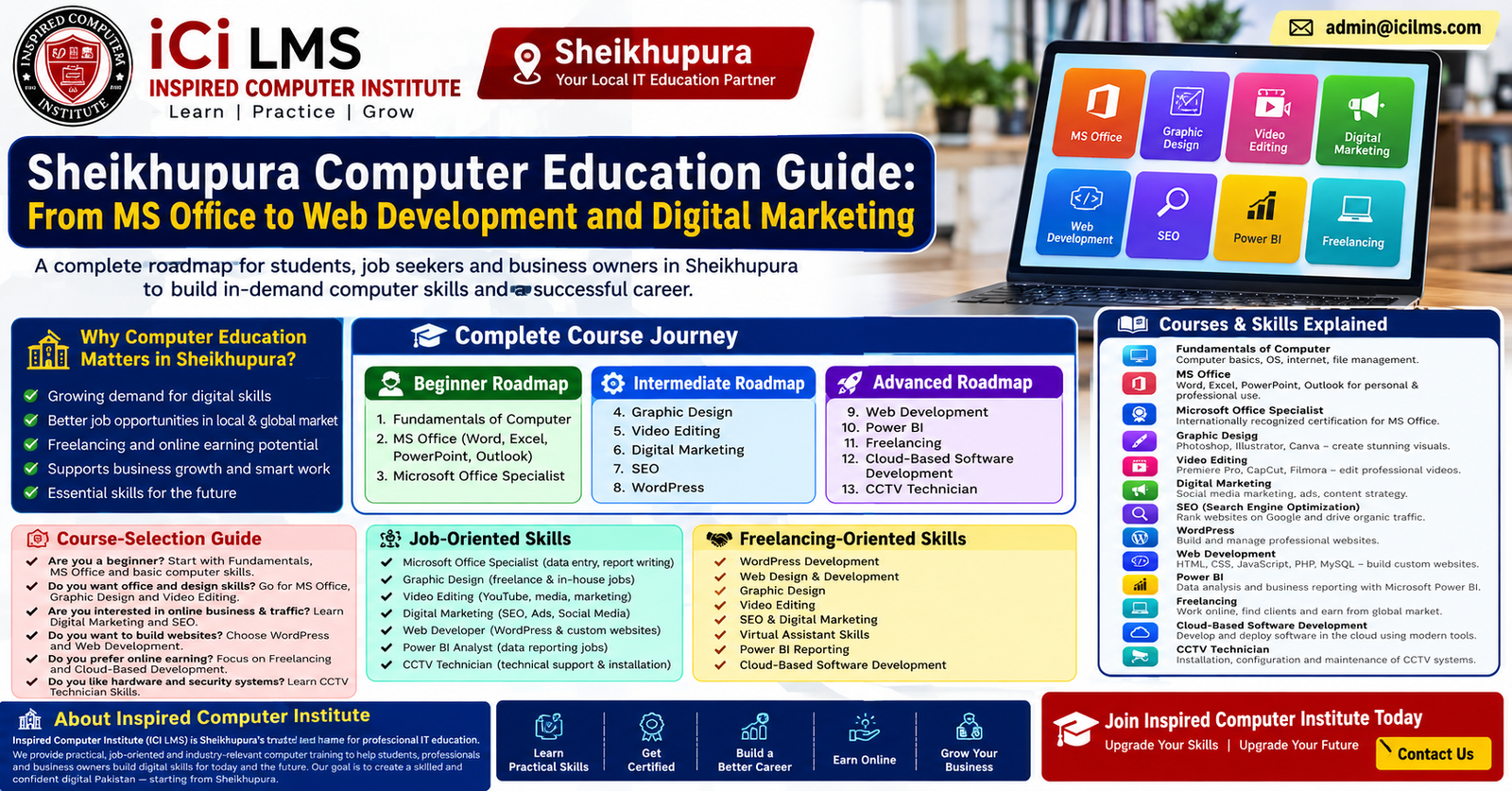
Sheikhupura Computer Education Guide: From MS Office to Web Development and Digital Marketing
Choosing a computer course can feel surprisingly difficult when every institute seems to offer a long list of technologies, software, certifications, and career promises. A beginner in Sheikhupura may hear about MS Office, graphic design, digital marketing, SEO, WordPress, web development, Power BI, freelancing, cloud development, and CCTV training and wonder where to begin. The simple answer is that there is no single “best” computer course for everyone. The right choice depends on your current education, computer knowledge, interests, available study time, career target, and whether you want a conventional job, freelance clients, or your own digital business. A student who needs an office job should not necessarily follow the same path as someone who dreams of becoming a web developer. Likewise, a shop owner may gain more immediate value from digital marketing and basic business software than from learning programming.
This guide is designed as a practical computer education roadmap for Sheikhupura, starting with fundamental computer literacy and moving toward professional and specialized skills. Think of the journey like building a house: computer fundamentals are the foundation, MS Office gives you everyday working tools, specialized software adds professional capabilities, and advanced technologies become the upper floors. Skipping the foundation can make advanced learning unnecessarily frustrating. On the other hand, staying at beginner level forever can limit your opportunities when you are ready to specialize. The goal is to understand what each field actually involves, what students learn, and where that knowledge can be used before spending time and money on a course.
Why Computer Education Matters in Sheikhupura
Computer education is no longer limited to people who want to become software engineers. Almost every modern workplace uses computers for communication, documentation, records, accounting, reporting, customer management, marketing, or data handling. In Sheikhupura, this can matter to students preparing for employment, office workers who want better productivity, small-business owners trying to establish an online presence, and freelancers looking for services they can sell beyond their local area. Even a person who never writes a line of programming code can benefit enormously from understanding files, documents, spreadsheets, presentations, email, cloud tools, online safety, and digital communication. The computer has effectively become a general-purpose workplace instrument, much like a calculator, telephone, and filing cabinet combined.
The important distinction is between using a computer and having a marketable computer skill. Basic computer literacy teaches you how to operate technology confidently, but specialized education can turn that familiarity into something another person or organization is willing to pay for. For example, knowing how to open Excel is useful; knowing how to create structured spreadsheets, formulas, reports, charts, and business dashboards is considerably more valuable. Similarly, knowing that websites exist is very different from being able to build a WordPress site, optimize it for search engines, or develop a custom web application. This is why students should think in terms of a progression rather than searching endlessly for one magical course.
Computer Skills for Students, Job Seekers, and Business Owners
Different learners should approach computer education differently. A college student who wants a first office position may start with computer fundamentals and MS Office, then add communication, Excel, and possibly Microsoft Office Specialist preparation. Someone with a creative personality might choose graphic design or video editing. A person who enjoys writing, research, analytics, and business strategy may find digital marketing and SEO more suitable. Someone who likes logical problem-solving and technology can eventually move toward web development or cloud-based software development.
Business owners have another useful route. They may not need to become professional programmers, but learning digital marketing, SEO, WordPress, basic design, analytics, and online business tools can help them understand how their business appears on the internet. A local retailer, educational center, service provider, or professional can use these skills to manage content, communicate with customers, and make more informed digital decisions. The strongest computer education is therefore not simply about collecting certificates. It is about matching a skill to a real-world problem.
Beginner Roadmap: Start With Computer Fundamentals
A beginner should resist the temptation to jump immediately into advanced technologies simply because they sound impressive. Computer fundamentals provide the operating knowledge required for almost every subsequent course. Students typically learn how computers work at a practical level, how to use an operating system, manage files and folders, install and use applications, connect devices, browse the internet, use email, and perform everyday digital tasks. Depending on the course structure, basic training may also introduce typing, printing, scanning, data storage, simple troubleshooting, and essential cybersecurity habits. These topics can sound ordinary, but they remove the friction that often makes a new learner feel uncomfortable around technology.
A good beginner course should be practical rather than purely theoretical. Students should actually create folders, rename files, copy and move documents, organize data, download and upload files, use browsers, manage email attachments, and understand common file formats. They should also learn why passwords matter, how suspicious links work, why software should be updated, and how to protect personal information online. These habits are useful whether the learner later becomes an office assistant, graphic designer, marketer, developer, freelancer, or business owner. A person who understands the digital basics has a much easier time learning specialized software because they are no longer struggling with elementary computer operations at the same time.
What You Learn in a Basic Computer Course
A structured fundamentals course generally acts as the beginner roadmap for someone starting from little or no experience. The learner should become comfortable with everyday computer operation before progressing to a specialized field. The practical objective is confidence: you should be able to sit in front of a computer and complete routine tasks without needing someone to guide every click. This is especially important for students who may later enter office environments where employers expect basic computer competence rather than treating it as an exceptional skill.
The most useful beginner curriculum usually covers operating-system navigation, file management, word-processing basics, internet browsing, email, printing, data entry concepts, and introductory productivity tools. Learners can then test themselves through small projects, such as creating a properly formatted document, organizing a folder containing different file types, preparing an email with attachments, or maintaining a simple spreadsheet. These projects are more meaningful than memorizing definitions because they resemble the tasks people actually encounter at work. Once those fundamentals become second nature, the student can choose an intermediate direction with much greater confidence.
MS Office: The Essential Workplace Skill
MS Office remains one of the most practical starting points for people seeking computer-based employment because office work frequently revolves around documents, spreadsheets, presentations, and routine information management. Microsoft Word is commonly used for letters, reports, applications, notices, assignments, resumes, and formatted business documents. Excel is especially important because it can handle calculations, lists, records, budgets, schedules, inventories, and analytical work. PowerPoint supports presentations, training materials, classroom projects, sales pitches, and internal business communication. Learning these applications together gives a student a versatile productivity foundation rather than a narrow software skill.
Excel deserves particular attention because beginners sometimes underestimate how much professional work can be done with it. A student can progress from entering data to using formulas, sorting and filtering information, applying conditional formatting, creating charts, preparing printable reports, and organizing business records. More advanced Excel learning can introduce functions, lookup techniques, data cleaning, pivot tables, and other analytical features. Word similarly goes beyond typing: styles, page layouts, tables, headers and footers, templates, document organization, and professional formatting can make a substantial difference in office productivity. The key is to learn how these applications solve workplace problems rather than simply memorizing where buttons are located.
Word, Excel, and PowerPoint Skills
For someone seeking an entry-level office role in Sheikhupura, Word, Excel, and PowerPoint can form a practical employment-oriented package. Administrative assistants, data-entry workers, office coordinators, school staff, sales teams, and many small businesses may require employees who can prepare documents, maintain records, and present information clearly. The exact requirements vary by employer, so students should also develop typing accuracy, communication, organization, and professional email habits alongside software training. A certificate can support a CV, but demonstrated ability is usually more persuasive when an employer asks you to complete a practical task.
A useful approach is to build a small portfolio even for office software. Instead of saying “I know Excel,” create a sample inventory sheet with formulas and a summary chart. Instead of saying “I know Word,” prepare a professionally formatted report or business letter. For PowerPoint, create a short presentation with consistent design, readable typography, visuals, and speaker-friendly structure. These examples give a learner something concrete to discuss during an interview and reveal whether the training has produced practical competence. For beginners, this combination of skills + practice + examples is much stronger than relying on a course title alone.
Microsoft Office Specialist: Taking Office Skills Further
Microsoft Office Specialist (MOS) is a certification-oriented path for learners who want to demonstrate proficiency with Microsoft applications. Rather than treating Office as a basic computer subject, MOS preparation can encourage students to develop more structured knowledge of particular Microsoft Office programs. This can be useful for learners who want a formal credential alongside practical skills, especially when their target education or employment environment values recognized software proficiency. However, students should understand that certification is not a substitute for actual ability. The best outcome is to prepare for certification while simultaneously completing realistic projects.
MOS can be particularly relevant for people who intend to build their careers around administrative work, business productivity, data handling, or office technology. A student who already understands basic Word, Excel, and PowerPoint can use specialist training to deepen knowledge rather than repeatedly studying introductory concepts. This progression also teaches an important career lesson: not every learner needs to keep adding unrelated courses. Sometimes becoming exceptionally capable with a core workplace tool is more useful than collecting ten certificates that never become practical skills.
When MOS Certification Makes Sense
MOS preparation makes the most sense when a learner has a clear reason for wanting a recognized Microsoft Office credential. A student preparing for office employment may use it as an additional signal of proficiency, while an experienced Office user may pursue it to validate and formalize existing knowledge. It can also create a structured learning target for someone who prefers studying toward a defined assessment. The value depends on the learner’s circumstances, the quality of preparation, and how the credential fits into the rest of the person’s career plan.
Students should therefore ask three questions before choosing this route: Do I already have basic Office skills? Does my target role benefit from stronger Office proficiency? Can I demonstrate these skills through practical work as well as certification? If the answer is yes, MOS can be a sensible next step. If someone has never used a computer before, however, beginning with fundamentals is usually more productive. The progression should feel like climbing stairs, not trying to leap from the ground to the roof.
Graphic Design for Creative and Commercial Work
Graphic design is a natural choice for learners who enjoy visual communication and creative problem-solving. The field involves much more than learning a design application. Students need to understand composition, typography, color, hierarchy, spacing, imagery, branding, and the difference between designing for print and designing for screens. Software is the toolbox, while design principles are the craft. A learner who knows how to click every button in a graphics program but cannot create a balanced layout will struggle to produce professional work.
In practical training, students may work on social-media graphics, posters, flyers, business cards, brochures, thumbnails, advertisements, banners, logos, and other visual assets. These projects can also connect directly with digital marketing, because businesses constantly need visual content for websites and social platforms. A Sheikhupura-based learner can therefore use graphic design for local clients while gradually developing a portfolio for remote work. Restaurants, retailers, educational businesses, property services, event organizers, professionals, and online sellers can all have different visual-content needs. The skill becomes especially powerful when combined with copywriting, marketing, branding, or social-media management.
Practical Graphic Design Skills to Learn
A useful graphic-design curriculum should combine software practice with design thinking. Students should learn how to select appropriate dimensions, prepare files for different uses, work with layers and assets, maintain visual consistency, and export designs in suitable formats. They should also learn how to take a vague client request and convert it into a clear visual concept. That last skill matters enormously in professional work because clients rarely provide a perfect design brief. They may simply say, “Make something modern for our business,” leaving the designer to ask the right questions and develop a solution.
Portfolio development should begin during training rather than after graduation. A student can create a fictional brand identity, social-media campaign, promotional poster, product advertisement, and several thumbnail concepts to demonstrate range. This creates evidence of skill for both local employment and freelancing. Graphic design can also become a stepping stone into video editing, social-media marketing, UI design, and broader digital content production, making it a particularly flexible creative skill for students who do not yet know exactly where they want to specialize.
Video Editing for Modern Content Creation
Video has become an important communication format for businesses, educators, creators, organizations, and individuals, which makes video editing another practical digital skill. A video editor takes raw footage and turns it into a coherent story by selecting clips, arranging sequences, improving audio, adding transitions where appropriate, incorporating text or graphics, and exporting the final project for its intended platform. Professional editing is not simply about adding flashy effects. In many cases, the best editing is almost invisible because it keeps the viewer engaged without distracting from the message.
Students learning video editing should understand the complete workflow from importing media through final export. They can practice cutting interviews, producing short promotional videos, editing educational content, creating social-media reels, adding captions, synchronizing audio, and preparing different versions for different platforms. Over time, they can explore color correction, motion graphics, audio cleanup, and more sophisticated storytelling techniques. These skills can complement graphic design and digital marketing, creating a broader content-production profile that may appeal to businesses seeking someone who can handle several aspects of their online communication.
Career and Freelancing Opportunities in Video Editing
Video editing can support both employment and freelancing, but the learner should avoid thinking that simply completing a course guarantees clients. The market rewards useful results: clean editing, dependable communication, meeting deadlines, understanding a client’s audience, and producing videos appropriate to the platform. A beginner can start with small portfolio projects rather than waiting for a “real” client to provide experience. For example, they can create a short product advertisement, a talking-head educational clip, a social-media reel, and a before-and-after editing demonstration.
Combining video editing with another skill can make the service more valuable. A video editor who understands social-media content can suggest appropriate formats and pacing. One who understands digital marketing can edit videos around a campaign objective rather than simply making them visually attractive. Someone with graphic-design skills can create matching thumbnails, titles, lower-thirds, and promotional graphics. This illustrates an important principle throughout computer education: skill combinations often create stronger career profiles than isolated software knowledge.
Digital Marketing: Building an Online Business Skill Set
Digital marketing sits at the intersection of technology, communication, content, advertising, analytics, and business strategy. It is a broad field, not a single software program. Students may study search engines, social-media marketing, content strategy, email marketing, online advertising, analytics, conversion principles, customer research, and digital campaign planning. The goal is to understand how businesses attract attention online and turn that attention into meaningful actions such as inquiries, purchases, registrations, appointments, or repeat customers.
For a beginner, digital marketing can seem confusing because it contains many related disciplines. A sensible course should explain how those pieces connect. SEO can help a website gain organic visibility, paid advertising can provide targeted traffic, social media can support awareness and community building, content can answer customer questions, and analytics can reveal what is working. A marketer needs to understand the customer journey rather than treating each platform as an isolated activity. This makes digital marketing especially useful for people interested in freelancing, e-commerce, local business promotion, and digital entrepreneurship.
What Students Learn in Digital Marketing
A practical digital-marketing student should learn how to identify a target audience, research competitors, develop content ideas, understand search intent, create basic campaigns, measure results, and improve marketing decisions using data. Depending on the curriculum, students may also encounter social-media management, paid advertising platforms, email campaigns, content calendars, landing pages, analytics, and conversion optimization. The most useful training connects theory to projects: rather than only learning what a campaign is, students should design one and explain why they selected its audience, message, channel, and measurement criteria.
Digital marketing can be particularly attractive to Sheikhupura learners because the skill is not restricted to one physical workplace. A person can help a local business improve its online presence or potentially work remotely with clients elsewhere. Still, competition exists, so beginners need a portfolio and a clear service offering. “I do digital marketing” is vague; “I manage local SEO and Google Business Profile content for service businesses” or “I create and manage social-media campaigns for small retailers” is much more specific. Specialization can make it easier for a new freelancer to explain the value they provide.
SEO: Learning How Search Engines Work
Search engine optimization (SEO) focuses on improving a website’s ability to appear prominently for relevant searches without relying solely on paid advertising. SEO involves understanding what people search for, creating useful content, improving website structure, strengthening technical performance, earning relevant authority, and measuring results. It is not a trick for forcing a website to rank overnight. Search engines continuously evaluate many signals, and sustainable SEO requires patience, testing, useful content, and technical awareness.
Students beginning SEO should learn the difference between keyword research, on-page SEO, technical SEO, off-page SEO, local SEO, and content strategy. They should understand search intent rather than simply inserting keywords repeatedly into an article. A good SEO practitioner asks what the searcher actually wants and whether the page provides the clearest useful answer. They should also become familiar with concepts such as titles, headings, internal links, crawlability, indexing, structured information, page experience, backlinks, and performance measurement.
SEO Skills for Websites and Local Businesses
Local SEO is especially relevant for businesses serving a particular geographic area. A business in Sheikhupura may want people nearby to discover its services when they search for an appropriate product or service. Local SEO education can cover business listings, consistent business information, location-focused content, reviews, on-page optimization, local intent, and other practices that help search engines understand geographic relevance. The goal is not to manipulate rankings but to make a legitimate business easier for relevant customers to discover.
SEO also combines naturally with WordPress and digital marketing. A student who can build a website but knows nothing about search visibility may create technically functional pages that attract little organic traffic. Conversely, someone who understands SEO but cannot implement basic website changes may depend heavily on developers. Learning both areas creates a more useful professional profile. For learners who enjoy research, writing, analytics, and problem-solving, SEO can become a specialized freelancing service as well as a valuable skill for their own websites.
WordPress: From Website Ideas to Published Websites
WordPress provides a relatively accessible route into website creation and is often a practical bridge between basic digital skills and deeper web development. Students can learn how websites are structured, how domains and hosting work, how themes and plugins affect functionality, how pages and menus are organized, and how content is published. Depending on the curriculum, they may also learn forms, security basics, backups, performance optimization, responsive design concepts, and search-engine-friendly configuration. This makes WordPress useful even for students who do not initially intend to become programmers.
A WordPress learner should build actual websites during training. A simple business website, personal portfolio, blog, service website, or small online store can demonstrate whether the student understands the complete workflow. The project should include navigation, mobile-friendly layouts, clear calls to action, appropriate images, useful content, and basic SEO considerations. Learning to troubleshoot common problems is equally important because real websites occasionally break after updates, plugin changes, configuration mistakes, or conflicts. Practical problem-solving separates someone who has watched WordPress tutorials from someone who can actually manage a website.
What a WordPress Student Should Be Able to Build
By the end of a solid WordPress course, a student should ideally be able to take a basic requirement and turn it into a functioning website. That includes selecting a suitable approach, organizing pages, customizing the design, adding content, configuring essential functionality, and publishing the site. Students should also understand that a website is not finished simply because it is online. It needs updates, backups, security awareness, performance monitoring, content maintenance, and periodic improvements.
WordPress can lead to several practical services. A freelancer can offer website setup, redesigns, maintenance, content publishing, landing-page creation, or basic SEO implementation. A business owner can use the skill to manage a website without depending on an outside developer for every small change. A student who later learns HTML, CSS, JavaScript, PHP, databases, or other development technologies can use WordPress as a stepping stone toward deeper technical work. It is therefore best viewed as a practical platform skill and a possible bridge to professional web development.
Web Development: The Advanced Technical Path
If you enjoy solving logical problems, building things from scratch, and understanding what happens behind a website, web development can be one of the strongest advanced computer-education paths to consider. Unlike a basic website-building course, web development teaches the underlying technologies that make websites and web applications work. Students commonly begin with HTML, CSS, and JavaScript, learning how to structure pages, control their appearance, and add interactive behavior. As their skills develop, they may move into front-end frameworks, server-side programming, databases, APIs, authentication, version control, deployment, and software-development practices. The exact technologies can vary, but the underlying objective remains the same: learning to create functional digital products rather than simply editing existing templates.
Web development requires more patience than many beginner-friendly computer courses. You will encounter errors, confusing messages, broken layouts, unexpected behavior, and code that works perfectly one moment and fails after a tiny change. That is not a sign that you are bad at programming; debugging is simply part of the profession. Good training should therefore teach students how to think through problems, read documentation, test assumptions, use developer tools, and gradually isolate the cause of an error. Someone who learns only by copying code may be able to reproduce a tutorial but can struggle when the project changes. Someone who understands the underlying concepts has a much better chance of adapting.
Front-End, Back-End, and Full-Stack Development
The front end is the part of a website or application that users interact with directly. A front-end developer works with page structure, visual presentation, responsiveness, interaction, accessibility, and browser behavior. The back end handles server-side logic, databases, authentication, business rules, and communication between different parts of an application. A full-stack developer works across both sides and therefore needs a broader understanding of how the complete system fits together. Beginners do not need to master everything simultaneously; a staged approach is usually far more manageable.
A practical learning sequence might begin with HTML and CSS, move into JavaScript, then introduce a suitable front-end framework and server-side development. Database concepts, Git, APIs, testing, deployment, and security can be added progressively. The student should build increasingly realistic projects instead of completing dozens of disconnected exercises. A personal portfolio site is a good starting point, but a stronger portfolio eventually includes applications such as a booking system, dashboard, inventory tool, content-management feature, or other project that demonstrates actual problem-solving. For a learner in Sheikhupura, web development can open opportunities beyond the local employment market because development work can often be delivered remotely when the required communication and technical standards are met.
Power BI: Turning Business Data Into Decisions
Microsoft Power BI is a valuable option for learners who enjoy working with numbers, reports, patterns, and business information but do not necessarily want to become programmers. Power BI is used to transform data into interactive reports and dashboards that help people understand what is happening in a business or organization. A student may learn how to import data, clean and transform it, create relationships between datasets, build visualizations, use calculations, and design reports that answer specific business questions. The real skill is not making colorful charts; it is determining which information matters and presenting it in a way that supports better decisions.
Power BI can become particularly useful after a student has developed a foundation in Excel. Excel teaches many of the habits needed for data work, while Power BI provides a more specialized environment for data modeling, visualization, and reporting. A learner might begin with sales records and create a dashboard showing revenue trends, product performance, regional comparisons, customer patterns, or monthly targets. Another project could analyze inventory or employee information. These exercises help students understand that data analysis is ultimately about questions: What happened? Why might it have happened? What should the organization investigate next?
For career development, Power BI can fit roles involving reporting, business intelligence, operations, finance, sales analysis, and data support. The exact job title and requirements vary, and advanced analytics may require additional statistical or programming knowledge. Still, Power BI is a practical specialization for someone who wants to move beyond basic spreadsheets. A strong portfolio should show not only attractive dashboards but also the reasoning behind them. If an interviewer asks why a particular visualization was selected, the student should be able to explain how it helps the intended audience understand the data.
Freelancing: Turning Computer Skills Into Services
Freelancing is not a computer skill by itself; it is a way of selling computer-related skills as services. This distinction is important because completing a course does not automatically create a freelance career. A freelancer needs a useful skill, a clear service, a portfolio, communication ability, pricing judgment, client-management habits, and the discipline to deliver work on time. Platforms and marketplaces can provide access to potential clients, but competition can be intense. The strongest long-term approach is to become genuinely useful and then learn how to communicate that usefulness clearly.
A beginner can choose from many service categories depending on their training. MS Office and Excel can support data-entry, formatting, spreadsheet, and administrative services. Graphic designers can sell social-media graphics, brand materials, advertisements, and other visual assets. Video editors can work on short-form content, promotional videos, educational material, or YouTube-style projects. Digital marketers and SEO specialists can offer campaign management, content optimization, local SEO, reporting, and related services. WordPress learners can build and maintain websites, while developers can create customized applications. The wider lesson is that freelancing becomes easier to understand when you turn a broad skill into a specific business offer.
Skills, Profiles, Portfolios, and Client Work
A new freelancer should build a portfolio before expecting consistent paid work. That does not mean pretending that practice projects were created for real clients. Instead, clearly label them as sample projects while demonstrating what you can actually do. A graphic designer might create a fictional restaurant campaign; a WordPress learner could build a sample service website; an SEO student could prepare a technical and content audit for a demonstration site; a Power BI learner could develop a dashboard using an appropriate sample dataset. Each project should explain the problem, approach, tools, and result rather than displaying an image without context.
Client communication is another skill that deserves formal attention. Freelancers need to ask useful questions, clarify deliverables, establish deadlines, discuss revisions, and keep records of agreements. They should avoid promising results they cannot control, particularly in areas such as SEO or advertising. A professional profile should be specific: clients should quickly understand what service is being offered, who it is intended for, and what kind of outcome the freelancer can realistically provide. Over time, reliability can become as important as technical ability. A client who receives excellent work but constantly has to chase the freelancer may not return, while a dependable professional can gradually build repeat business and referrals.
Cloud-Based Software Development
Cloud-based software development represents a more advanced stage of the technology roadmap. Instead of thinking only about a program running on one computer, cloud development involves applications and services that use remote infrastructure, scalable resources, databases, storage, APIs, deployment systems, and managed services. Students entering this field generally benefit from having a solid foundation in programming and web development first. Trying to learn cloud architecture without understanding software fundamentals can feel like learning how to manage an airport before learning how airplanes work.
A cloud-focused curriculum may introduce concepts such as virtual computing resources, cloud storage, databases, networking, identity and access management, application deployment, monitoring, APIs, containers, and automation. The major cloud providers offer different services and terminology, but the underlying concepts are transferable. Students should learn not only where to click in a cloud dashboard but why a particular architecture is appropriate. Cost, security, reliability, scalability, and maintainability all matter. A system that works for ten users may require a different design if it needs to support thousands.
Why Cloud Skills Are an Advanced Career Option
Cloud technology is best approached after gaining practical programming and development experience. A sensible pathway is computer fundamentals → programming/web development → databases and APIs → version control and deployment → cloud technologies. This progression helps learners understand what the cloud is actually providing. Once a student has built an application locally, deploying it to cloud infrastructure becomes a meaningful exercise because the learner can see how hosting, databases, security, and networking fit together.
For career purposes, cloud knowledge can complement software development, DevOps, systems administration, cybersecurity, and data engineering. It is a broad ecosystem rather than a single job. Students should therefore avoid selecting a cloud course solely because the phrase “cloud” sounds advanced or lucrative. A strong course should include hands-on projects and explain architecture, security, deployment, and troubleshooting. Certifications may provide structured learning and help demonstrate knowledge, but practical experience remains important. For someone in Sheikhupura who wants to pursue a high-level technology career, cloud development can be a longer-term destination rather than a first computer course.
CCTV Technician Training
Not every computer-related career requires programming, marketing, or office software. CCTV technician training provides a more hands-on technical route for people who prefer installation, networking, hardware, configuration, and troubleshooting. Students can learn about camera types, recording systems, cables, connectors, power requirements, network configurations, storage, remote viewing, basic troubleshooting, and system maintenance. Modern CCTV environments increasingly overlap with networking and IP technology, so students should understand basic networking concepts rather than treating surveillance equipment as an isolated subject.
A practical CCTV course should involve actual installation exercises. Students need to understand how to position cameras, route cables appropriately, connect equipment, configure recording devices, establish network access, and diagnose common faults. They should also learn about privacy, responsible access, secure passwords, and the importance of protecting recorded information. A technically functioning system that is poorly secured can create serious problems, so security should be part of the training rather than an afterthought.
Installation, Configuration, and Troubleshooting
The job-oriented value of CCTV training comes from the ability to complete a project from assessment through installation and maintenance. A technician may need to determine where cameras should be placed, estimate cable requirements, select suitable equipment, configure recording settings, connect networked devices, and test remote access. Troubleshooting is equally important because real installations can experience power problems, network failures, damaged cables, storage issues, incorrect configurations, or hardware faults. Learning how to methodically identify the cause is more valuable than memorizing a list of fixes.
CCTV can suit learners who prefer practical fieldwork and technical services. It can also complement basic networking knowledge, computer hardware, and security awareness. Someone who eventually understands both surveillance installation and networking may be able to provide a broader range of services than a technician who knows only one device type. As with every other pathway in this guide, the best course is the one that matches the student’s preferred type of work. If you enjoy working with physical equipment and visiting installation sites, CCTV may be more suitable than sitting at a computer writing code all day.
Intermediate Roadmap for Sheikhupura Students
Once the beginner stage is complete, the intermediate roadmap should become more focused. At this point, a student should stop asking, “Which computer course is popular?” and start asking, “Which skill matches the work I want to do?” Someone interested in office employment can deepen Excel and Office skills, potentially moving toward MOS or data-focused tools such as Power BI. A creative learner can combine graphic design with video editing. A marketing-oriented learner can combine digital marketing, SEO, and WordPress. Someone interested in technology can begin serious web development. These combinations create coherent skill sets instead of a random collection of certificates.
A useful intermediate roadmap can be built around one primary skill and one supporting skill. For example, WordPress + SEO can support website and local-search services, while graphic design + digital marketing can support content and campaign work. Excel + Power BI can form a data-reporting pathway, while web development + cloud fundamentals creates a foundation for more advanced software careers. The supporting skill should strengthen the primary one rather than distract from it. A learner does not need to master five disciplines at once.
Practice should also become more realistic at this stage. Instead of isolated exercises, students should complete projects with requirements, deadlines, revisions, and documentation. A WordPress student might receive a fictional business brief and build a complete website. A Power BI student might receive raw data and produce a management dashboard. A developer might create an application with authentication and a database. Projects create the bridge between classroom learning and professional expectations, which is where many learners discover the difference between knowing a tool and being able to use it effectively.
Advanced Roadmap for a Professional Career
An advanced computer-education roadmap should be based on specialization. At this level, broad introductory learning becomes less useful than deep competence. A web developer might study advanced JavaScript, frameworks, databases, APIs, testing, system design, deployment, and cloud infrastructure. A marketer might specialize in SEO, paid acquisition, analytics, conversion optimization, or content strategy. A data professional may move deeper into Power BI, data modeling, SQL, analytics, and related technologies. The goal is to become capable of handling increasingly complex problems independently.
Advanced learners should also develop professional habits that are easy to overlook during classroom training. Documentation, version control, testing, security, communication, project estimation, and continuous learning become increasingly important. Technology changes quickly, so memorizing a particular software interface is rarely enough for a long career. The durable advantage comes from understanding concepts and knowing how to learn new tools when the ecosystem changes.
A strong advanced roadmap should therefore contain three elements: deep technical skill, practical projects, and professional evidence. Evidence can include a portfolio, case studies, live websites, dashboards, software repositories, design samples, campaign reports, or documented client work where appropriate. The exact evidence depends on the field. Employers and clients want to know whether you can solve their problem, not merely whether you attended a class. Advanced education should make that capability visible.
How to Choose the Right Computer Course
The best computer course for you depends on your starting point and destination. If you have little computer experience, begin with fundamentals. If you can already use a computer comfortably but need an employable office skill, MS Office and Excel are sensible options. If you are creative, graphic design or video editing may be a better fit. If you are interested in online business and communication, digital marketing, SEO, and WordPress can work well together. If you enjoy logical problem-solving, web development can provide a deeper technical path, while Power BI can suit learners who prefer data and business analysis.
| Goal | Recommended Starting Path | Useful Next Step |
|---|---|---|
| Basic computer literacy | Computer Fundamentals | MS Office |
| Office employment | MS Office + Excel | MOS or Power BI |
| Creative work | Graphic Design | Video Editing |
| Digital marketing | Digital Marketing | SEO + WordPress |
| SEO career | SEO | WordPress + Analytics |
| Website services | WordPress | SEO or Web Development |
| Software development | Fundamentals + Programming | Web Development |
| Data/reporting work | Excel | Power BI |
| Freelancing | One specialized skill | Portfolio + Client Skills |
| Advanced technology | Web Development | Cloud-Based Development |
| Technical field work | CCTV Technician | Networking fundamentals |
Before enrolling, compare the curriculum, practical work, instructor experience, lab access, course duration, class schedule, assessment method, and student support rather than selecting an institute based solely on advertising language. Ask what you will actually build during the course. Ask whether students receive opportunities to practice. Ask whether the syllabus reflects current versions and professional workflows. A serious learner should also consider whether the course fits their available time and whether they have the computer access necessary to practice outside class.
Inspired Computer Institute (ICI LMS) in Sheikhupura
Inspired Computer Institute is a relevant option for learners looking for professional computer education in Sheikhupura, with its short name ICI LMS also used in connection with the institute’s learning environment. For someone comparing computer-training options, the important question should not simply be whether an institute offers many courses. The better question is whether the educational environment can help a learner progress from understanding concepts to applying them in practical situations. A professional training institute should make the learning journey understandable, especially for beginners who may otherwise feel overwhelmed by the number of available technologies.
Inspired Computer Institute can be considered within the broader local computer-education landscape because the course areas discussed in this guide represent different stages of professional development. A learner might begin with fundamentals and MS Office, then specialize in graphic design, digital marketing, SEO, WordPress, web development, Power BI, freelancing, or another technical area. The appropriate sequence depends on the individual’s objective. ICI LMS can be viewed as the institute’s shorter learning-platform reference, while Inspired Computer Institute is the name to look for when evaluating its professional computer education offering in Sheikhupura.
Choosing Professional Computer Education With a Practical Focus
When evaluating Inspired Computer Institute, prospective students should still do their own due diligence and match the available course to their personal goal. A beginner should look for clear foundational instruction and hands-on practice. An intermediate learner should examine whether the curriculum goes beyond introductory software demonstrations. Someone interested in freelancing should ask how projects, portfolios, client communication, and practical assignments are handled. A learner pursuing advanced development should look closely at programming depth, project work, deployment concepts, and the technologies included in the current syllabus.
The institute’s value should ultimately be judged by the learning experience and the student’s resulting ability. Course certificates can be useful, but the strongest outcome is being able to perform a task independently. If you finish an Excel course and can create a useful reporting workbook, that matters. If you complete WordPress training and can build and maintain a functioning business website, that matters. If you study digital marketing and can explain a campaign strategy using evidence and analytics, that matters. This practical mindset keeps computer education informative and career-focused rather than turning it into a race to collect certificates.
Job-Oriented, Freelancing, and Digital Business Skills Compared
There are three broad reasons people pursue computer education: employment, freelancing, or digital business. These paths overlap, but they are not identical. Someone seeking a traditional job may prioritize reliability, office software, data handling, communication, and role-specific technical skills. A freelancer needs a specialized service, portfolio, client acquisition, communication, and delivery skills. A digital business owner needs a broader understanding of websites, marketing, content, analytics, customer acquisition, and operations. Recognizing the difference can prevent students from choosing a course simply because it is advertised as “high demand.”
For job seekers, the strongest strategy is often to select a skill that matches identifiable roles and then add supporting competencies. For example, MS Office plus Excel can support administrative work, while Excel plus Power BI can move toward more analytical responsibilities. For freelancing, a narrower service can be easier to sell: WordPress website creation, SEO audits, graphic design, video editing, or spreadsheet work are clearer offers than an undefined “computer services” profile. For digital business, combinations become especially powerful because the owner needs to understand how the pieces interact.
A useful way to think about the three routes is this: employment rewards role readiness, freelancing rewards service readiness, and digital business rewards system thinking. None of these is automatically better. The right path depends on personality, risk tolerance, financial goals, and career circumstances. A student can also move between them over time. Someone might begin with an office job, develop WordPress skills in the evenings, start freelancing, and eventually use those skills to launch an online business. Computer education can therefore be a staircase rather than a single destination.
Beginner, Intermediate, and Advanced Roadmap at a Glance
The entire Sheikhupura computer-education journey can be simplified into three stages. At the beginner level, focus on fundamentals, typing, file management, internet use, email, and MS Office. At the intermediate level, select a specialization such as graphic design, video editing, digital marketing, SEO, WordPress, Excel/Power BI, or another practical field. At the advanced level, deepen that specialization through professional projects, advanced development, cloud technologies, analytics, business systems, or specialized technical work.
A learner should not feel pressured to complete every course in the list. That is one of the biggest mistakes beginners make. If your objective is office employment, you do not need to become a full-stack developer before applying for jobs. If your goal is graphic design, learning three programming languages immediately may distract you from building a strong design portfolio. If your ambition is software engineering, however, spending too long on basic office applications after mastering them may delay the technical progression you actually want.
The most effective roadmap is therefore personalized. Start with your current ability, define a realistic target, choose one primary skill, practice through projects, and then add complementary skills. Reassess after each stage. If you discover that you enjoy data more than design, change direction. If programming feels exciting rather than frustrating, go deeper. If you enjoy helping local businesses attract customers, digital marketing and SEO may be a better fit. Good computer education does not lock you into one identity; it gives you enough experience to make better career decisions.
Conclusion
Choosing a computer course in Sheikhupura becomes much easier when you stop looking for one universal “best course” and start thinking about where you want the skill to take you. Computer fundamentals provide the foundation, while MS Office develops everyday workplace productivity. Microsoft Office Specialist training can deepen professional Office capability, whereas graphic design and video editing serve creative and content-focused careers. Digital marketing, SEO, and WordPress create a powerful combination for online visibility and website services. Web development offers a deeper technical route, Power BI provides a data-oriented specialization, freelancing turns skills into services, cloud-based development leads toward advanced software infrastructure, and CCTV technician training offers a practical field-based technical pathway.
For beginners, the safest strategy is to build a strong foundation before specializing. For intermediate learners, combining one primary skill with a complementary skill can create a much more useful professional profile. Advanced learners should focus on depth, projects, problem-solving, and evidence of competence rather than simply adding more introductory certificates. Inspired Computer Institute, also referred to through its shorter name ICI LMS, can be considered by Sheikhupura learners evaluating professional computer education, but students should always compare the current curriculum, practical training, instructor support, facilities, and course objectives before enrolling. Ultimately, the most valuable course is the one that gives you a skill you can actually use.
Frequently Asked Questions
1. Which computer course is best for beginners in Sheikhupura?
For someone with little or no computer experience, Computer Fundamentals followed by MS Office is usually the most sensible starting point. This combination develops basic digital confidence and practical workplace skills before the learner moves into specialization. Once the foundation is strong, the student can choose graphic design, digital marketing, SEO, WordPress, data analysis, web development, or another field based on personal interests and career goals.
2. Which computer skills are useful for freelancing?
Freelancing opportunities can exist in many areas, including graphic design, video editing, SEO, digital marketing, WordPress, web development, Excel-related services, Power BI, and other specialized digital services. The important point is that a freelancer needs more than course completion. A marketable portfolio, clear service description, communication skills, realistic pricing, and dependable delivery are essential parts of building freelance work.
3. Should I learn digital marketing or web development?
Choose digital marketing if you enjoy communication, content, research, audience behavior, business strategy, and online promotion. Choose web development if you enjoy programming, logical problem-solving, technology, and building software. Neither is universally better. Your interests and willingness to practice should guide the decision because both require continuous learning and practical experience.
4. Is WordPress enough to start a website career?
WordPress can be enough to begin offering website-related services, particularly for business websites, blogs, landing pages, and content-driven projects. However, deeper web development requires additional knowledge of programming, databases, APIs, development workflows, and other technologies. WordPress can therefore be both a practical professional skill on its own and a useful stepping stone for learners who later want to become developers.
5. How should I choose a computer institute in Sheikhupura?
Compare the course syllabus, practical projects, instructor expertise, laboratory facilities, class schedule, student support, assessment approach, and relevance of the curriculum. Ask what you will be able to do after completing the course rather than focusing only on the certificate. If you are considering Inspired Computer Institute or ICI LMS, evaluate the specific course against your career objective and confirm the current curriculum and training arrangements before enrollment.
6. Which computer course is best for getting an office job?
MS Office, particularly Word and Excel, is a strong starting point for office-oriented employment. Students should focus on practical skills such as document formatting, spreadsheets, formulas, sorting, filtering, charts, presentations, email, typing, and professional file management. Adding stronger Excel skills or Microsoft Office Specialist preparation can help learners progress beyond basic computer literacy.
7. Is Excel still useful for modern jobs?
Yes. Excel remains a practical business and workplace skill because organizations use spreadsheets for records, calculations, reporting, budgeting, inventory, schedules, and analysis. Learners can begin with formulas and formatting and gradually progress to functions, pivot tables, data cleaning, charts, and more advanced reporting. Students interested in data careers can eventually add Power BI and related analytical skills.
8. What should I learn after MS Office?
The next course should depend on your career objective. For office work, you can deepen Excel and Power BI skills. For creative work, graphic design or video editing may be appropriate. For online business, digital marketing, SEO, and WordPress form a useful combination. If you are interested in programming and technology, you can begin a structured web-development pathway.
9. Can a student learn graphic design without an art background?
Yes. A traditional art background is not required to begin graphic design. Students can learn design principles such as composition, typography, color, spacing, hierarchy, and visual balance through practice. However, becoming genuinely good at design requires regular project work, feedback, experimentation, and portfolio development rather than simply learning design software.
10. Is video editing a good skill for freelancing?
Video editing can be a useful freelancing specialization when combined with strong practical ability. Beginners can build portfolios around short-form videos, social-media reels, promotional videos, educational content, interviews, and other common formats. Success depends on editing quality, communication, turnaround time, reliability, and the ability to understand what the client wants the video to accomplish.
11. Can I learn SEO without knowing programming?
Yes. You can learn many areas of SEO without becoming a programmer. Beginners can study keyword research, search intent, content optimization, internal linking, local SEO, analytics, and basic technical SEO. However, deeper technical SEO becomes easier when you understand HTML, website structure, JavaScript concepts, server behavior, and other web technologies.
12. Is local SEO useful for businesses in Sheikhupura?
Yes. Local SEO can help businesses become more discoverable for relevant searches associated with their geographic service area. Businesses can benefit from accurate online business information, useful location-focused content, customer reviews, technically sound websites, and a strong local presence. Local SEO should focus on making a genuine business easier for relevant customers to find rather than relying on shortcuts.
13. Should I learn SEO before WordPress?
You can learn either one first, but WordPress and SEO complement each other particularly well. WordPress teaches you how to create and manage a website, while SEO teaches you how to improve its visibility and relevance in search. Learning both can allow a freelancer to provide a more complete website service instead of depending on another person for basic optimization.
14. Can WordPress be used for freelancing?
Yes. WordPress can support freelance services such as business website development, landing pages, website redesigns, content management, maintenance, and basic website optimization. A beginner should build several practice websites before seeking clients. A portfolio showing different types of websites is more convincing than simply claiming to know WordPress.
15. What is the difference between WordPress and web development?
WordPress is a website and content-management platform, while web development is the broader process of creating websites and web applications using programming and other technologies. WordPress allows many websites to be built efficiently without writing everything from scratch. Web development can involve HTML, CSS, JavaScript, server-side programming, databases, APIs, frameworks, testing, deployment, and custom software architecture.
16. Is web development difficult for beginners?
Web development has a steeper learning curve than basic computer courses, but beginners can learn it with a structured approach and consistent practice. Starting with HTML and CSS, followed by JavaScript and progressively more advanced technologies, is generally more manageable than attempting full-stack development immediately. The ability to debug problems and keep practicing is often more important than having a technical background at the beginning.
17. How long does it take to learn web development?
There is no single timeframe because “learning web development” can mean very different things. A beginner may learn basic HTML and CSS relatively quickly, while becoming capable of building professional full-stack applications takes considerably longer. Consistent practice, project complexity, previous computer knowledge, and study time all affect progress. Students should measure development through projects and abilities rather than a fixed number of months.
18. Who should learn Power BI?
Power BI can suit students and professionals who enjoy data, reporting, business analysis, and visualizing information. It can be particularly useful for people who already have Excel experience and want to progress toward more sophisticated dashboards and reporting. Learners should focus on data modeling and business questions rather than simply making visually attractive charts.
19. Can Power BI help with freelancing?
Power BI can be offered as a specialized freelance service, particularly when a freelancer can turn raw business information into understandable reports and dashboards. A beginner should create sample projects demonstrating data cleaning, modeling, calculations, visualizations, and business insights. The ability to explain what a dashboard tells the client is often just as important as knowing the software.
20. Is freelancing a separate computer course?
Freelancing is better understood as a professional and business skill built around an existing marketable service. A student first needs something useful to sell, such as web development, graphic design, SEO, video editing, WordPress, data analysis, or digital marketing. Freelancing education should then add client communication, portfolio development, proposals, pricing, project management, and professional delivery.
21. Can I start freelancing after completing one course?
You can begin offering a service after becoming competent in one area, but course completion alone does not guarantee freelance work. Before approaching clients, create several quality samples, understand your service, prepare a professional profile, and practice communicating with potential customers. Starting with a narrow service can be easier than presenting yourself as an expert in everything.
22. What is the best computer course for starting an online business?
There is no single course that covers every requirement of an online business. A useful combination can include digital marketing, SEO, WordPress, graphic design, basic analytics, and content creation. These skills help a business create an online presence, attract relevant visitors, communicate its value, and understand performance. The exact combination should depend on the type of business being built.
23. Is CCTV technician training suitable for computer students?
Yes. CCTV work has increasingly involved networking, IP cameras, recording systems, remote access, configuration, and troubleshooting, making it a technical pathway related to computer and networking knowledge. It can suit learners who prefer practical fieldwork and equipment installation over office software or programming. Basic networking knowledge can make CCTV training even more useful.
24. Do I need programming knowledge to become a CCTV technician?
Generally, CCTV technician work does not require advanced programming skills. Students typically need to understand equipment, installation, cabling, networking, configuration, recording systems, and troubleshooting. Learning basic networking can be particularly valuable for modern IP-based surveillance systems.
25. What is cloud-based software development?
Cloud-based software development involves creating, deploying, and operating applications using cloud infrastructure and services. It can involve computing resources, databases, storage, networking, APIs, authentication, monitoring, security, and deployment automation. Because these concepts build on software and networking fundamentals, cloud development is usually better treated as an advanced pathway rather than a first computer course.
26. Should beginners start directly with cloud computing?
Usually, beginners will benefit from learning computer fundamentals and programming or web-development concepts first. Understanding applications, databases, networking, APIs, and deployment makes cloud technologies much easier to understand. Starting with cloud platforms without understanding the underlying concepts can turn the course into a collection of unfamiliar terms and dashboard settings.
27. Can computer courses help students in Sheikhupura work remotely?
Yes. Skills such as web development, graphic design, video editing, SEO, digital marketing, WordPress, data analysis, and software development can potentially be delivered remotely. Remote work still requires professional communication, reliable internet access, suitable equipment, time management, and the ability to meet client or employer expectations. The location of the learner does not eliminate the need for professional-quality work.
28. Should I take several computer courses at the same time?
For most beginners, learning one primary skill at a time is more effective than taking many unrelated courses simultaneously. Too many subjects can create shallow knowledge and make it difficult to practice properly. After developing competence in one area, add a complementary skill that strengthens your career direction.
29. How can I know whether a computer institute is teaching practical skills?
Ask the institute what projects students complete, what software or technologies they use, how much hands-on lab work is included, and how students are assessed. Request details of the actual syllabus instead of relying only on course titles. Practical assignments, portfolio work, troubleshooting exercises, and instructor feedback are useful indicators of a hands-on learning environment.
30. Is a computer certificate enough to get a job?
A certificate can demonstrate that you completed training, but practical ability is usually more important than the certificate alone. Employers may ask candidates to perform real tasks during interviews or probation. Building a portfolio, practicing realistic assignments, improving communication, and understanding the requirements of your target job can make your training much more useful.
31. What computer skills should a complete beginner learn first?
A complete beginner should generally start with computer fundamentals, file management, internet use, email, typing, and MS Office basics. These skills create the foundation needed for almost every later specialization. Once comfortable with computers, the learner can choose a direction based on whether they prefer office work, creativity, marketing, data, programming, freelancing, or technical fieldwork.
32. Can Inspired Computer Institute help beginners?
Inspired Computer Institute is one option for learners in Sheikhupura who are exploring professional computer education. Beginners should examine the specific course syllabus, practical training, instructor support, facilities, schedule, and learning outcomes before enrollment. The short name ICI LMS may also be encountered when referring to the institute’s learning environment, so prospective students should confirm the current course details directly with the institute.
33. Which skills should I combine for the strongest career profile?
The best combination depends on your target career. WordPress + SEO can support website and search-optimization services, while graphic design + video editing can create a strong content-production profile. Digital marketing + SEO + analytics suits online marketing, and Excel + Power BI can support data and reporting work. For technical careers, web development + databases + cloud fundamentals can provide a progressive foundation.
34. What is the biggest mistake beginners make when choosing a computer course?
One common mistake is choosing a course because it sounds popular or promises quick income without considering whether the subject matches the learner’s interests and abilities. Another is collecting certificates without completing meaningful projects. A better approach is to choose a clear career objective, learn the necessary foundation, practice consistently, build evidence of your ability, and then specialize further.
35. What is the simplest computer education roadmap for someone in Sheikhupura?
A simple roadmap is: Computer Fundamentals → MS Office → choose a specialization → complete practical projects → develop a portfolio → add a complementary skill → pursue employment, freelancing, or a digital business path. The specialization could be graphic design, video editing, digital marketing, SEO, WordPress, Power BI, web development, cloud development, or CCTV technology. The important part is not completing every subject; it is developing a skill deeply enough to use it professionally.