Currently Empty: ₨ 0
Gujranwala IT Training Guide: Learn Computer Skills from Beginner to Professional Level
Komal Shahzadi
- September 1, 2026
- Comment 0
Gujranwala IT Training Guide: Learn Computer Skills from Beginner to Professional Level
Gujranwala is widely known for manufacturing, trade, entrepreneurship, education, and a growing services economy, but the nature of work is changing quickly. A person who once needed only basic office knowledge may now be expected to use cloud applications, prepare professional reports, manage social media, build websites, analyze data, or communicate with clients online. That is why IT training in Gujranwala is no longer limited to learning how to operate a computer. The real opportunity is to build a progression of skills that starts with the keyboard and mouse and eventually reaches areas such as SEO, web development, data analytics, freelancing, software development, and cloud technologies.
The good news is that you do not need to know everything on day one. If you are a matric or intermediate student, university student, job seeker, business owner, office worker, teacher, or someone planning a career change, you can approach technology as a staircase rather than a wall. The first step might be understanding files and folders. The next could be Excel. After that, you might discover graphic design, WordPress, Power BI, or digital marketing. With enough practice, those individual skills can become a professional profile that gives you access to local employment as well as remote and international opportunities.
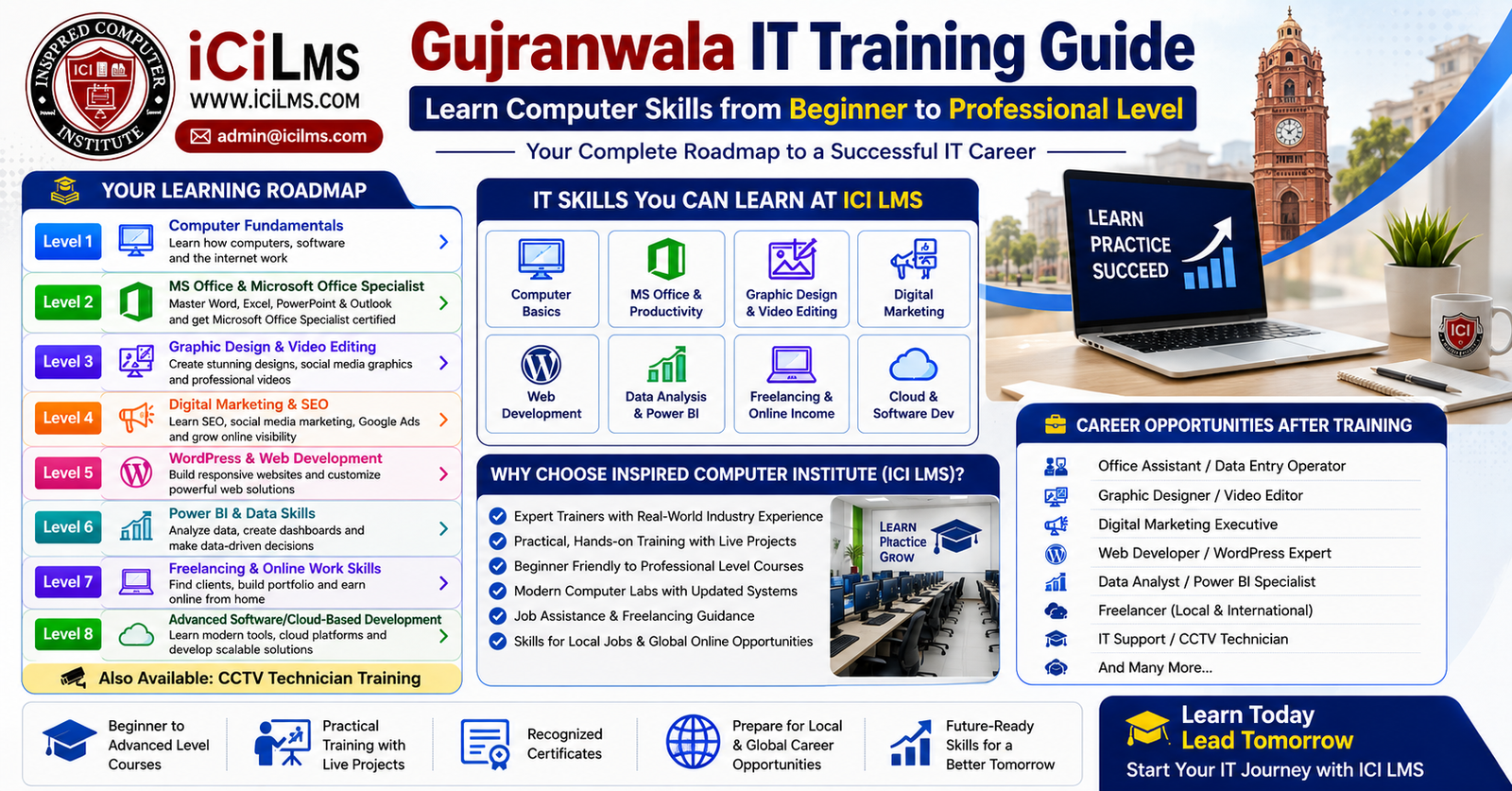
This Gujranwala IT training guide is designed as a complete roadmap. It moves through eight levels, beginning with computer fundamentals and gradually introducing professional digital skills. It also explains where specialized training such as CCTV technician work fits into the picture and how an institute such as Inspired Computer Institute (ICI LMS) can support learners who prefer structured training. The goal is not to convince you that one course magically guarantees a career. Instead, the goal is to show you how to make sensible choices, practice deliberately, build evidence of your ability, and turn computer knowledge into something employers and clients can actually use.
Why IT Training Matters for Students and Professionals in Gujranwala
For many people in Gujranwala, the first question is not whether technology is important. It is which technology skill should I learn first? A student may want a freelancing career, while an office employee may simply want to become faster and more valuable at work. A shop owner might need digital marketing, an aspiring designer may want Photoshop and video editing, and a graduate may be considering data analytics or software development. These people all need computer skills, but they do not need identical training paths. Treating every learner as though they have the same destination can waste both time and money.
The local business environment makes practical digital skills particularly useful. Gujranwala has a strong commercial and industrial identity, which creates many situations where technology supports rather than replaces traditional business activity. A manufacturer may need product catalogs, social media campaigns, inventory reports, websites, and customer databases. A retailer may need online advertising and e-commerce support. An educational institution may require administrative staff who understand Word, Excel, presentations, email, and digital record keeping. Even a small local business can benefit from someone who knows how to create a professional Facebook or Instagram presence, design promotional material, maintain a website, and interpret basic sales data.
This is why professional computer training should be approached as a combination of technical ability and workplace problem-solving. Learning a menu in software is not the same as knowing how to complete a real assignment. For example, an Excel learner becomes far more valuable when they can take an untidy sales spreadsheet, clean it, calculate totals, create useful formulas, build a dashboard, and explain what the numbers mean. Likewise, a WordPress student should not stop after installing a theme. They should learn how to structure pages, improve usability, manage plugins responsibly, optimize content, and maintain a website.
The same principle applies to freelancing. Knowing Photoshop does not automatically make someone a successful designer. Knowing SEO does not automatically make someone an SEO consultant. A professional needs a portfolio, communication skills, reliable delivery habits, pricing awareness, and the ability to understand a client’s actual problem. IT training in Gujranwala becomes most valuable when classroom learning is connected to practical projects and measurable outcomes.
Choosing the Right Learning Path
A sensible learning path begins with an honest assessment of your current level and your intended destination. Someone who has never used a computer should not jump directly into advanced programming simply because software development sounds prestigious. Likewise, someone who already works comfortably with Excel may not need to spend months repeating basic computer lessons. The best roadmap is the one that closes your specific skill gaps without forcing you through unnecessary material.
Think about your goal before selecting a course. If you want an office job, MS Office, Excel, documentation, presentations, email, and professional communication may be your strongest starting combination. If you are visually creative, graphic design and video editing could be a better direction. If you enjoy writing, research, websites, and business strategy, digital marketing and SEO may suit you. People who like logical problem-solving and technology can explore web development, programming, cloud systems, or data analytics.
There is also nothing wrong with combining related skills. In fact, combinations can make your profile more useful. A WordPress developer who understands SEO can build search-friendly websites. A graphic designer who understands social media can create content that is designed around marketing goals rather than aesthetics alone. An Excel expert who learns Power BI can move from spreadsheet reporting toward interactive data analysis. A freelancer who understands communication and project management can often deliver a better client experience than someone who possesses technical ability alone.
Before enrolling, look beyond the course title. Ask what software is taught, whether learners complete practical assignments, how projects are reviewed, whether the training covers current workflows, and whether the instructor demonstrates real-world applications. A certificate may help document training, but skill is ultimately demonstrated through what you can produce. Your ideal Gujranwala training program should therefore help you leave with both knowledge and a portfolio of work.
Level 1 — Computer Fundamentals
Every professional IT journey needs a foundation. Computer fundamentals may appear simple to someone who has been using a laptop for years, but for a true beginner they are the equivalent of learning the grammar of a new language. Without this foundation, later subjects become unnecessarily frustrating. A learner who does not understand folders, file extensions, keyboard shortcuts, software installation, browser settings, or basic troubleshooting can spend more time fighting the computer than learning the actual professional skill.
A good beginner course should start with the physical and digital sides of computing. Learners need to understand the basic purpose of a computer, monitor, keyboard, mouse, storage, memory, operating system, and common peripheral devices. They should become comfortable with Windows or another desktop operating system, including opening applications, switching between windows, adjusting basic settings, connecting devices, and understanding where information is stored. These concepts do not need to be taught as a collection of technical definitions. They should be connected to everyday tasks so that learners understand why each function matters.
File management is particularly important. Imagine creating an assignment, downloading an image, receiving a PDF through email, and saving a spreadsheet without knowing where any of those files went. A learner can technically use a computer but still struggle professionally because their digital workspace is disorganized. Beginners should practice creating folders, renaming files, copying and moving documents, deleting unnecessary material, using external storage, and recognizing common formats such as DOCX, XLSX, PDF, JPG, PNG, MP4, and ZIP. They should also understand the difference between a file and a folder and develop the habit of using clear file names.
Internet literacy belongs in this first level as well. Students should learn how to use browsers, search effectively, download information safely, evaluate websites, create and manage email accounts, attach documents, and recognize suspicious links or messages. Basic cybersecurity habits are increasingly important because a careless click can expose accounts or data. Strong passwords, multi-factor authentication, software updates, backups, and awareness of phishing should become routine rather than optional extras.
Essential Computer Skills Every Beginner Should Master
A beginner does not need to become a technician, but they should reach a point where ordinary computer problems do not immediately stop their work. They should know how to restart an application, check whether a device is connected, identify when storage is becoming full, search for a document, update software, and find basic help when something goes wrong. Keyboard shortcuts can also make a noticeable difference. Simple combinations for copying, pasting, saving, undoing, selecting text, switching applications, and searching can gradually turn slow computer use into confident computer use.
Typing deserves more attention than it often receives. Someone who works with documents, emails, data entry, customer support, or online platforms will repeatedly benefit from faster and more accurate typing. The objective should not be speed alone. Accuracy, punctuation, formatting, and the ability to work without constantly looking down at the keyboard are equally useful. A learner who practices for a short period every day can steadily improve.
Beginners should also learn the difference between local storage and cloud storage. A document saved on a laptop is not automatically available on every other device. Cloud services allow files and information to be synchronized or accessed online, depending on the service and configuration. Understanding this distinction prepares learners for modern workplace environments where teams may collaborate through online documents, shared drives, cloud applications, and web-based project systems.
Another important foundation is digital communication. Writing a professional email is a workplace skill, not merely an internet skill. Learners should know how to use meaningful subject lines, attach the correct files, communicate clearly, and avoid careless formatting. They should also understand basic online etiquette when communicating with teachers, employers, customers, or freelance clients.
The best way to complete Level 1 is through repetition. Rather than spending every lesson memorizing terminology, a beginner can practice realistic scenarios: create a folder for a project, download a PDF, rename it, move it into the correct folder, send it through email, save a copy to cloud storage, and later retrieve it. That simple exercise teaches several interconnected skills. Once a learner can perform such tasks comfortably, the computer stops feeling like an intimidating machine and starts becoming what it should be: a practical tool for getting work done.
Level 2 — MS Office & Microsoft Office Specialist
After computer fundamentals, Microsoft Office training is one of the most practical directions for students and job seekers in Gujranwala. Office software appears in an enormous range of administrative, educational, commercial, and professional tasks. A learner may use Word for reports and letters, Excel for financial records and calculations, PowerPoint for presentations, and Outlook or other email tools for communication. The difference between basic familiarity and professional competence can be significant, especially when an employee is expected to complete work accurately without constant supervision.
Microsoft Word should be approached as more than a typing application. Learners need to understand styles, headings, page layouts, tables, images, headers and footers, page numbering, document organization, templates, and PDF export. A practical exercise might involve creating a professional business report with a cover page, structured headings, a table, an image, page numbers, and consistent formatting. This teaches learners to produce documents that look deliberate rather than simply typed.
Excel deserves especially strong attention because spreadsheet ability can transfer across many occupations. Beginners can start with data entry, formatting, simple calculations, sorting, filtering, and basic charts. As confidence grows, they can learn formulas, conditional logic, lookup functions, tables, data validation, pivot tables, and more advanced analytical techniques. The important point is to understand what a function solves rather than memorizing formulas without context. For example, an employee managing monthly sales should know how to identify totals, compare periods, locate missing values, and summarize information efficiently.
PowerPoint has its own professional logic. A presentation is not a document pasted onto slides. Learners should understand visual hierarchy, concise text, charts, images, alignment, consistency, speaker notes, and presentation flow. Someone preparing a business presentation for a Gujranwala company, for example, might need to turn several pages of sales information into a short series of understandable slides. That requires judgment as much as software knowledge.
Microsoft Office Specialist, commonly abbreviated as MOS, can provide a more structured way of demonstrating proficiency in selected Microsoft applications. Certification is not a replacement for practical experience, but structured preparation can encourage learners to understand the software more deeply. Students should still prioritize real projects because an employer or client ultimately wants to know whether the candidate can complete useful work.
From Everyday Office Work to MOS Certification
A productive Office learning strategy moves from everyday tasks toward increasingly complex projects. Start with a document, spreadsheet, or presentation that resembles something used in an actual workplace. Then introduce features that make the work faster, more accurate, or easier to maintain. This approach prevents the common problem of learning a long list of commands and forgetting most of them after the course ends.
For Excel, a project could involve creating a small business sales workbook. One sheet might contain raw transactions, another could summarize monthly results, and a third could present charts or key figures. Learners can then experiment with formulas, filters, tables, and pivot-based summaries. Such a project teaches a way of thinking that is more valuable than memorizing isolated commands.
For Word, learners could create a professional resume, invoice template, company letter, or structured report. For PowerPoint, they might design a presentation for a fictional product or local business. These projects can eventually become part of a portfolio, particularly when the learner saves both the editable source file and a polished final version.
The MOS path can then be used to organize preparation around recognized Microsoft application competencies. Learners should verify the current exam structure and requirements before registering because certification programs and exam details can change over time. The practical lesson remains the same: certification can support your profile, but demonstrable ability makes the profile credible.
This level is also an ideal bridge toward later specializations. Someone who becomes strong in Excel may naturally progress toward Power BI and data analytics. A Word and PowerPoint specialist may develop into an administrative or business support professional. Someone who enjoys creating presentations may move toward graphic design. The foundation is flexible, which is exactly what a good foundation should be.
Level 3 — Graphic Design & Video Editing
Once a learner is comfortable with computers and office applications, creative technology opens an entirely different door. Graphic design and video editing combine software skills with visual communication, making them attractive options for people who enjoy creating rather than simply processing information. In Gujranwala, these skills can be relevant to local businesses, educational organizations, manufacturers, retailers, agencies, social media teams, and freelance clients who need promotional material.
Graphic design training should begin with principles, not buttons. Software such as Photoshop, Illustrator, CorelDRAW, Canva, or other design platforms can be useful, but knowing where a tool is located does not automatically make someone a designer. Learners should understand typography, contrast, alignment, color, spacing, composition, hierarchy, and consistency. They should learn why one design communicates clearly while another looks crowded even when both contain attractive elements.
Practical projects are the fastest way to understand these ideas. A learner might design a promotional poster for a local restaurant, a social media campaign for a clothing business, a product brochure for a manufacturer, or a set of branded graphics for a hypothetical company. Each project introduces a different constraint. A social post needs to work at a small screen size. A printed brochure needs appropriate dimensions and output settings. A logo needs to remain useful across different sizes and applications.
Video editing follows a similar principle. Beginners can start with cutting and arranging clips, adding transitions carefully, balancing audio, adding text, and exporting videos in appropriate formats. As they improve, they can explore color correction, motion graphics, captions, sound design, storytelling, and platform-specific formats. Modern short-form content has made video useful for businesses that previously relied almost entirely on static advertising.
Building a Creative Portfolio
A portfolio is the bridge between learning a design program and being taken seriously as a designer. Instead of collecting certificates without examples of work, learners should gradually build a small selection of projects that demonstrate different abilities. A portfolio does not need dozens of random graphics. Five or ten thoughtfully developed projects can tell a stronger story when each one has a clear purpose.
A particularly useful method is to create before-and-after case studies. Explain the hypothetical client problem, show the original challenge, present the design solution, and briefly describe the decisions behind it. A learner could take a fictional Gujranwala-based manufacturing brand and develop a logo concept, product post, brochure cover, and short promotional video. The project then demonstrates not only software knowledge but also consistency and business thinking.
Design learners should also learn file organization, export settings, image resolution, fonts, licensing, and asset management. These details can sound boring compared with choosing colors or creating effects, but professional reliability often lives in the boring details. A beautiful design delivered in the wrong format or at unusable dimensions can create problems for a client.
The same is true for video. A good editor should understand where the final video will be published, what aspect ratio it requires, how captions affect accessibility and viewing, and how audio quality influences perceived professionalism. A 30-second promotional video for social media is not produced exactly like a long educational presentation.
Graphic design and video editing can also complement other IT skills. A digital marketer with design ability can produce better campaigns. A WordPress professional can create stronger website visuals. A freelancer can offer bundled creative services instead of competing for a single narrow task. The strongest path is not always to become an expert in everything. It is often to develop one primary specialty supported by two or three complementary skills.
Level 4 — Digital Marketing & SEO
Digital marketing is one of the broadest fields in modern IT training because it sits at the intersection of technology, communication, business, content, advertising, and analytics. A person can build an excellent website and still struggle to attract visitors. A business can publish frequently on social media without generating meaningful customers. SEO and digital marketing training help learners understand the connection between online visibility and business objectives.
A solid beginner program should cover the major components rather than presenting SEO as a collection of tricks. Learners should understand search intent, keyword research, content structure, on-page optimization, technical foundations, internal linking, backlinks, local SEO, analytics, and the importance of producing genuinely useful content. They should also understand that search engines evolve and that strategies designed around manipulating rankings can become outdated or harmful.
Local SEO is particularly relevant to a city such as Gujranwala. A local business may want customers to find its location, phone number, services, opening information, products, or website when searching online. A learner can practice by creating a hypothetical local business profile and planning its website content around real customer questions. For example, an industrial supplier may need pages describing its products and service areas, while a restaurant may need location information, menus, reviews, and useful customer-facing content.
Digital marketing extends beyond organic search. Students can explore social media strategy, email marketing, content planning, paid advertising concepts, landing pages, conversion optimization, and basic analytics. The objective is to understand how the pieces connect. A social media post can attract attention, a landing page can explain an offer, and analytics can reveal whether people actually took the desired action.
Learning SEO Through Practical Projects
SEO becomes much easier to understand when learners work on an actual website rather than studying isolated definitions. A practical project might involve selecting a fictional Gujranwala service business, researching the questions potential customers ask, organizing those topics into website pages, writing useful content, improving titles and headings, adding internal links, and measuring performance over time.
Keyword research should be taught carefully. The objective is not to force a phrase into every paragraph. Search terms are clues about what people want to accomplish. If someone searches for a computer institute in Gujranwala, they may want course information, location details, fees, timings, reviews, or beginner-friendly options. A useful SEO professional thinks about the intent behind the query, not just the wording of the query.
Learners should also understand that no ethical SEO course can honestly guarantee a specific Google ranking. Search visibility depends on competition, website quality, relevance, authority, technical factors, user behavior, and changes in search systems. Good training therefore focuses on sustainable practices: helpful content, strong site architecture, technical cleanliness, relevant authority, clear information, and measurement.
A learner who combines SEO with WordPress can become particularly versatile. They can create a website, publish optimized content, manage basic technical settings, and improve the site’s search visibility. Add graphic design and the person can also create supporting visuals. Add digital analytics and they can report whether the work is producing results.
That combination illustrates why a Gujranwala IT training roadmap should not be viewed as a rigid list where every person must complete every course. Each level can act as a foundation for the next. The learner should choose a primary career direction while collecting complementary skills that make the final professional profile stronger.
Level 5 — WordPress & Web Development
Web development is where computer skills begin turning into digital products that other people can actually use. For a beginner in Gujranwala, WordPress training can provide a relatively approachable entry point because it allows learners to understand websites without immediately needing to master a programming language. WordPress can introduce important concepts such as domains, hosting, themes, plugins, pages, menus, forms, media, responsive design, security, backups, and content management. Once those concepts become familiar, learners who enjoy technical problem-solving can move deeper into HTML, CSS, JavaScript, PHP, databases, APIs, and modern development frameworks.
A WordPress learner should avoid treating the subject as simply “install a theme and change some colors.” Professional website work requires understanding what a website is supposed to accomplish. A business website should communicate services clearly, work across devices, provide easy navigation, load efficiently, and give visitors an obvious next step. A portfolio website should make projects easy to browse. An e-commerce website needs product organization, customer trust, checkout functionality, and careful attention to security. The technology serves the purpose; it should never become the purpose itself.
A practical WordPress course can therefore begin with a small project. Imagine building a website for a Gujranwala-based furniture manufacturer. The learner might create a homepage, company profile, product categories, individual product pages, contact page, inquiry form, and basic search-friendly content. That project teaches much more than clicking through WordPress menus because every feature has a reason for existing. The student begins thinking like a website builder rather than simply a software operator.
Website maintenance is another important part of professional training. Learners should understand backups, updates, user permissions, plugin management, security precautions, image optimization, broken links, and basic troubleshooting. A website that works beautifully on launch day but becomes vulnerable or outdated later is not a complete professional solution.
Moving from Website Building to Coding
WordPress is an excellent starting point, but it does not need to be the final destination. Students who discover that they enjoy building systems from the ground up can progress toward coding. HTML and CSS provide a useful foundation because they explain how web pages are structured and styled. JavaScript then introduces programming concepts and interactive behavior.
At this stage, the learning curve becomes steeper, and patience matters. Programming is less like memorizing office software and more like learning to solve puzzles. You write instructions, test them, discover that something does not work, investigate the cause, and modify the solution. Errors are not proof that you are bad at programming; they are part of the programming process.
A serious web-development roadmap can eventually include version control, databases, APIs, backend development, authentication, testing, deployment, and frameworks. The exact technologies should be chosen according to current market requirements rather than following a fixed list forever. Tools change, but fundamental concepts such as logic, data structures, clean code, debugging, security, and software architecture remain valuable.
Students in Gujranwala can make their learning more practical by building projects connected to familiar business problems. A product catalog, appointment system, inventory interface, school management feature, small business website, or service booking application can provide much stronger learning than copying tutorials without understanding them. A project should create moments where the learner has to make decisions independently.
Web development also connects naturally with freelancing. A learner can begin with smaller WordPress assignments and gradually pursue more advanced work. The key is to avoid claiming expertise before acquiring it. Building three strong websites independently is more useful than telling clients you are an expert because you completed a course.
Level 6 — Power BI & Data Skills
Modern businesses produce enormous amounts of information, but raw data has limited value if nobody can understand it. This is where Power BI and data skills become useful. Learners who enjoy numbers, organization, investigation, and logical thinking may find data analytics particularly rewarding. The field also provides a natural progression for people who already have strong Excel skills.
The first step is learning how data is structured. Students need to understand rows, columns, fields, records, data types, missing values, duplicates, and consistent formatting. These concepts sound basic, but poor-quality data can undermine an otherwise impressive dashboard. If a sales file contains inconsistent product names or dates stored in different formats, a visualization may look polished while communicating misleading information.
Excel remains relevant here. Learners can practice cleaning datasets, creating formulas, using tables, filtering records, summarizing information, and creating charts. They can then move toward Power Query and Power BI, where larger and more repeatable data workflows become possible. Power BI introduces data models, relationships, measures, interactive reports, dashboards, and visualization choices.
The real skill is not creating colorful charts. Data analysis is about answering questions. A manager might want to know which products generate the most revenue, which month performed best, which customer segment is declining, or where costs are increasing. The analyst must determine what data is needed, prepare it correctly, choose an appropriate calculation, and present the result in a way that supports a decision.
A Gujranwala business context makes these exercises easier to understand. A manufacturing company could analyze production output, defect rates, sales by product, or monthly orders. A retailer could study inventory movement. An educational organization could examine enrollment and attendance. A service business could track leads and conversions. The same analytical principles can be practiced across different industries.
Turning Raw Data into Business Insights
Power BI training should include complete projects from raw data to final dashboard. Imagine receiving several months of fictional sales records containing dates, product names, cities, quantities, prices, and sales representatives. The learner’s task is to clean the data, calculate revenue, create useful relationships, build measures, and design a report.
The final dashboard might answer several business questions at a glance. Which products are selling most? Which sales representatives are performing strongly? How does this month compare with previous months? Which locations contribute the most revenue? Are there unusual changes that deserve investigation? A professional dashboard should make these questions easier to answer rather than simply displaying every available number.
Data storytelling is an underrated skill. Two analysts can work with exactly the same dataset and produce reports of very different quality. One may fill a screen with charts, colors, and numbers. The other may identify the three metrics that actually matter and arrange them into a logical story. The second report is usually more useful.
Learners should therefore practice explaining findings in plain language. Instead of saying that a particular category represents 37% of revenue, they should consider what that means for the business. Is the category growing? Is it unusually profitable? Is its performance dependent on one customer? Does the trend require action? Data skills become commercially valuable when analysis leads to better decisions.
Power BI can also become a strong complementary skill. An Excel professional who learns Power BI can offer reporting services. An administrator can improve internal reporting. A freelancer can create dashboards for clients. A business graduate can add technical analysis capability to an existing professional profile.
Level 7 — Freelancing & Online Work Skills
Learning a technical skill and earning from that skill are two different challenges. This is why freelancing training deserves its own level. A talented designer can struggle to find clients if they cannot present their services. A capable developer can lose opportunities by responding poorly to inquiries. A skilled SEO professional can damage their reputation by promising impossible rankings. Professional online work requires technical ability plus communication, positioning, reliability, and business discipline.
A beginner should first decide what service they can genuinely deliver. Rather than offering twenty unrelated services, it is usually easier to start with a focused package. A learner might offer WordPress landing pages, social media graphics, Excel dashboard creation, short-form video editing, SEO content optimization, or virtual administrative support. The exact service should match demonstrated ability.
A portfolio then becomes essential. Freelance platforms and direct outreach can provide opportunities, but clients need evidence that the freelancer understands their problem. A portfolio can include personal projects, practice projects, internships, or legitimate previous work. The important thing is honesty about what was created and what role the learner performed.
Communication is just as important. A freelancer should learn how to ask useful questions, confirm requirements, estimate timelines, explain revisions, and document deliverables. If a client says, “I need a website,” the professional should not immediately quote a price. What type of website? How many pages? What functionality? Who supplies content? What is the deadline? Is hosting already available? What happens after launch?
Building a Sustainable Online Career
Freelancing should be approached as a small professional business rather than an online lottery. A new freelancer may spend time developing profiles, sending proposals, improving portfolios, communicating with potential clients, and completing small assignments before reaching a consistent workload. Results vary substantially from person to person, so training should avoid unrealistic income promises.
Pricing is another area where beginners need guidance. Charging extremely low prices may attract attention temporarily, but it can also create difficult clients, unrealistic expectations, and unsustainable workloads. On the other hand, charging premium rates without having premium evidence can make it difficult to win initial projects. A better approach is to understand the scope of work, estimate the time and complexity involved, define revisions, and gradually adjust rates as skills and reputation improve.
Online work also demands digital professionalism. Files should be organized. Deadlines should be tracked. Messages should be answered reasonably promptly. Work should be backed up. Client information should be handled responsibly. Passwords should never be casually shared. These behaviors sound ordinary, but they separate a dependable freelancer from someone who simply knows a piece of software.
Students in Gujranwala can also consider combining local and international opportunities. A local business may provide the first real portfolio project. Once experience grows, the same type of service can be presented to remote clients. This creates a useful progression: learn locally, practice realistically, document your work, and then compete globally.
Freelancing can be combined with almost every previous level. A graphic designer can sell design services. A WordPress developer can build websites. An SEO specialist can provide optimization services. An Excel or Power BI professional can create reports. A video editor can work with content creators and businesses. The strongest freelance profiles often come from a clear specialty supported by related skills.
Level 8 — Advanced Software & Cloud-Based Development
Learners who progress beyond basic web development can explore advanced software development and cloud-based technologies. This is a more demanding level and should not be treated as the natural next step for every student. Someone interested in office administration does not need cloud architecture. However, students who want long-term careers in software engineering, application development, DevOps, cloud systems, or related technical fields can use this stage as a foundation for more specialized study.
Advanced development can involve programming languages, databases, APIs, software architecture, testing, version control, application security, containerization, continuous integration and deployment, and cloud services. Platforms and services from major cloud providers can support computing, storage, databases, networking, monitoring, and application deployment. The specific provider matters less at the beginning than understanding the underlying concepts.
Cloud computing changes the way applications and infrastructure are delivered. Instead of thinking only about software installed on one computer, learners begin considering systems that operate across networks and dynamically use remote resources. That introduces new questions: How is data stored? How are applications deployed? How are users authenticated? How does a system scale? What happens when a service fails? How should sensitive information be protected?
A serious learner should build gradually. First strengthen programming fundamentals. Then learn version control and collaborative development. Next build applications that interact with databases and APIs. After that, deployment and cloud concepts become much easier to understand. Jumping directly into advanced cloud services without understanding software fundamentals can feel like trying to fly an aircraft before learning what the controls do.
Preparing for Modern Development Careers
Modern software work is increasingly collaborative. Developers work with repositories, issue trackers, documentation, automated tests, deployment pipelines, code reviews, and other specialists. Therefore, advanced training should include professional development habits rather than focusing exclusively on writing code.
Artificial intelligence is also changing software workflows. Developers increasingly encounter AI-assisted coding, automated testing, code explanation, documentation tools, and intelligent development environments. That does not eliminate the need for programming fundamentals. If anything, it makes understanding code more important because professionals need to evaluate generated suggestions, detect errors, consider security implications, and determine whether a solution actually fits the requirements.
Cloud skills can complement software development particularly well. A developer who understands deployment can take greater ownership of an application. A systems-oriented learner can explore infrastructure and DevOps. A data-focused learner may investigate cloud databases and analytics services. These are specialized paths, and each deserves deeper study beyond a general introductory course.
For Gujranwala students, the most practical strategy is to focus on fundamentals first and then build increasingly sophisticated projects. A simple application that you completely understand is more valuable educationally than a complex application copied from a tutorial. Over time, learners can document projects on professional profiles and code repositories where appropriate, creating a visible record of development ability.
Other Professional IT Training: CCTV Technician and Technical Skills
Not every technology career needs to involve websites, software, or digital marketing. CCTV technician training is an example of a practical technical specialization that combines computer knowledge with physical installation and troubleshooting. Security camera systems are used by homes, shops, offices, educational institutions, warehouses, factories, and other organizations, creating demand for people who understand installation and maintenance.
A CCTV course can introduce camera types, cabling, power requirements, network configuration, recording systems, storage considerations, remote viewing, troubleshooting, and safe installation practices. Modern surveillance systems can involve networking and IP technology, so basic computer and networking knowledge can make a learner more capable. Depending on the system, technicians may work with network video recorders, routers, switches, mobile applications, and configuration interfaces.
This path can be attractive to learners who prefer hands-on technical work. Instead of sitting at a computer throughout the day, a CCTV technician may visit different locations, install equipment, diagnose problems, and configure systems. It is a reminder that IT training is broader than coding. Technical careers exist across hardware, networking, security systems, software, data, design, and digital business.
Other complementary areas may include networking fundamentals, hardware maintenance, IT support, database administration, and office automation. The right choice depends on interests and local opportunity. Someone who enjoys troubleshooting physical systems may be happier in technical support or CCTV work than in content writing. Someone who loves numbers may prefer data analytics. Career fit matters.
How Inspired Computer Institute (ICI LMS) Can Support Your IT Learning Journey
For learners looking for structured computer training in Gujranwala, an institute such as Inspired Computer Institute (ICI LMS) can serve as a learning environment where students follow organized courses rather than trying to piece everything together from random online tutorials. A structured program can be especially useful for beginners because it provides a sequence, instructor guidance, practical exercises, and a learning routine. The exact courses, schedules, software versions, facilities, and current offerings should always be confirmed directly with ICI LMS before enrollment.
The biggest advantage of structured training is accountability. When learning alone, it is easy to watch a tutorial, feel that you understand the topic, and then move on without actually producing anything. A classroom or guided LMS environment can encourage learners to practice, submit work, ask questions, and correct mistakes. This distinction matters because watching someone perform a task is not the same as being able to perform it independently.
ICI LMS can be particularly relevant to a learner following the multi-level roadmap described in this guide. A beginner might start with computer fundamentals and Office applications. After building confidence, the learner could explore creative tools, digital marketing, WordPress, data skills, freelancing, or more advanced technologies according to their goals. Specialized options such as CCTV technician training may also be relevant for learners who prefer hands-on technical work, subject to the institute’s current course offerings.
A useful institute should also encourage project-based learning. For example, an Office student could produce a professional workbook; a graphic design student could create a branding project; an SEO learner could develop an optimization plan; a WordPress student could build a complete website; and a Power BI learner could create a business dashboard. Projects make learning visible and give students something they can discuss during interviews or show prospective clients.
Learners should still take responsibility for their own progress. No institute can practice on your behalf. Even excellent instruction needs to be supported by repetition, experimentation, independent projects, and continuous learning. Before joining ICI LMS or any other IT institute in Gujranwala, ask about the current curriculum, practical training, instructor experience, class format, project work, assessment process, and whether the program matches your intended career direction.
How to Choose the Best IT Course in Gujranwala
The “best” IT course is not the same for everyone. A course that is ideal for a future graphic designer may be almost irrelevant to someone who wants to become a data analyst. Before comparing institutes, start by defining the problem you want your new skill to solve. Do you want employment, freelancing, business growth, a career change, or simply confidence with technology?
Next, evaluate your current level. A person with zero computer knowledge should prioritize fundamentals. Someone already comfortable with computers can move toward a specialization. This prevents the common mistake of enrolling in an advanced course and becoming overwhelmed by assumptions about prior knowledge.
Course content deserves close attention. A promising syllabus should explain what learners will actually do, not just list fashionable software names. “Digital marketing” can mean anything from a basic social media introduction to advanced SEO, analytics, paid advertising, and conversion strategy. “Web development” could mean WordPress configuration or full-stack programming. Ask for the actual module breakdown.
Practical work should be another deciding factor. If a course contains mostly lectures and demonstrations, ask how much time students spend completing tasks independently. You should ideally finish training with tangible projects. A certificate can document attendance or assessment, but projects provide stronger evidence of capability.
Instructor quality matters too. A teacher should be able to explain concepts in simple language while also answering practical questions. Students should feel comfortable asking why something works rather than simply copying instructions. Technology changes continuously, so current industry awareness is another useful quality.
Finally, consider schedule, travel, course duration, fees, available equipment, and learning support. The perfect course is not useful if its schedule makes consistent attendance impossible. Compare options carefully, but avoid choosing solely on the lowest price. The goal is value per hour of genuine learning, not merely a cheap certificate.
A Practical 12-Month Roadmap from Beginner to Professional
A twelve-month roadmap can provide direction, although the actual timeline should be adjusted according to the learner’s starting level, available study time, and chosen specialization. A person studying two hours daily can progress differently from someone attending classes twice a week. The following structure is therefore a planning model rather than a guarantee.
During the first month, focus heavily on computer fundamentals. Learn the operating system, file management, typing, internet usage, email, basic cybersecurity, and troubleshooting. Do not rush this stage. The purpose is to make everyday computer operation automatic enough that later learning is not slowed down by basic tasks.
Months two and three can focus on Microsoft Office. Spend meaningful time with Word, Excel, and PowerPoint, while giving Excel additional practice if you are considering business, administrative, finance, or data-related careers. Build at least three practical projects instead of completing exercises only once.
Months four and five can be used for your first specialization. A creative learner might choose graphic design and video editing. A business-minded learner might choose digital marketing and SEO. A website-focused learner might begin WordPress. Someone who enjoys numbers could start advanced Excel and Power BI foundations.
Months six and seven can deepen the selected specialization. If you chose WordPress, begin HTML and CSS. If you chose SEO, build and optimize a complete website. If you chose design, create a portfolio with varied projects. If you chose data, progress into Power BI and dashboard development.
Months eight and nine can focus on professionalization. Create a portfolio, improve your resume, establish professional profiles, practice client communication, and learn how to explain your work. If freelancing is the goal, study proposal writing, project scope, pricing, revisions, delivery, and client management.
Months ten through twelve can be used to build advanced capability and pursue real opportunities. A web learner might move toward JavaScript or backend development. A data learner could build more sophisticated dashboards. A marketer could specialize in local SEO or paid campaigns. A designer could specialize in branding or motion content. A technical learner might explore networking, CCTV, or support services.
The most important element is consistency. One focused hour of hands-on practice repeated regularly can produce more progress than occasional bursts of enthusiasm. Keep project files organized, document what you learn, and periodically revisit older work. When you can look at something you created six months earlier and immediately see how you would improve it, you have evidence that your skills are growing.
Career Opportunities After Completing IT Training
IT training can lead in several directions, and the final career depends on the skills selected and the depth of practice achieved. Office professionals can work in administrative support, data entry, documentation, coordination, and business operations. Strong Excel skills can improve opportunities in reporting and business support. Power BI and analytics can move a learner toward data-focused roles.
Creative learners can pursue graphic design, video editing, social media content creation, presentation design, branding, or related freelance services. Digital marketers can specialize in SEO, content strategy, local search, social media, email marketing, analytics, or advertising. WordPress professionals can build and maintain business websites, while programmers can progress toward application and software development.
Freelancing creates another route because clients do not necessarily care where the freelancer lives if the required work can be delivered reliably. A skilled professional in Gujranwala can potentially serve clients in other Pakistani cities or international markets. However, remote competition is real. The advantage comes from specialization, quality, communication, reliability, and a portfolio that makes the freelancer’s capability obvious.
There are also local opportunities that should not be overlooked. Gujranwala businesses need websites, product catalogs, promotional designs, reports, administrative systems, social media content, technical support, and security installations. Working locally can provide practical experience that later strengthens a remote career.
The long-term objective should not simply be “complete courses.” It should be become useful at solving a specific category of problems. Employers hire people who can contribute. Clients pay people who can produce results. Training is the process that helps you acquire the capability, but projects and experience are what turn capability into professional confidence.
Conclusion
A strong Gujranwala IT training roadmap does not require every learner to become a programmer. The technology sector is broad enough to accommodate different personalities, educational backgrounds, and career goals. Some people will thrive in Office and data work, others in graphic design, digital marketing, WordPress, software development, cloud technologies, freelancing, networking, or hands-on fields such as CCTV installation.
The smartest approach is to start at the correct level and build upward. Computer fundamentals create confidence. MS Office develops workplace productivity. Creative tools build visual communication. Digital marketing introduces online business growth. WordPress and web development create digital products. Power BI turns data into insights. Freelancing teaches learners how to package and sell their abilities. Advanced software and cloud development open doors to deeper technical careers.
For learners considering Inspired Computer Institute (ICI LMS), structured training can provide useful guidance and practice, provided the current course content and facilities match the learner’s goals. The institute should be evaluated on practical training, curriculum relevance, instructor support, projects, and learning outcomes rather than on certificates alone.
The most important lesson is simple: do not try to learn the entire technology industry at once. Choose a starting point, practice consistently, build real projects, develop complementary skills, and keep upgrading your knowledge. A beginner in Gujranwala can start with something as simple as learning how to organize files and, step by step, develop the professional abilities needed to work with businesses, employers, and clients in an increasingly digital economy.
Frequently Asked Questions About IT Training in Gujranwala
Which computer course is best for beginners in Gujranwala?
For someone with zero computer knowledge, a computer fundamentals course is the best starting point. It should cover operating-system basics, typing, files and folders, internet use, email, basic cybersecurity, and everyday troubleshooting before moving into software such as Word and Excel. Once the learner becomes comfortable with computers, they can choose a specialization such as Office, graphic design, digital marketing, WordPress, data analytics, or another professional field.
Can I learn professional IT skills without a computer background?
Yes. Professional IT skills can be learned progressively without previous technical experience. The important factor is choosing training appropriate to your current level rather than jumping immediately into an advanced subject. Starting with computer fundamentals and then progressing through practical projects can make complex subjects much easier to understand.
Which IT skill is best for freelancing?
There is no single best freelancing skill for everyone. WordPress, graphic design, video editing, SEO, digital marketing, data analysis, and software development can all support freelance careers when learned to a professional level. The better question is which skill matches your strengths and whether you can build a portfolio that demonstrates useful results. Communication, reliability, client management, and business skills are also essential.
Is WordPress better than coding for beginners?
WordPress is often easier for beginners who want to start building websites quickly, while coding provides deeper control and a broader technical foundation. They are not mutually exclusive. A learner can start with WordPress, understand how websites work, and then progress into HTML, CSS, JavaScript, backend programming, databases, and other development technologies.
How long does it take to become professionally skilled in IT?
There is no universal timeframe because it depends on the subject, starting level, study hours, practice quality, and desired level of expertise. Basic computer skills can develop relatively quickly, while professional software development or advanced data work requires substantially more practice. A useful target is to learn continuously, build increasingly difficult projects, and judge progress by what you can independently produce rather than by the number of months since you started.