Currently Empty: ₨ 0
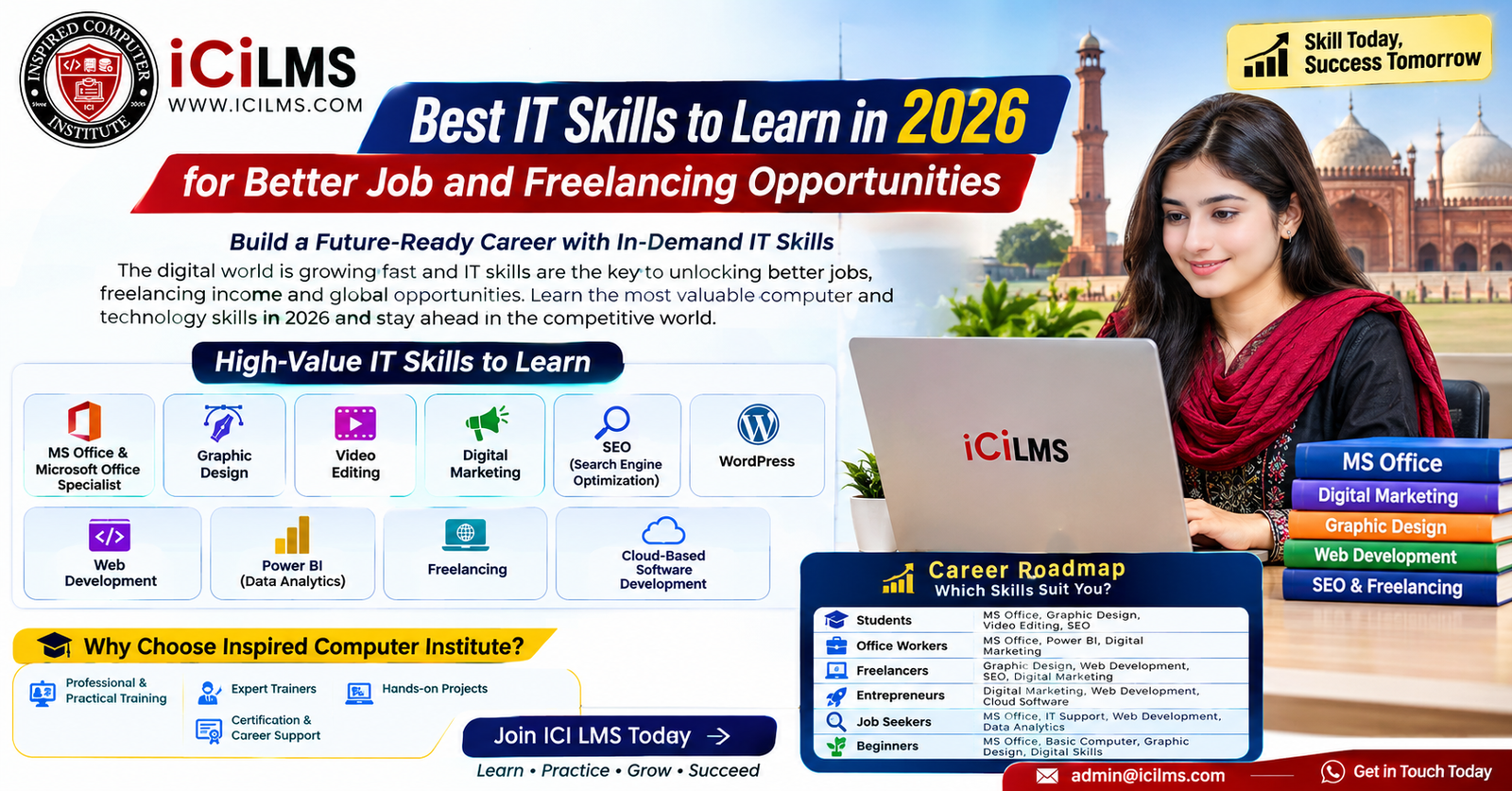
Best IT Skills to Learn in Lahore in 2026 for Better Job and Freelancing Opportunities
Komal Shahzadi
- August 19, 2026
- Comment 0
Best IT Skills to Learn in Lahore in 2026 for Better Job and Freelancing Opportunities
Why IT Skills Matter for Careers in Lahore in 2026
The way people build careers has changed dramatically, and in 2026, knowing how to use technology is no longer limited to software engineers or IT professionals. A student preparing for a first job, an office employee hoping for a promotion, a graduate searching for a practical career path, or a small-business owner trying to attract customers online can all benefit from developing relevant IT and computer skills. In Lahore, this shift is particularly important because the city has a broad employment ecosystem covering education, software houses, e-commerce, marketing agencies, financial services, manufacturing, retail, startups and traditional businesses that increasingly depend on digital tools. A degree can open a door, but practical digital skills can make it much easier to demonstrate what you can actually do after entering that door. That is why choosing the right skill in 2026 should not simply mean learning whatever software happens to be popular. The smarter approach is to identify a skill that matches your interests, current education, career objective and willingness to practice. Someone who enjoys visual creativity may thrive in graphic design or video editing, while someone who likes numbers and business decisions might find Power BI and data analytics more rewarding. Likewise, a person who wants remote income may prefer WordPress, SEO, digital marketing or freelancing, whereas someone interested in a deeper technical career could eventually move toward web development and cloud-based software development. The good news is that beginners do not have to learn everything at once. A focused learning path can turn a basic computer user into a capable professional over time, provided the learner practices consistently and builds evidence of practical ability rather than collecting certificates alone.
The Shift From Traditional Jobs to Digital Careers
The modern workplace increasingly rewards people who can combine basic computer literacy with specialized digital skills. Consider a typical business employee: the job may involve preparing reports in Excel, creating presentations, organizing information, communicating through cloud applications, analyzing sales figures, managing online documents and occasionally working with customer or marketing platforms. Each individual task may look ordinary, but together they create a valuable professional skill set. The same principle applies outside traditional employment. A freelancer might use graphic design software to create a client’s branding, WordPress to build the client’s website, SEO techniques to improve its visibility, and digital marketing knowledge to help generate leads. A business owner might not personally perform every technical task, yet understanding these areas can make it easier to hire specialists, evaluate their work and make informed decisions. This is why the most useful IT skill is not necessarily the one with the most complicated terminology. A skill becomes valuable when it solves a real problem. In Lahore’s competitive employment environment, candidates who can demonstrate practical outcomes—such as a professional spreadsheet, a polished presentation, a functioning website, an edited promotional video, a dashboard, a marketing campaign or a portfolio of designs—can create a stronger impression than candidates who merely say they have completed a course. For beginners, this is encouraging rather than intimidating. You can start with fundamentals, practice on realistic projects and gradually add more advanced capabilities. Think of your learning journey as building a staircase: MS Office might be the first few steps, while areas such as Power BI, web development and cloud software development can become higher levels of specialization. The objective is not to climb every staircase in the city; it is to choose one that leads toward the kind of career you actually want.
How to Choose the Right IT Skill
Choosing an IT skill in 2026 should begin with a simple question: What do you want the skill to help you accomplish? If the answer is “get my first office job,” learning advanced programming immediately may not be the most efficient choice. If you want to start freelancing quickly, a skill with clearly deliverable services—such as graphic design, video editing, WordPress, SEO or digital marketing—may give you a more straightforward starting point. If your long-term goal is to become a software professional, you may need to accept a longer learning curve and invest serious time in programming, web technologies, databases, version control, software engineering practices and eventually cloud platforms. Your current background matters too. A commerce graduate who already understands business concepts could have a natural advantage when learning Excel, Power BI or digital marketing analytics. A student who spends time creating social content might already possess an intuitive understanding of visual communication and could explore graphic design or video editing. Meanwhile, someone who enjoys solving logical problems may feel more comfortable with web development and programming. It is also important to distinguish between learning a tool and developing a skill. Knowing where buttons are located in an application is not the same as being able to complete professional work with it. A person can watch dozens of tutorials about Photoshop without becoming a designer, just as someone can memorize Excel formulas without becoming a useful data professional. Real progress comes from repeated practice, feedback and projects that become progressively more challenging. Before enrolling in training, therefore, consider the kind of work you want to perform, the tools commonly associated with that work, the amount of time you can dedicate to practice and whether you are prepared to build a portfolio. The strongest IT learning decisions usually combine personal interest with market usefulness instead of chasing trends blindly.
Beginner-Friendly Skills vs. Advanced Technical Skills
Not every learner needs to begin at the same level. MS Office, Microsoft Office Specialist preparation, basic graphic design, WordPress and introductory digital marketing can provide relatively accessible entry points for many beginners. These skills can also overlap, which is useful because modern jobs rarely operate inside one isolated software application. For example, an office worker who starts with Excel may later learn Power BI; a graphic designer may add video editing; a WordPress learner may expand into SEO; and a digital marketer may eventually develop stronger analytics capabilities. Advanced technical areas require a different mindset because they generally involve longer periods of structured learning. Web development can require familiarity with programming concepts, front-end technologies, back-end systems, databases and development workflows. Cloud-based software development adds another layer involving cloud infrastructure, deployment, security, scalability and platform-specific services. That does not make these areas inaccessible to beginners, but it does mean expectations should be realistic. You would not expect someone to become a professional architect after learning how to draw a floor plan for a weekend, and technical careers work in much the same way. A beginner can absolutely start the journey, but professional competence comes through sustained practice. One useful strategy is to choose a core skill and one complementary skill rather than attempting ten unrelated courses simultaneously. For instance, “WordPress + SEO,” “Graphic Design + Video Editing,” “Excel + Power BI,” or “Web Development + Cloud” can create logical combinations. The complementary skill strengthens the first one and can make your eventual service or job profile more useful. Over time, you can add further specialization once your foundation is solid.
MS Office Skills for Students and Office Professionals
For many students, graduates and office workers, MS Office remains one of the most practical computer skill sets to learn because businesses across industries use documents, spreadsheets, presentations and organized digital information every day. Microsoft Word, Excel and PowerPoint can appear basic when compared with programming or cloud computing, but professional proficiency is a different matter. A person who knows how to create clean documents, format reports, use spreadsheet formulas, organize data, build meaningful charts and deliver polished presentations can save a company considerable time. Excel in particular can become a gateway to more advanced career opportunities because it introduces learners to structured data, formulas, calculations, tables, charts and analytical thinking. Students can use these abilities for assignments, research and presentations, while office employees can apply them directly to reporting, budgeting, inventory, records and administrative workflows. The key is to move beyond simply learning where commands are located. Professional computer training should show learners how to use these tools in realistic situations. Imagine being given a messy spreadsheet containing hundreds of sales records and being asked to clean it, calculate totals, identify trends and present the results to a manager. That exercise teaches far more than memorizing a formula from a textbook. Similarly, creating a professional business report in Word or developing a concise presentation in PowerPoint can build workplace confidence. MS Office training in Lahore can therefore be an especially sensible starting point for beginners who want an employable foundation without immediately committing to programming. Once these fundamentals become comfortable, learners can progress toward Microsoft Office Specialist certification preparation, advanced Excel, data visualization and Power BI. In other words, Office skills should not be viewed as a dead-end beginner course; they can form the foundation for a broader digital career.
Microsoft Office Specialist as a Career Advantage
The Microsoft Office Specialist (MOS) pathway can be useful for learners who want to demonstrate more structured proficiency with Microsoft applications. Instead of simply stating “I know MS Office” on a CV, a learner can work toward measurable competence in applications such as Word, Excel and PowerPoint. Certification by itself does not guarantee employment, of course, because employers still care about practical performance, communication and relevant experience. However, structured preparation can give learners a clear curriculum and a target to work toward. It can also encourage deeper exploration of features that casual users often ignore. In Excel, for example, professional capability can involve functions, tables, charts, data handling and efficient workflows rather than basic addition and formatting. In Word, it can involve professional document structures, styles, layouts and document management. PowerPoint requires more than decorative slides; effective presentations depend on hierarchy, readability, visual communication and purposeful storytelling. For students and fresh graduates, these capabilities can strengthen applications for administrative, coordination, support and junior business roles. For existing employees, improving Microsoft Office proficiency can help with tasks that already form part of their job. There is another benefit that is easy to overlook: confidence. When you know how to handle a spreadsheet, format a report or build a professional presentation without constantly asking someone else for help, your day-to-day effectiveness changes. The best training approach is therefore to combine certification-oriented learning with practical workplace projects. A learner might create a monthly sales report, prepare a business proposal, construct an employee attendance workbook or build an executive presentation. These projects turn abstract lessons into evidence of capability. For people entering the workforce, that combination—recognized learning plus practical work samples—can be much more convincing than a certificate sitting alone on a CV.
Graphic Design for Creative Careers and Freelancing
Graphic design is a strong option for people who naturally enjoy visual communication, branding, typography, layouts, social media content and creative problem-solving. Its appeal in the freelance market comes partly from the enormous number of businesses that need visual material: logos, social posts, advertisements, brochures, presentations, product graphics, thumbnails, packaging concepts and other branded assets. Yet professional graphic design is not simply a matter of learning Photoshop or another design application. The software is the paintbrush; design thinking is what helps you decide what to paint. A beginner who understands color, composition, typography, spacing, hierarchy and audience intent can often create more effective work than someone who knows hundreds of software shortcuts but lacks visual judgment. This is why practical training should combine design principles with hands-on software practice. Beginners can start with simple projects such as social media posts and promotional banners, then progress toward brand identity systems, marketing materials and more complex compositions. For freelancers, portfolio development is particularly important because potential clients generally want to see evidence before trusting someone with paid work. A carefully selected portfolio of ten strong projects can be more persuasive than a huge collection of unrelated designs. Learners should also practice interpreting briefs because real clients rarely say, “Please demonstrate your knowledge of layers and typography.” Instead, they may say, “I need an Instagram campaign for my restaurant,” or “Can you make our new product look premium?” The designer has to translate that business requirement into visual communication. In a city with a large base of businesses, agencies, educational organizations and entrepreneurs, this ability can be applied across many niches. Graphic design can also pair naturally with digital marketing, WordPress and video editing, creating a broader service profile for freelance work. For someone who enjoys creativity but also wants commercial opportunities, it can be an attractive IT skill to develop.
Video Editing for Digital Content and Online Businesses
Video has become one of the most powerful formats for communicating online, which makes video editing another practical skill for students, freelancers, content creators and businesses. A modern editor may work on social media reels, YouTube videos, advertisements, educational content, interviews, product demonstrations, corporate videos or short-form promotional campaigns. The beginner’s temptation is to focus entirely on flashy transitions, but professional editing is really about communication. When should a clip change? Which part of an interview deserves emphasis? How can distracting pauses be removed without making the speaker sound unnatural? Where should text, music or visual elements appear? These decisions require judgment, not just software knowledge. Learning editing tools is therefore only one part of becoming useful. Beginners should practice cutting footage, arranging a narrative, improving audio, adding captions, applying appropriate transitions, using basic color correction and exporting content for different platforms. As skill develops, learners can explore motion graphics, advanced color work, sound design and more sophisticated storytelling. Video editing also combines well with graphic design because editors often need thumbnails, titles, branded graphics and social media assets. Similarly, digital marketers benefit from understanding how video content supports campaigns, while entrepreneurs can use editing skills to produce better promotional material without outsourcing every small project. For freelancers, a niche can make the learning process more focused. Instead of trying to become “an editor for everything,” a beginner might specialize in short-form social videos, YouTube editing, real-estate videos, educational content or business advertisements. The goal should be to build a portfolio that answers a client’s question before they even ask it: Can this person create the kind of video I need? With consistent practice and a strong understanding of audience behavior, video editing can become both a creative profession and a commercially useful digital skill.